Unlock a world of possibilities! Login now and discover the exclusive benefits awaiting you.

- Qlik Community
- :
- Blogs
- :
- Technical
- :
- Design
- :
- Fact Table with Mixed Granularity

.png "Former Employee") hic
hic
- Subscribe to RSS Feed
- Mark as New
- Mark as Read
- Bookmark
- Subscribe
- Printer Friendly Page
- Report Inappropriate Content
A common situation when modeling the data for a Qlik application is that you have several fact tables and the fact tables have mixed granularity. An example is budget vs. actual numbers, where the budget typically is made on a higher level than the actual numbers, e.g. the budget has regions instead of specific customers and months or quarters instead of specific dates.
It could also be that you want to have different granularity in a mixture, e.g. you want full details for the numbers for the current year, but – due to the amounts of data – you want to compare these to aggregated numbers from previous years.
In a Qlik data model, it is possible and not very difficult to use a fact table with mixed granularity. Say for instance that you have a detailed fact table with the numbers for current year:
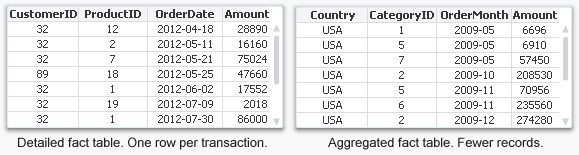
In addition, you have an aggregated fact table for previous years: Instead of CustomerID, ProductID and OrderDate, you have Country, CategoryID and OrderMonth as foreign keys.
The solution is to concatenate these two tables into one common fact table and use generic keys for the three dimensions.
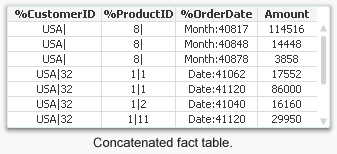
The generic keys contain information about both the higher and lower levels of the dimensional hierarchy and can be used for either the higher level only or for both levels. This way, the detailed records of the fact table link to customer, product, and date, while the records with aggregated numbers link to country, but not to customer; to product category but not to individual products; and to order month but not to individual dates.
It can sometimes be tricky to create the generic keys because the detailed fact table lacks direct information about the higher levels in the dimensional hierarchies, e.g. country and product category. But this can be solved using the function Applymap. For the detailed part of the fact table, the generic keys can be defined as:
Applymap('MapCustomerToCountry',CustomerID) & '|' & CustomerID as %CustomerID,
Applymap('MapProductToCategory',ProductID) & '|' & ProductID as %ProductID,
'Date:' & Num(OrderDate)) as %OrderDate
And in the aggregated part of the fact table, the corresponding definitions could be:
Country & '|' & Null() as %CustomerID,
CategoryID & '|' & Null() as %ProductID,
'Month:' & Num(MonthStart(OrderMonth)) as %OrderDate
The generic keys must be mapped to the real keys using a dimensional link table, but once this is done the application will work like a normal QlikView app.
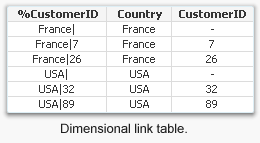
This method can be used in a number of cases where you want to define keys that link to several values simultaneously, the most common one being comparison of actual numbers with budget.
Read more about generic keys in the Technical brief on Generic Keys.
You must be a registered user to add a comment. If you've already registered, sign in. Otherwise, register and sign in.