Do not input private or sensitive data. View Qlik Privacy & Cookie Policy.
Skip to main content

Announcements
April 13–15 - Dare to Unleash a New Professional You at Qlik Connect 2026: Register Now!
ArturoMuñoz
Employee
Employee

Starting with version 12 of QlikView we released a new connector that allowed developers to extend the target data sources available. The Qlik REST Connector provides a means for the Qlik Analytics Platform to efficiently load data into a Qlik Sense or QlikView application from a REST service that returns data in XML, CSV or JSON format.


What is REST?


REST stands for Representational State Transfer. It relies on a stateless, client-server, cacheable communications protocol. RESTful applications use HTTP requests to post, read, and delete data. REST is a lightweight alternative to RPC (Remote Procedure Calls) and Web Services (SOAP, WSDL, et al.).


More info on REST (Representational state transfer - Wikipedia, the free encyclopedia)


The Qlik REST Connector


The Qlik REST Connector is a generic connector, it is not tailored to a specific REST data source. The requirements for creating connections must be acquired from the specific data sources. Examples for connecting to popular social network platforms are provided in the help documentation.


How to get the connector?


Get the connectors here: Qlik Connector Packages


How it works. Getting Star Wars data


If you read the Qlik documentation you will find examples on how to get data from Facebook, Twitter, LinkedIn and even Google Analytics.


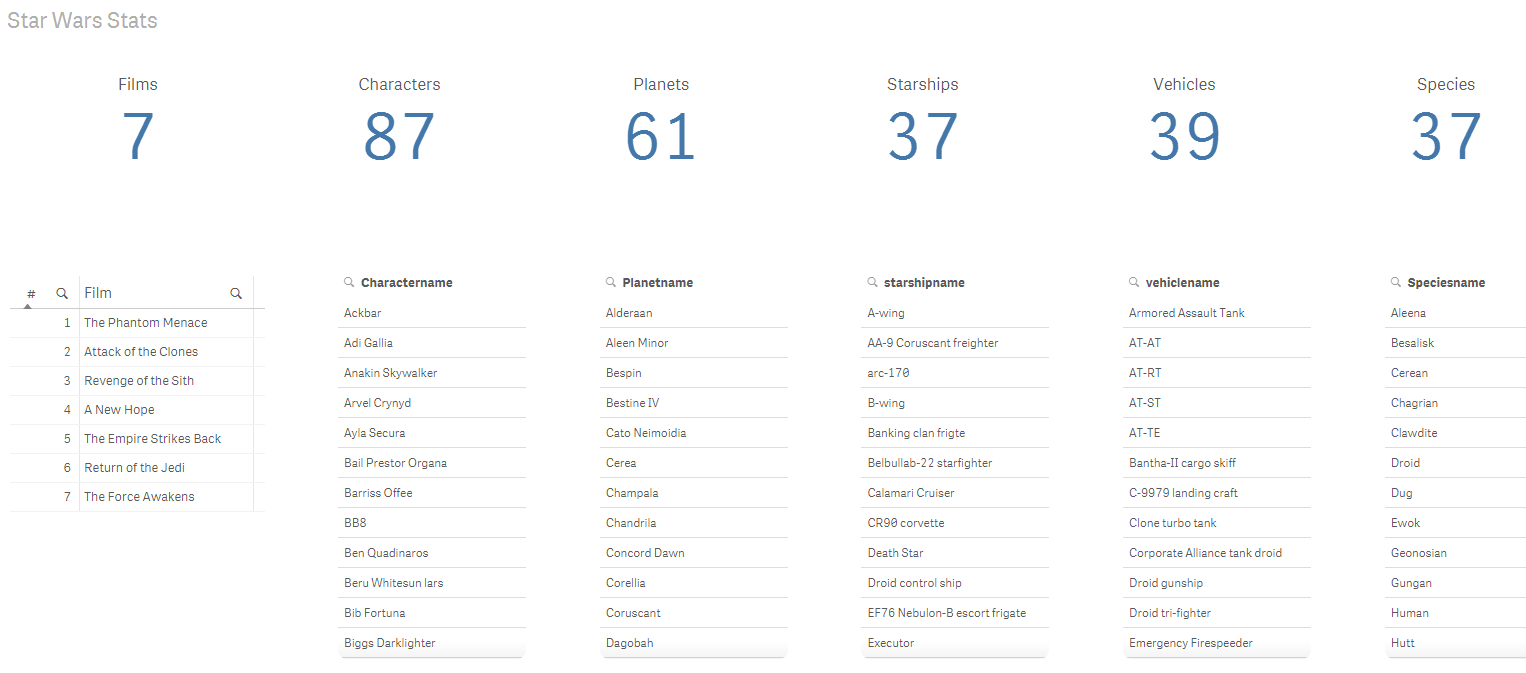
For this post example we are going to get data from this website http://swapi.co/ It contains data from the universe of Star Wars. It uses JSON format to give us access to data about the seven films so we can plot some SW demographics.


Because Qlik REST is a generic connector first step to connect to a new data source will always be to carefully read the documentation from the source where the data will be acquired from.


I’m interested in getting data from the Characters, in the API documentation web page we can read how to query the requested data.

http://swapi.co/documentation#people


  1. Create new connection. Give your connection a name and then fill in the blanks.
    1. Request URL. http://swapi.co/api/people/
    2. Data Options. If you want to specify the output data type, JSON, CSV or XML during the load process you can uncheck it otherwise keep it auto detect.
    3. Key generation strategy will let you define how you want it to generate the table’s keys, I rarely change it from Sequence ID.
    4. Authentication. This API uses no authentication so we can skip that.
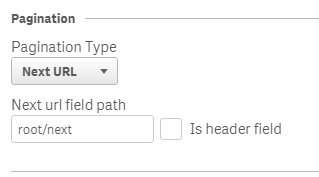
    5. Pagination. Qlik REST connector will provide you with standard pagination methods (explained in help page) and Custom pagination that will let you do build your own process.

      If you are looking for more pagination examples please check help page

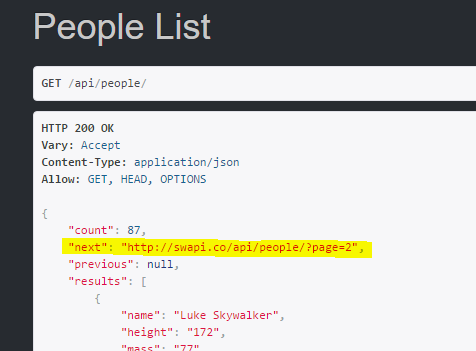
      For this particular example I will pick Next URL as it comes specified in the API documentation.
      pic1.png
      pic2.png


    6. Query parameters & Query headers. For this API we don’t have to specify any further parameter.
  2. We should be good to go (you might want to normalize fields names and so forth) and perform a reload.
 

pic3.png

I'm attaching the app so you all can check how it's done.


Enjoy Qliking

AMZ

http://twitter.com/arturoqv

25 Comments
ArturoMuñoz
Employee
Employee

Yes it's the same connector.

0 Likes
3,435 Views
maksim_senin
Partner - Creator III

Hi Göran,

Could you please analyse the following issue with $filter parameter I'm trying to send to our REST-source which is hosted on IIS. It's strange that everything works via browsers (Chrome, IE, FF, Edge) but does not work via QV. In my URL I have the following parameter string: <URI>?filter=Code eq '643'.

When I add the parameters to the REST Connection dialog (either into URL or Query parameters) and test connection, the "Operation is not allowed in WHERE" error appears.

I found that IIS logs contains the following:

1. for queries sent from browsers (works) -> $filter=Code%20eq%20%27643%27

2. for queries sent from QV (fails) -> %24filter=Code+eq+'643'

I.e. QV or REST Connector replaces some symbols in such a way the service throws an error (400 or 500). In case I put "$filter=Code%20eq%20%27643%27" into REST Connector all "%" symbols are replaced with "%25", and such request fails too.

Don't you have any assumption how to fix this?

Thanking you in advance.

Best regards,

Maxim

0 Likes
3,435 Views
maksim_senin
Partner - Creator III

Hi guys,

I found that the REST Connector replaces the symbols when it translates the URL to utf-8. This happens when I connect to source with Russian characters in URL and there is no translation when URL contains only latin characters.

Is there a way to fix/change URL translation?

Thanking you in advance.

Best regards,

Maxim

0 Likes
3,428 Views
Not applicable

The download links do not work for me.

0 Likes
3,428 Views
Not applicable

Hi community!

Arturo , thanks for the post.

Does anybody knows if there is a "batch" way to load definitions into the REST Connector?

I have 30+ different queries, same parameters but different definitions; I was fancying if I could create a csv with the whole bunch and upload it somehow, rather than create connection by connection manually.

Any advice on this would be really great, thanks in advance!

Azu

0 Likes
3,428 Views
jasonmomoa
Creator
Creator

Hi Arturo!

After seeing your demo on the StarWars example, I tried myself to retrieve data from the RIOT API. Specifically, I started with the Champions endpoint.

However, the data structure that I receive is quite different from the one in your video. As you can see in the following image, I get a 'data' node (your 'results'). But instead of having all the data in rows for this 'data' (132 rows, one per each character), I get 132 nodes with 1 row of data:

QlikRest.png

The load script, then, rename all the fields. This results in 132 tables of 1 row, instead of 1 Champions table with 132 rows of data. I managed to create this table by concatenating all of them, but this shouldn't be the solution.

Is this a problem of how the REST API is built? Can you help me find a workaround so i can load the 132 rows of data in just 1 data table?

QlikRest2.png

All the feedback is apreciated.

Thanks,

-X.

0 Likes
3,428 Views
ArturoMuñoz
Employee
Employee

Hi Xavier,

Thanks for your comment. Qlik REST connector is a generic connector that will let you get data from several data sources, that also means you are supposed to fine tune the configuration according to each particular case. Your use of concatenate seems like a solution to me although I understand you're trying to get a cleaner solution to your problem.

If you could setup a simple example of you app and REST connection config and share it here it would help us to help you

Regards,

0 Likes
3,428 Views
jasonmomoa
Creator
Creator

Hi Arturo, thanks for the reply.

Right now, the connector configuration is very simple:
url: https://global.api.pvp.net/api/lol/static-data/euw/v1.2/champion

key generation strategy: sequence id (i tried all 4 with no luck).

As query parameters:

champData: info

api_key: XXXXXXXXXXXXXXXXXXXXXXXXXXXXXXXXXXXX (account-based)

Sorry, i can't give you my credientials. Although anyone can sign up to use the Riot API here and get an api key.

The response i am getting has the following structure:

QueryChampion.png

Root - Fields: type, version, __KEY_root
  |_  data - Fields: __KEY_data, __KEY_root  ------  1 line of data (Key_data=1, Key_root = 1)
                                                                        ------ in your example, here you had ALL people. not just 1 row of keys
         |_ champion_id1 - Fields: __KEY_data, id, key, name, title, info

         |_ champion_id2  ....

I can not manage to generate the table in the The Load script then generates:

LIB CONNECT TO 'RiotChampions';

RestConnectorMasterTable:

SQL SELECT

  "type",

  "version",

  "__KEY_root",

  (SELECT

  "__KEY_data",

  "__FK_data",

  (SELECT

  "id",

  "key",

  "name",

  "title",

  "__FK_Jax"

  FROM "Jax" FK "__FK_Jax"),

  (SELECT

  "id" AS "id_u0",

  "key" AS "key_u0",

  "name" AS "name_u0",

  "title" AS "title_u0",

  "__FK_Sona"

  FROM "Sona" FK "__FK_Sona")

  FROM "data" PK "__KEY_data" FK "__FK_data")

FROM JSON (wrap on) "root" PK "__KEY_root";

[Jax]:

LOAD [id] AS [id],

  [key] AS [key],

  [name] AS [name],

  [title] AS [title],

  [__FK_Jax] AS [__KEY_data]

RESIDENT RestConnectorMasterTable

WHERE NOT IsNull([__FK_Jax]);

[Sona]:

LOAD [id_u0] AS [id_u0],

  [key_u0] AS [key_u0],

  [name_u0] AS [name_u0],

  [title_u0] AS [title_u0],

  [__FK_Sona] AS [__KEY_data]

RESIDENT RestConnectorMasterTable

WHERE NOT IsNull([__FK_Sona]);

DROP TABLE RestConnectorMasterTable;

I would like to generate a Master Table called 'Champions' which has 132 rows of data.

My original question was: given that the api is retrieveing each champion with different ids (id, id_u0, etc), can I do something 'automatically' to merge the data? If not, I can only thing of manually concatenate all tables and generate the needed one. However, this is not a valid solution for me, as for other endpoints I have even more data.


I tried to explain my issue in more detail. Hope it helps.

Thanks

0 Likes
3,428 Views
john9inno
Creator
Creator

take a look at this post.

this will give you good tip as i had.

REST CONNECTOR locate the Authorization token

below is a part of script will give you a solution from above posting

  1. Flags: 
  2. Generic 
  3. LOAD 
  4.     [__FK_rows_u0], 
  5.     name, 
  6.     Value 
  7. RESIDENT rows; 
  8.  
  9. DROP TABLE access_token; 
  10.  
  11. MergeTable: 
  12. LOAD distinct [__FK_rows_u0] 
  13. RESIDENT rows; 
  14.  
  15. DROP TABLE rows; 
  16.  
  17. FOR i = NoOfTables()-1 to 0 STEP -1  
  18.   LET vTable=TableName($(i));  
  19.   IF WildMatch('$(vTable)', 'Flags.*') THEN  
  20.     LEFT JOIN (MergeTable) LOAD * RESIDENT    [$(vTable)];  
  21.     DROP TABLE  [$(vTable)];  
  22.   ENDIF  
  23. NEXT i 
  24.  
  25. DROP FIELD [__FK_rows_u0]; 

John

0 Likes
3,545 Views
Not applicable

Hi all

I need to retrieve data from a specific method in a WSDL web service, how can I do this using this rest connector ?

Regars

Rodolfo

0 Likes
3,545 Views