Iterations – or loops – are constructions where a set of statements are executed zero or more times, until some condition is met. They are very common in all programming languages, and QlikView scripting is no exception.
First of all, the Load statement is in itself a loop: For each record in the input table, the field values are read and appended to the output table. The record number is the loop counter, and once the record is read, the loop counter is increased by one and the next record is read. Hence – a loop.
But there are cases where you want to create other types of iterations – in addition to the Load statement.
For - Next Loops
Often you want a loop outside the Load statement. In other words; you enclose normal script statements with a control statement e.g. a "For…Next" to create a loop. An enclosed Load will then be executed several times, once for each value of the loop counter or until the exit condition is met.
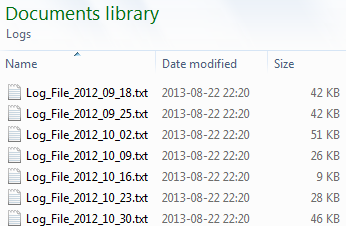
The most common case is that you have several files with the same structure, e.g. log files, and you want to load all of them:
For eachvFileNamein Filelist ('C:\Path\*.txt') Load *, '$(vFileName)' asFileName From [$(vFileName)]; NextvFileName
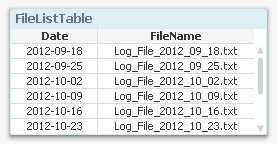
Another common case is that you already have loaded a separate table listing the files you want to load. Then you need to loop over the rows in this table, fetch the file name using the Peek() function, and load the listed file:
ForvFileNo = 1 to NoOfRows('FileListTable') LetvFileName = Peek('FileName',vFileNo-1,'FileListTable'); Load *, '$(vFileName)' asFileName From [$(vFileName)]; NextvFileNo
Looping over the same record
You can also have iterations inside the Load statement. I.e. during the execution of a Load statement the same input record is read several times. This will result in an output table that potentially has more records than the input table. There are two ways to do this: Either by using a While clause or by calling the Subfield() function.
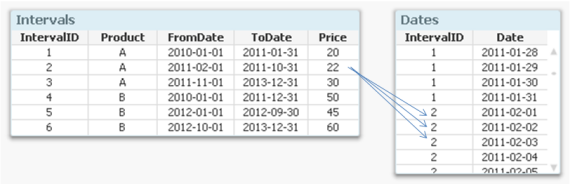
One common situation is that you have a table with intervals and you want to generate all values between the beginning and the end of the interval. Then you would use a While clause where you can set a condition using the loop counter IterNo() to define the number of values to generate, i.e. how many times this record should be loaded:
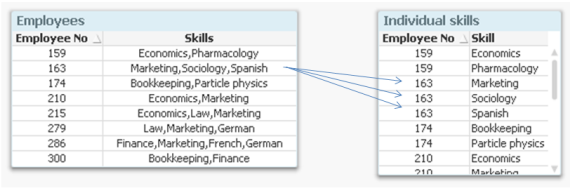
Another common situation is that you have a list of values within one single field. This is a fairly common case when e.g. tags or skills are stored, since it then isn’t clear how many tags or skills one object can have. In such a situation you would want to break up the skill list into separate records using the Subfield() function. This function is, when its third parameter is omitted, an implicit loop: The Load will read the entire record once per value in the list.
Thx I migth use the scanfolder function. Though I dont think your example helps me here?
Sorry, I did only count the "For" with the explicit Each after.
"The file name returned by the 3rd For-Each will be used several times by the 4th For-Each. Or?"
Well, yes and no I think. Its the same folder and the same files.
Perhaps I made it more advanced than I need:
The scope is that before this, I have a load statement with a field (which is restricted by a where clause), which gives me a list of numbers.
I need to loop (and store to qvd) only the files in the folder that ends with these numbers, so only where there is a match. The filenames consist of text and numbers. The numbers can be 1, 2 or 3 digits. That is where the $(vNo) is original peeked from, to get this list of numbers. In front of it is the text in the files: $(vTextFile).
So if the list of numbers from a loaded file is like 77, 88 an 99 and my file names in the folder I want to loop from is like:
Filename88.txt,
Filename99.txt,
Filename2.txt,
Samplename88.txt,
Samplename55.txt
- then when I store them into QVD I get:
Filename88.qvd,
Filename99.txt,
Samplename88.txt.
That is the result I need and so it works - kind of.
Because of the 3rd For-Each (vFile), it load files with "Filename" 3 times and "Samplename" 2 times.
Then the 4th For-Each will load only the ones I need, (or that is what I think it does... ). In the script execution process it looks like it is just overwriting (same name), but I checked the Qvd, I do end up with the correct one.
So sorry for my first Question/formulation, since it actually does what I ask it too.
This means that first I load all the files, to get the few I need, which seems a little stupid, but I could not make it with a simple where clause.
One function I miss though is the FieldValueList(). I find it very helpful when having a loaded table with values I want to use in the loop. This way I don't need the peek() function to find a specific value for each iteration, the FieldValueList() function makes that for me.
For example I've used it for first loading a system table from a SQL database, filtering out the views from a Data Warehouse. Then use the table name like this:
TableNames_tmp:
Load TableName
From SQL_sytemtable
Where "filter for finding the needed views";
For each vTableName in FialdValueList('TableName')
$(vTableName😞
Load *
From SQL_Servername.$(vTableName)
;
Store $(vTableName) into ...\$(vTableName).qvd;
The function has pretty bad documentation but works really good when looping over values from a previous load table in Qlik.
hic is there a reason for the lack of documentation and is it not "recommended" to use this function?
For my latest requirement, i need to build my data model, in such a way that, it should contain a table(Virtual or master table) which contains data from multiple table and get some counts or sum of filtered rows from table and dump into this master or virtual table.
My Using Tables, currently consists of following columns.
CourseCompletion Table
course_completion_id
,course_id
,user_id
,is_new_user
,certificate_id
,certificate_access_log_id
,batch_meta_data_id
invitation_id
lender_offer_id
percentage_score
final_test_status
test_attempt_count
course_completed
final_test_appeared_date
date_completed
date_created
survey_completed
is_feedback_completed
Signup table
signup_activity_log_id
,invitation_id
,client_id
,user_id
,batch_meta_data_id
,rc_activation_code
,referrer_email_type_id
user_signed
user_agent
referrer
date_accessed
date_signed
ip_address
landing_page_accessed
Invitation Table
invitation_id
,user_id
,client_id
,batch_meta_data_id
,first_name
,last_name
,email
,custom_field_1
,custom_field_2
custom_field_3
Street1
Street2
city
zip_code
telephone
State
client_unique_id
rc_activation_code
shorter_activation_code
rc_activation_link
activated
date_activated
date_created
created_by
campaign_id
language_id
Things i need to know:
1.) As you can see in course completion table, there it only consists of batch_meta_data_id, for this while building virtual table i need to identify its client in looping to which it belongs, how to do this?
2.)Using loop technique, i only find looping of single tables, how could i loop througn multiple tables data, and dump into virtual table. How should i approch this?
3.)Through looping i need to get count or sum of filtered datas, how to get sum or count of those?
Could you provide some outline code for this, as i found only single table data looping every where. How should i approach to get required table to achieve requirement. Please help me on this.
And i know this provide me the right solution. The issue is i don't know how to start. Hope some one can give me kick start. As i see so many expert is here all know.
Thanks for the post. I have question with respective to the performance of looping and individual sections code. In my script i am having the separate section for 10 tables and the code is almost similar in each section with additional deriving columns with respect to the table.
So if i want to implement the same code in the for loop to avoid code redundancy, i need to keep additional if conditions in the for loop for each table. Can you please suggest me which is faster in loading data, is it individual sheet code or is it the for loop?. The data will be like 10 lakh records in each table.
There really shouldn't be a ny significant difference in script execution time. Since the tables are large, the execution time of the additional IF statements is negligeble.
HIC
PS I had to google "lakh". Did not know what it was 🙂
Sorry for the trouble. can you please suggest me what is the better way for writing the code in loading hundred thousand records without code redundancy. And if the data is small then, is looping faster than individual script??
As I said, there should be no significant difference in execution time when you compare a loop with repeated code. So to avoid code redundancy, I would use a loop or a subroutine.