Unlock a world of possibilities! Login now and discover the exclusive benefits awaiting you.

- Qlik Community
- :
- Blogs
- :
- Technical
- :
- Design
- :
- Merging Data from Multiple Sources

.png "Former Employee") hic
hic
- Subscribe to RSS Feed
- Mark as New
- Mark as Read
- Bookmark
- Subscribe
- Printer Friendly Page
- Report Inappropriate Content
A common situation in Business Intelligence is that you have data in different data sources. It could e.g. be that you have several data systems within your company or that you have some data in an Excel spreadsheet in addition to the data in your database.
In any case, you want to load data from several sources and view them in a coherent way. This is sometimes referred to as merging data or blending data.
Not all BI tools can do this – you sometimes have to rely on external tools or SQL to do this prior to loading the data into your BI tool. QlikView, however, can do this easily.
If you have two different database systems, you need two different connect strings in the script:
ODBC CONNECT TO <Database 1>;
SQL SELECT * FROM TableA;
ODBC CONNECT TO <Database 2>;
SQL SELECT * FROM TableB;
At any place in the script, a SELECT statement will use the latest CONNECT string. In addition, LOAD statements will load data from files, disregarding the CONNECT statement. This way you can merge data from any number of databases and any number of files. Simple!
The next question is how to merge the two tables. In principle there are two ways to do this: Concatenating them (a union) or linking them (joining). Which one to use, depends on the situation.
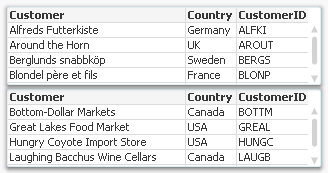
Concatenation should be used, if you have two tables with basically the same type of entity, but different data sets; for example “Customers in Europe” and “Customers in North America”. In this case, you want both tables to be merged into one. See picture above. The script then becomes:
ODBC CONNECT TO <Database 1>;
SQL SELECT * FROM Customers;
ODBC CONNECT TO <Database 2>;
Concatenate SQL SELECT * FROM Customers;
But if you instead have a situation where the tables contain different entities, and a selection of an entity in one of the tables should imply one or several entities in the other table, then you should usually link the tables.
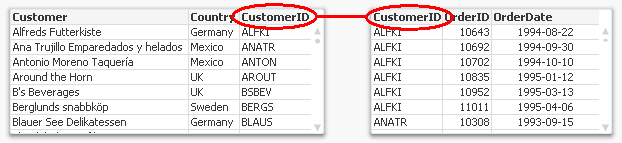
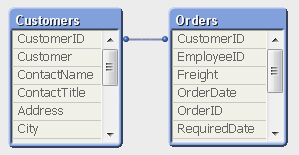
The script then becomes:
ODBC CONNECT TO <Database 1>;
SQL SELECT * FROM Customers;
ODBC CONNECT TO <Database 2>;
SQL SELECT * FROM Orders;
Linking tables is from a logical-mathematical perspective identical to an outer join, but QlikView keeps the two tables separate. Keeping them separate has the advantage that calculations are made in the “right table”.
Not all BI tools can perform an outer join as easily as this. I recently read an article about how to join an “Opportunities” table with a “Leads” table using a competing tool, and it was all but simple. But with QlikView, it is straightforward: Just make sure that the linking key field is named the same in both tables (and that no other fields are) and it will work right away.
The ability of QlikView to load data from any number of sources and merge it any way you want is one of the major strengths of QlikView and its script. Use it.
See also Wizards vs. Scripts
You must be a registered user to add a comment. If you've already registered, sign in. Otherwise, register and sign in.