Unlock a world of possibilities! Login now and discover the exclusive benefits awaiting you.

- Qlik Community
- :
- Blogs
- :
- Technical
- :
- Design
- :
- Redefining the Week Start in Qlik Sense

.png "Former Employee") hic
hic
- Subscribe to RSS Feed
- Mark as New
- Mark as Read
- Bookmark
- Subscribe
- Printer Friendly Page
- Report Inappropriate Content
Last year I wrote a blog post on how to set Sunday as the first day of the week, instead of using the ISO 8601 default. This is fairly straight forward – all you need to do is to write some formulas in the script. See Redefining the Week Start.
However, if you use Qlik Sense it has become even simpler. You don’t need any custom formulas and usually it just works - without you doing anything.
When you create your Qlik Sense app, a number of environment variables are created in the beginning of the script. These variables are based on regional settings of your computer, so usually you don’t need to change any of them. One of the variables is “FirstWeekDay” and this defines which day of the week you want to use as your first day.
If you want Monday, then you should use
Set FirstWeekDay = 0; // 0=Mon, 1=Tue, ... , 6=Sun
And if you want Sunday, you should use
Set FirstWeekDay = 6; // 0=Mon, 1=Tue, ... , 6=Sun
Change it if you need to!
This variable is used as default for several functions, most notably WeekDay() and WeekStart(). So when you call these functions, you will automatically get the correct week start and the correct order of the week days.
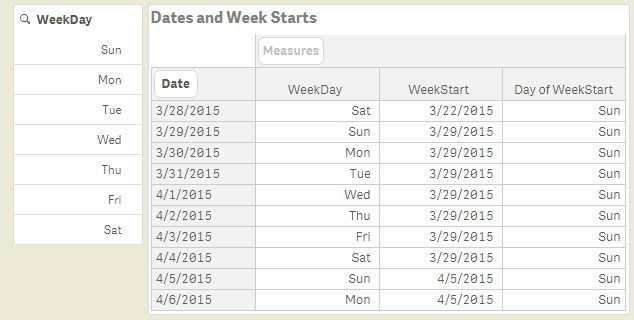
If you use FirstWeekDay=6, you will get a result like in the picture above. You can clearly see that both the order of the week days (in the filter pane to the left) and the week starts (in the pivot table) are correctly defined. I have used US settings and the following expressions to define these fields:
WeekDay( Date ) as WeekDay,
WeekStart( Date ) as WeekStart,
WeekDay( WeekStart( Date ) ) as [Day of WeekStart],
The environment variable changes the defaults of these functions, but you can of course also override the default by using an explicit parameter in the function call:
WeekDay( Date, $(MyFirstWeekDay) ) as MyWeekDay,
WeekStart( Date, 0, $(MyFirstWeekDay) ) as MyWeekStart,
With Qlik Sense, we have made the date and time management a lot easier.
PS This functionality does not yet exist in QlikView.
Further reading related to this topic:
You must be a registered user to add a comment. If you've already registered, sign in. Otherwise, register and sign in.