Unlock a world of possibilities! Login now and discover the exclusive benefits awaiting you.

- Qlik Community
- :
- Blogs
- :
- Technical
- :
- Design
- :
- Switch Control Statement

 Jennell_Yorkman
- Subscribe to RSS Feed
- Mark as New
- Mark as Read
- Bookmark
- Subscribe
- Printer Friendly Page
- Report Inappropriate Content
The switch control statement is one of many controls statement that can used to determine the flow of the script. In Qlik Sense help, it is defined as:
The switch control statement is a script selection construct forcing the script execution to follow different paths, depending on the value of an expression.
Syntax:
Switch expression {case valuelist [ statements ]} [default statements] end switch
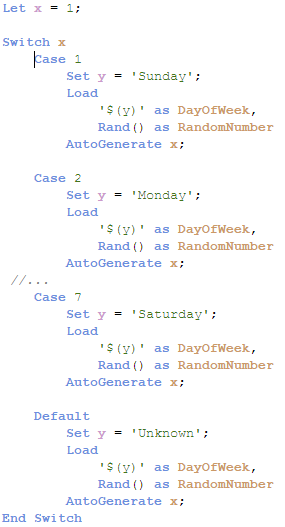
The switch control statement can be used in the script to identify a specific execution path. With the switch control statement, several paths can be defined and a default path can be defined as well when no match is found in the case clause. The various script paths cannot cross – they should be individual paths that do not overlap. In the script below, the expression x will be compared to each case. When there is a match, the script for that case will be executed.
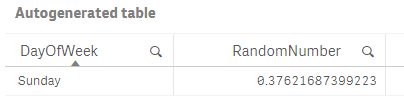
In the example below, Case 1 will be executed – the variable y will be set to Sunday and one record will be generated in the table.
Below is a look at the record generated.
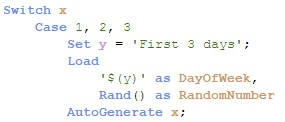
It is also possible to have more than one value for a case, for instance, you can use the script below to run the same script if x matches 1, 2 or 3.
When faced with various script execution paths, try using the switch control statement. While I rarely have a need to use it, I like how neat and straight-forward the syntax is. I have attached an example Qlik Sense app with the full script for you to test out for yourself.
Thanks,
Jennell
You must be a registered user to add a comment. If you've already registered, sign in. Otherwise, register and sign in.