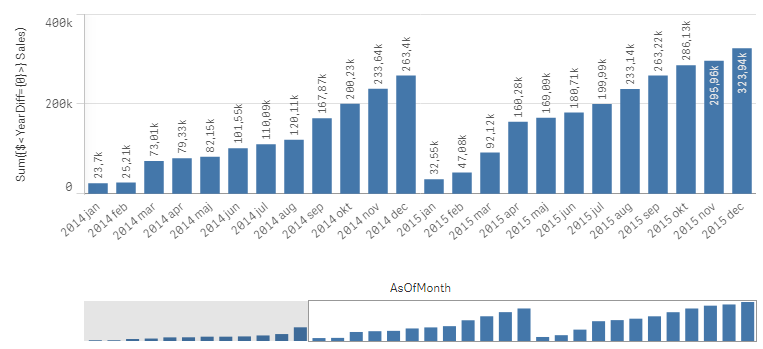
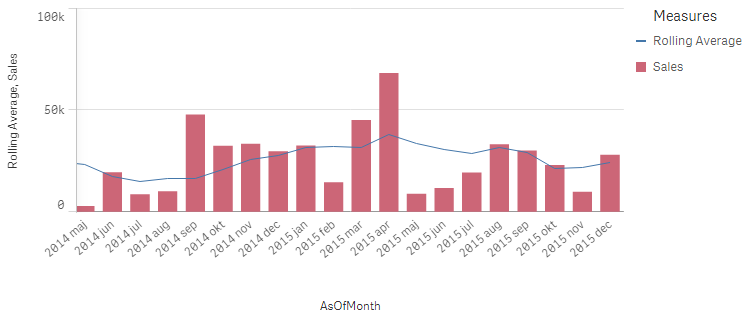
Last week I wrote about how the Above() function can be used for calculating rolling averages and other accumulations. There is however also an alternative method for doing the same thing:
The As-Of table.
When you use the Above() function, you fetch a number from other rows in a chart or Aggr() table. The As-Of table is slightly different in this respect: It is not a transient table created by an object or an expression – instead it is a real table in the data model.
The idea is to create a secondary month field – the AsOfMonth - that links to multiple real months.
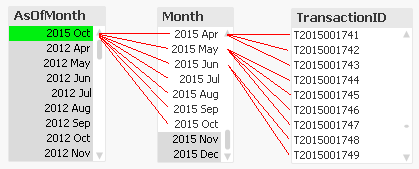
In the example above, you can see that ‘2015 Oct’ links to several preceding months, and each Month in turn links to several rows in a fact table. This means that a specific transaction will be linked to several AsOfMonths.
In the data model, the As-Of table should appear as a separate calendar table that links to the existing primary calendar table:
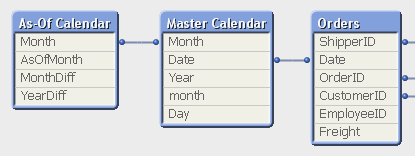
One way to create this table is the following:
First, make sure that you in your master calendar have a field “Month” that is defined as the first date of the month, e.g.
Date(MonthStart(Date),'YYYY MMM') asMonth,
Then add the following lines at the end of the script:
// ======== Create a list of distinct Months ======== tmpAsOfCalendar: LoaddistinctMonth Resident [Master Calendar] ;
I have made the Set Analysis expressions based on two fields: YearDiff and MonthDiff. However, for clarity it could be a good idea to add flags in the As-Of table, so that the Set Analysis expressions become even simpler, e.g.
I am using the as-of table with a 12 months rolling average, with a chart showing all data available. How can I limit to only show the last full 24 months in my chart?
I would still like to correctly calculate a 12 months rolling average for all the 24 months in the chart , by using the previous months not shown in the chart.
The AsOf table is the gift that keeps on giving! Thank you for providing this method.
I am curious if others think the below is a good method of dealing with multiple set analysis conditions with different timeframe requirements (two look back four quarters, another looks back eight quarters).
I concatenated two types of data (visits, diagnosis) into a FACT table containing [PatientID], [FactType], [AgeAtEvent], [CC], and [Date]. [Date] links to a common calendar and the common calendar links to an As-Of table on [Year-Month].
In summary, I am identifying patients who had a visit in rolling 4 quarters, were diagnosed with Hypertension in rolling 8 quarters, were not diagnosed with pregnancy or ESRD in rolling 4 quarters, and I am counting them over rolling 4 quarters in my table. It does appear to return correct results, and the performance is good.
I'm glad you brought this post back into my Daily Digest. The As-Of table is just the right solution for one of my current clients!
Regarding your code above, I don't have any comments on your solution except to say that I can see how your use of P() and E() are being used to solve your problem.
Having said that, whenever I see long and complex set analysis expressions, I always look for ways to simplify and streamline them by pre-calculating as much as possible in the load script. In my experience the P() and E() functions don't generally translate well into load script code, but your filtering could be pre-calculated as flags. Here's how I would simplify:
Hello, thank you for this guide! How to perform a 12m rolling of current month(example) versus 12m rolling of previous month using the AsOfTable?
I would like to have a pivot table in which it display the last 3 months (asoftable month with the 12 month rolling on each of them) + the delta between month and previous one (in total 2 deltas).
I am new to Qlik. I am not very good in English, but I will try to expose my doubt: I have tried to recreate these measures, but the values do not accumulate on a monthly basis.
My goal is to create cumulative time measurements: MTH, QTR, YTD, and MAT. And that when selecting a specific month, everything is filtered according to the selected month.
This is my master calendar:
[Master Calendar]:
QuartersMap: MAPPING LOAD rowno() as Month, 'Q' & Ceil (rowno()/3) as Quarter AUTOGENERATE (12);
Temp: Load min("Periodo") as minDate, max("Periodo") as maxDate Resident ENLACE;
Let varMinDate = Num(Peek('minDate', 0, 'Temp')); Let varMaxDate = Num(Peek('maxDate', 0, 'Temp')); DROP Table Temp;
TempCalendar: LOAD $(varMinDate) + Iterno()-1 As Num, Date($(varMinDate) + IterNo() - 1) as TempDate AutoGenerate 1 While $(varMinDate) + IterNo() -1 <= $(varMaxDate);
MasterCalendar: Load Date(TempDate,'YYYY MMM') AS Periodo, MonthStart(TempDate) as Month, num(Month(TempDate)) as NumMes, week(TempDate) As Semana, Year(TempDate) As Año, Month(TempDate) As Mes, Day(TempDate) As Dia, YeartoDate(TempDate)*-1 as CurYTDFlag, YeartoDate(TempDate,-1)*-1 as LastYTDFlag, ApplyMap('QuartersMap', month(TempDate), Null()) as Trimestre, Week(weekstart(TempDate)) & '-' & WeekYear(TempDate) as WeekYear, WeekDay(TempDate) as WeekDay Resident TempCalendar Order By TempDate ASC; Drop Table TempCalendar;
// ======== Create a list of distinct Months ======== tmpAsOfCalendar: Load distinct Month Resident MasterCalendar;
// ======== Cartesian product with itself ======== Join (tmpAsOfCalendar) Load Month as AsOfMonth Resident tmpAsOfCalendar ;
// ======== Reload, filter and calculate additional fields ======== [As-Of Calendar]: Load Month, AsOfMonth, Round((AsOfMonth-Month)*12/365.2425) as MonthDiff, Year(AsOfMonth)-Year(Month) as YearDiff Resident tmpAsOfCalendar Where AsOfMonth >= Month;
Drop Table tmpAsOfCalendar;
I finally replicated the formula: "Sum({$<YearDiff={0}>} Sales)", but it didn't rack me up
Is there a way to achieve the same thing without an as-of-table for rolling total?
when I use the above() function in the expression it start the count from the active filters, I want it to start from the first value e.g. 2020-01-01 and if I filter to May 2020 I don't want the rolling average to start counting from first of May but from the beginning first of January but zoom in on May...
Is there a way to do this without the as-of table?
I think your question isn't really related to the features from an as-of-table else more to the selection states. In your case you couldn't just use one selection state else you need to combine several ones. This may in your case look like:
whereby the bold-marked set analysis defined the wanted data-set with a start- and end-date as well as ignoring selections within unwanted fields - which creates an own selection state. Just using this your chart would start by the first January and discard the made period-selection. To consider them, too is the second part which worked like a boolean factor because the count() within sign() has no separate state included will therefore react normally on the made selection and all possible dates will return TRUE and the exclude ones FALSE which should restrict the available dimension-values again.
Depending on your data-model and requirements you may need a bit more complex approach by nesting the above logic within an aggr() and/or adding some other stuff - but the main-logic will remain the same that tasks like yours couldn't be solved within a single selection state.