Unlock a world of possibilities! Login now and discover the exclusive benefits awaiting you.

- Qlik Community
- :
- Blogs
- :
- Technical
- :
- Design
- :
- The Generic Load

.png "Former Employee") hic
hic
- Subscribe to RSS Feed
- Mark as New
- Mark as Read
- Bookmark
- Subscribe
- Printer Friendly Page
- Report Inappropriate Content
Whenever you have a generic database, the Generic prefix can be used to transform the data and create the desired fields. A generic database is basically a table where the second last column is an arbitrary attribute and the very last is the value of the attribute. In the input table below you have a three-column generic database.
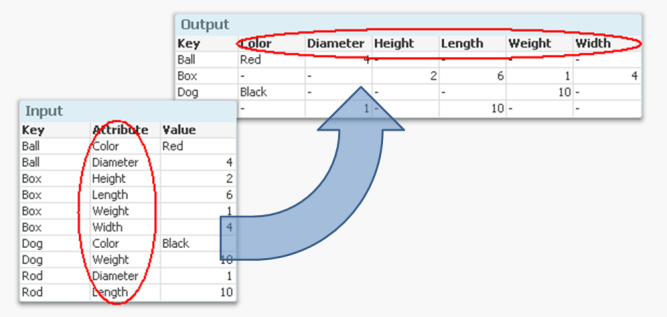
But if you want to analyze this data, it is much easier to have all attributes in separate fields so that you can make the appropriate selections. It is not very practical to have one single field for all attribute values, since you may want to make selections using different attributes at the same time.
Enter the Generic prefix.
It converts the data to a structure where each attribute is placed in a field of its own. Another way to express it is to say that it takes field values and converts these to field names. If you compare it to the Crosstable prefix, you will find that they in principle are each other’s inverses.
The syntax is
Generic Load Key, Attribute, Value From … ;
There are however a couple of things worth noting:
- Usually the input data has three columns: one qualifier field (Key in the above example), an Attribute and a Value. But you may also have several qualifying fields. If you have four or more columns, all columns except the two last will be treated as qualifying fields.
- The Generic prefix will create several tables; one table per attribute. This is normally not a problem. Rather, it is an advantage: It is the least memory-consuming way to store data if you have many attributes.
If you have more than one key, this means that you will get a composite key – a synthetic key – in the data model:
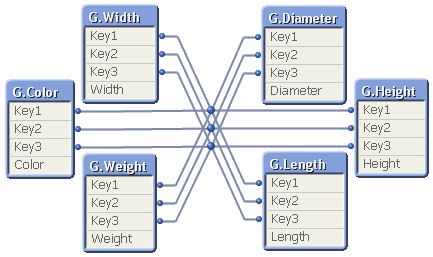
Although it looks ugly, this synthetic key is completely harmless. But it may still be a good idea to replace it with a manually created concatenated key:
Autonumber(Key1 & '|' & Key2 & '|' & Key3) as Key,
Finally, I have seen many examples on QlikCommunity where a For-Next loop is used to join together all tables created by the Generic prefix, e.g.:
Set vListOfTables = ;
For vTableNo = 0 to NoOfTables()
Let vTableName = TableName($(vTableNo)) ;
If Subfield(vTableName,'.',1)='GenericLabel' Then
Let vListOfTables = vListOfTables & If(Len(vListOfTables)>0,',') & Chr(39) & vTableName & Chr(39) ;
End If
Next vTableNo
CombinedGenericTable:
Load distinct Key From GenericDB;
For each vTableName in $(vListOfTables)
Left Join (CombinedGenericTable) Load * Resident [$(vTableName)];
Drop Table [$(vTableName)];
Next vTableName
The result is one big table that contains all attributes; a table that often is sparse (containing many NULL values) and much larger than the initial tables. And no performance has been gained… So I can only say:
You should not do this - unless you have a specific reason to.
The Generic prefix creates a set of tables that store the data in an optimal way. In most cases you should not change this. I realize, however, that there are cases where you want to transform the data further and need the data in one, unified table. Then the above scriptlet can be used.
You must be a registered user to add a comment. If you've already registered, sign in. Otherwise, register and sign in.