Unlock a world of possibilities! Login now and discover the exclusive benefits awaiting you.

- Qlik Community
- :
- Blogs
- :
- Technical
- :
- Design
- :
- The Importance Of Being Distinct
.png "Miguel_Angel_Baeyens")
 Miguel_Angel_Ba
- Subscribe to RSS Feed
- Mark as New
- Mark as Read
- Bookmark
- Subscribe
- Printer Friendly Page
- Report Inappropriate Content
Part of my job as an Enterprise Architect at Qlik is dealing with hardware sizing. There are several factors to take into account to properly size any environment, and one of the most underrated I have found when discussing this subject with IT teams and developers, is the value of distinctness. But this is exactly one of the things that makes QlikView different. Let me explain this by taking a look at an example.
My app needs a calendar from January 1, 2011 to February 25, 2013. This data is stored in the database in the form of a timestamp:
DD/MM/YYYY hh:mm:ss
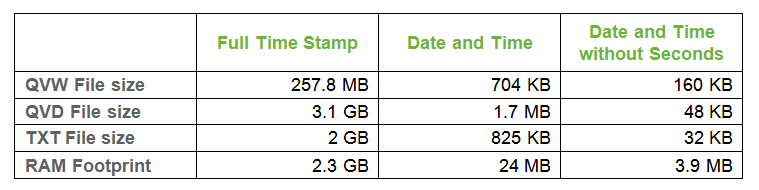
That makes 99 531 648 possible values. This field alone, when the QVW is opened, uses 2.3 GB of RAM.
That’s quite a bit of RAM for only one field. Let’s do some math. QlikView pointers are bit stuffed pointers meaning that QlikView needs 27 bits to store 99.5 million values. So, to calculate the RAM usage for the symbol tables, you need to use the following formula:
(Field Length in bytes * Number of Values) + Pointer Size (2^27) = Theoretical Total Size of Model
(18 * 99 531 648) + 134 217 728 = 1 925 787 392 Bytes
So for that field alone, I need to allocate 2 GB RAM, of which 134 MB are to store the pointers. It seems to be quite big for this small part of the model.
Since I cannot afford that much for one field alone, I’m going to split that field into two: date and time.
Now I have a Date field of 1 152 possible values and a Time field of 86 400 possible values. These two fields, when the QVW is open uses 24 MB of RAM.
Let’s do the math with these figures, using the same formula for Date and Time:
Date: 13 568 Bytes
Time: 707 576 Bytes
Because I’m always thinking of optimizing the models, I have decided to discard seconds, as they are not going to be used in my app, but I do need hour and minute.
The Date field has 1 152 possible values but the Time field is now reduced to 1 439 possible values. These two fields, when the QVW is open use 3.9 MB of RAM.
Let’s do the math with these figures, using the same formula
Date: 13 568 Bytes
Time: 9 243 Bytes
These file sizes may vary slightly depending on the file system, size of hard disk, amount of RAM in the system, etc.
We have seen some figures handling dates, but use this same technique with full names, addresses, composite fields, phone numbers… This is when the associative magic happens!
As you can see, distinctness is everything but trivial in QlikView, and taking proper care of fields when developing from the start will make the difference between a viable, well performing model and app and a huge, slow app.
Do you have any examples or tips and tricks of the value of distinctness?
Appendix I: Table with file sizes and RAM footprint for each example
Appendix II: Script code used for each scenario, that you can download here.
You must be a registered user to add a comment. If you've already registered, sign in. Otherwise, register and sign in.