Do not input private or sensitive data. View Qlik Privacy & Cookie Policy.
Skip to main content

Announcements
Now accepting applications for the Qlik Luminary and Partner Ambassador Programs: Apply by July 6!
hic
Former Employee
Former Employee

One of the strengths of QlikView is its search engine. With it, you can find pieces of information in a fraction of a second and select the found field values. But how is the search defined? And where can the search be used?

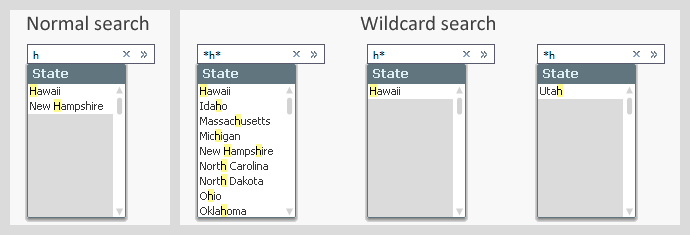
Obviously, a search is defined by the search string that you enter when you search for something. But there are several different ways a search string can be interpreted. See for instance the picture below: In the normal search to the left you have a different result set from what you get in the wildcard search.
 

search h.png


The logic is the following:


  • Normal search
    The search string is matched against the beginning of every word in the field value. Normal search is used only in interactive searches.
  • Wildcard search
    If the search string contains a wild card or the search string is used in a programmatic search (e.g. in a Set Analysis expression), a wildcard search is made instead of a normal search. This means a strict, case insensitive, match between the search string and the field values, where the only way of representing unknown characters is explicit use of wild cards.
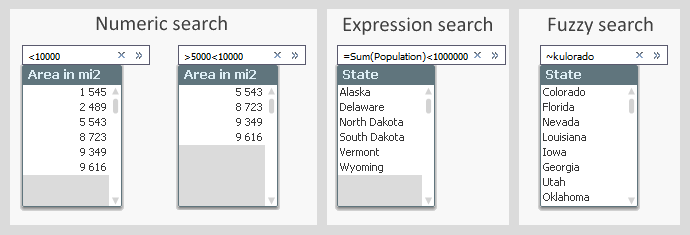
  • Numeric search
    If the search string begins with ‘<’ or ‘>’, a numeric comparison is made. E.g. ‘>=1000’. Only values that fulfill the numeric requirement will be matched.
  • Expression search
    If the search string begins with an equals sign ‘=’, an expression search is made. E.g. ‘=Sum(Sales)>1000’. Then an aggregation is made for each value in the field, and a match is found if the expression is true. This means that you can make a selection in one field based on an aggregation in another field.
  • Fuzzy search
    If the search string begins with ‘~’, a fuzzy search is made. This means that all field values are ranked according to similarity and the top one will be selected when you hit return.
  • Compound search
    Using a compound search, you can express more complicated search conditions with logical operators. Use brackets and ‘&’ or ‘|’, e.g. ‘(California|Nevada)’.
 

search num.png


Hence, how the search string is interpreted depends only on which characters it contains. The settings in the list box properties do not affect the evaluation. The "Default Search Mode" only affects how the initial search string is created.


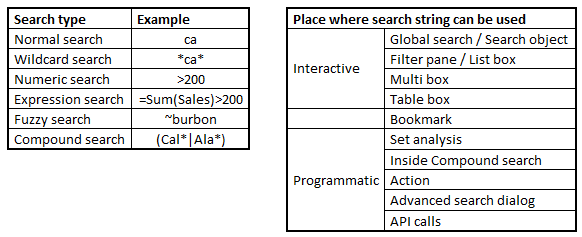
Further, you can use the search string in a number of different places, not just in the search area in the user interface: You can also use it in Set analysis, in actions, in bookmarks, in API calls, etc.


In principle, you can combine any search string with any search place. There are however some anomalies and exceptions. For example, you cannot use normal search or fuzzy search in programmatic searches and you cannot use the advanced search modes in the Qlik Sense global search.
 

Type and place2.png


The bookmark deserves a special mention. If a search is made and the resulting selection is stored in a bookmark, the bookmark remembers the search string and not the selection. This means that if new values appear when the script is run, they may be selected by the bookmark, even though they didn’t exist when the bookmark was created.


HIC


Further reading related to this topic:

Text searches

Search - But what shall you find?

The Expression Search

63 Comments
hic
Former Employee
Former Employee

Concerning levenshtein distance:

Currently there is no simple way to do this, but I will pass on the request to our Product Management and our developers.


HIC

0 Likes
990 Views
hic
Former Employee
Former Employee

Concerning one fieldname for GUI/end-user and another fieldname for Datamodeling/Developer:

I must say that this is something which I think would make the product worse. Today you can have one field name in the data model and a second name on the object. What you are suggesting is a third layer of names, something which would confuse more than help.

No, as I see it, you should rename the fields in the script, so that they become user-friendly and still unique. One way to do this, is to use the Rename statement. Then you can store the mapping between DB names to UI names in a table (easy to manage) and apply the change all at once at the end of the script. This way the script will contain DB names and the UI will contain user-friendly names.

See more on How to Rename Fields

HIC

990 Views
luciancotea
Specialist
Specialist

You're right HIC, but there should be a solution for the multi-language requirement (everything can be translated, except for the "Current Selection Box" data)

990 Views
hic
Former Employee
Former Employee

LucianCotea

Multi languuage is a different thing, and I absolutely agree with you here. It would be very nice to have this.

HIC

0 Likes
990 Views
blaise
Partner - Specialist

The "rename using map" can also be a bit confusing, as you cannot easily backtrace a fieldname used in the script to the QVD / db table. Using a table/file for the map helps a bit but you need to open this table/file every time.

But of course, doing backtracing of GUI and script/DB tables is also not that easy as you still need to check what the script/DB name is for a GUI field. I can see i need to think this over again, now when my thoughts has been challanged

0 Likes
990 Views
hic
Former Employee
Former Employee

Whenever I need to debug or backtrack, I just comment the Rename statement, and then I'm back at using the DB field names. When I am done, I un-comment the statement.

HIC

0 Likes
990 Views
rwunderlich
Partner Ambassador/MVP

You can always add TAGs to your final fields that indicate the source field name. You can use the same source file you use for the rename fields,

Note that TAGging fields in a QVD has some issues. I don't recommend it.

954 Views
Anders_Eriksson
Partner - Specialist

Yes that sounds good in theory and while QlikView automatically changes the field names in expressions when the only change of the data modell is renaming of fields there are situations when fields are not renamed, examples are in $-expansions, variable stored formulas and macros.

It is good enough for debug and backtrack but it is not 100% for multi language use.

Using TAGs is probably better for documentation.

0 Likes
954 Views
ChiragPradhan
Creator II
Creator II

Excellent article ! Thanks hic

0 Likes
954 Views
swuehl
Champion III
Champion III

The bookmark deserves a special mention. If a search is made and the resulting selection is stored in a bookmark, the bookmark remembers the search string and not the selection. This means that if new values appear when the script is run, they may be selected by the bookmark, even though they didn’t exist when the bookmark was created.

Henric,

this seems only to be true if the resulting selection will hold more than 1 value.

=ID = max({1} TOTAL ID)

for example will be stored into bookmark as a single value.

This behaviour has changed between QV versions, now there is an easter egg to enable the old behaviour, with the risk running into others open issues then.

Since the request to find the max value of a list (max date, year, RecordID etc, or similar searches returning a single value, e.g. based on today() ) is quite common, any chance we get this finally fixed without the need for easter eggs and side effects?

Ref: Issues 67172, 63741

954 Views
