Unlock a world of possibilities! Login now and discover the exclusive benefits awaiting you.

- Qlik Community
- :
- Forums
- :
- Groups
- :
- Location and Language
- :
- Francophones
- :
- Re: Wrong total of percentages in a pivot table
- Subscribe to RSS Feed
- Mark Topic as New
- Mark Topic as Read
- Float this Topic for Current User
- Bookmark
- Subscribe
- Mute
- Printer Friendly Page
- Feature this Topic

- Mark as New
- Bookmark
- Subscribe
- Mute
- Subscribe to RSS Feed
- Permalink
- Report Inappropriate Content
Wrong total of percentages in a pivot table
Hello,
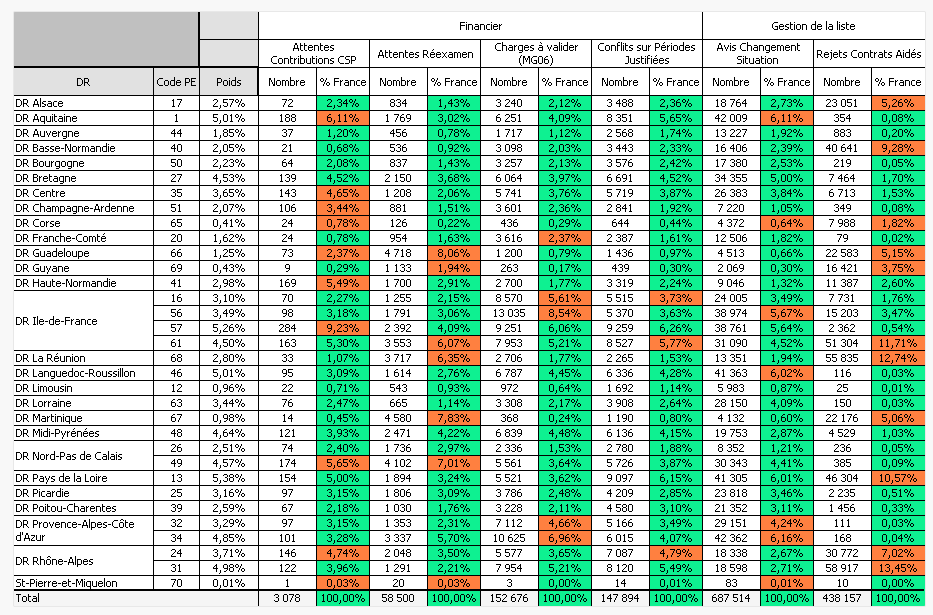
I have a problem with the total of percentages in a pivot table.
The total is wrong, normally the total has to be 100% for all columns.
I'm new to QlikView, can anybody help me to fix it?
Attatched you find the application.
Best regards.
- Tags:
- Group_Discussions
Accepted Solutions

 MK_QSL
- Mark as New
- Bookmark
- Subscribe
- Mute
- Subscribe to RSS Feed
- Permalink
- Report Inappropriate Content
SUM({<DR = >}NOMBRE)/SUM({<DR = >}TOTAL <Type, Compteur> NOMBRE)
MK_QSL
- Mark as New
- Bookmark
- Subscribe
- Mute
- Subscribe to RSS Feed
- Permalink
- Report Inappropriate Content
Use 2nd expression as
SUM(NOMBRE)/SUM(TOTAL <Type, Compteur> NOMBRE)
 sunny_talwar
- Mark as New
- Bookmark
- Subscribe
- Mute
- Subscribe to RSS Feed
- Permalink
- Report Inappropriate Content
Or try this for your second expression:
Sum(Aggr(sum(NOMBRE)/sum(NB_FRANCE), DR, [CODE PE], POIDS1, Type, Compteur))
- Mark as New
- Bookmark
- Subscribe
- Mute
- Subscribe to RSS Feed
- Permalink
- Report Inappropriate Content
Thank your for the reply.
The problem of this solution is that when I select a specific DR, %France changes value.
I don't want it to change value.
MK_QSL
- Mark as New
- Bookmark
- Subscribe
- Mute
- Subscribe to RSS Feed
- Permalink
- Report Inappropriate Content
SUM({<DR = >}NOMBRE)/SUM({<DR = >}TOTAL <Type, Compteur> NOMBRE)
- Mark as New
- Bookmark
- Subscribe
- Mute
- Subscribe to RSS Feed
- Permalink
- Report Inappropriate Content
Thank you very much it works.
I have just modified it a little like this:
SUM(NOMBRE)/SUM({<DR = >}TOTAL <Type, Compteur> NOMBRE)
Because when i select a specific DR, i want to display only the lines of that DR and in this case the total has to be the sum the displayed lines which is different than 100% (normal).
I tested also the solution proposed by sunindia, one pb with it is that when i delete all selections, the totals are a little more than 100%.
Best regards.
MK_QSL
- Mark as New
- Bookmark
- Subscribe
- Mute
- Subscribe to RSS Feed
- Permalink
- Report Inappropriate Content
Please close the thread by selecting appropriate answer.
sunny_talwar
- Mark as New
- Bookmark
- Subscribe
- Mute
- Subscribe to RSS Feed
- Permalink
- Report Inappropriate Content
I agree that with no selection the percentages total is going beyond 100%, but that's just a function of what you are using to calculate your %. When all cleared %France is showing 100.65% and Excel export shows that the sum of all the rows is also 100.65%.
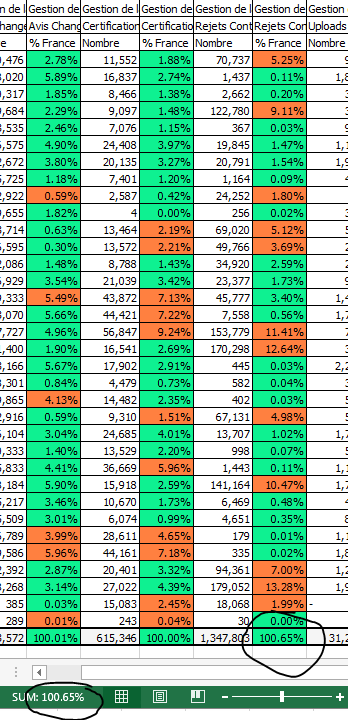
Not saying that my solution is the right one, just pointing out that you may or may not want to fix the issue 
Also, if the issue has been resolved, would you be kind enough to mark Manish's answer as correct.
Best,
Sunny