Unlock a world of possibilities! Login now and discover the exclusive benefits awaiting you.

- Qlik Community
- :
- All Forums
- :
- GeoAnalytics
- :
- Re: Name the geopoints
- Subscribe to RSS Feed
- Mark Topic as New
- Mark Topic as Read
- Float this Topic for Current User
- Bookmark
- Subscribe
- Mute
- Printer Friendly Page

 Luis_Fer0812
- Mark as New
- Bookmark
- Subscribe
- Mute
- Subscribe to RSS Feed
- Permalink
- Report Inappropriate Content
Name the geopoints
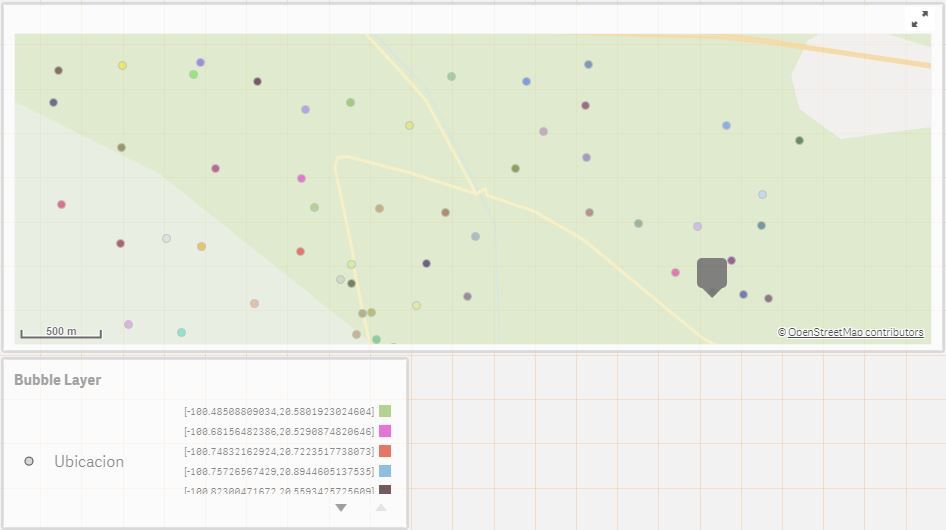
Hi, I have a location field that has location coordinates which can be correctly projected on a map, but it does not show me the name of my locations, it is assumed that there is also a name field for each location in the same table, how can I name each location with my field that I already have?
the label only shows the coordinates.
Accepted Solutions

 Jonas_Karlsson
- Mark as New
- Bookmark
- Subscribe
- Mute
- Subscribe to RSS Feed
- Permalink
- Report Inappropriate Content
Hi,
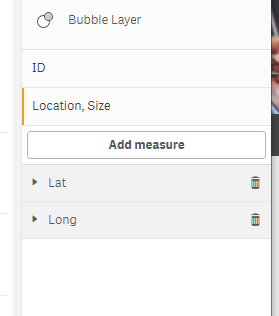
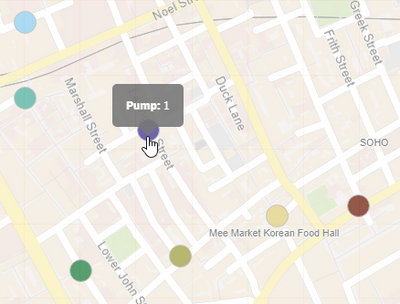
Try to use something else that the lat/lon as ID. Then add the lat/lon as measure and use that as location under "Locations Options"
Cheers
/Jonas
Jonas_Karlsson
- Mark as New
- Bookmark
- Subscribe
- Mute
- Subscribe to RSS Feed
- Permalink
- Report Inappropriate Content
Hi,
Try to use something else that the lat/lon as ID. Then add the lat/lon as measure and use that as location under "Locations Options"
Cheers
/Jonas
Luis_Fer0812
- Mark as New
- Bookmark
- Subscribe
- Mute
- Subscribe to RSS Feed
- Permalink
- Report Inappropriate Content
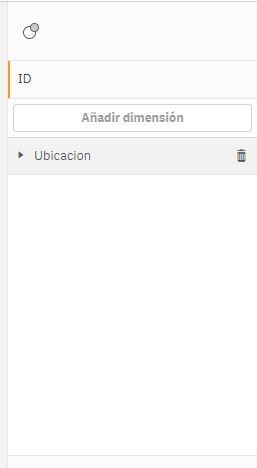
Hello, what I did was to call the latitude and longitude in a another field "Location" in the same table and it works, and in the bubble layer I set as the dimension the Location field, the problem here is that only works with the function that I created GeoMakePoint.
Table example:
LOAD
-LocationName,
-Latitude,
-Longitude
-GeoMakePoint(Latitude, Longitude) as Location
Luis_Fer0812
- Mark as New
- Bookmark
- Subscribe
- Mute
- Subscribe to RSS Feed
- Permalink
- Report Inappropriate Content
Thank you, finally it works.
