Unlock a world of possibilities! Login now and discover the exclusive benefits awaiting you.

- Qlik Community
- :
- All Forums
- :
- GeoAnalytics
- :
- Re: Zip code
- Subscribe to RSS Feed
- Mark Topic as New
- Mark Topic as Read
- Float this Topic for Current User
- Bookmark
- Subscribe
- Mute
- Printer Friendly Page

- Mark as New
- Bookmark
- Subscribe
- Mute
- Subscribe to RSS Feed
- Permalink
- Report Inappropriate Content
Zip code
I am trying to do a map using zip codes in Qlik Sence. Is there a way to tell the data to look at the zip as a Geo Data field for "zip"? I am only seeing the option for 4 different geo field type and zip is not one of them.
- « Previous Replies
-
- 1
- 2
- Next Replies »

 Patric_Nordstro
- Mark as New
- Bookmark
- Subscribe
- Mute
- Subscribe to RSS Feed
- Permalink
- Report Inappropriate Content
Hi Lee,
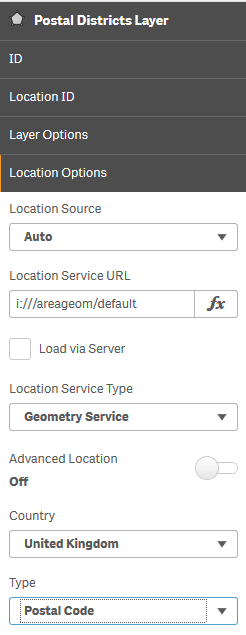
Use the dropdown Layer properties->Location Options->Type->Postal Code
or add the type to the location string. =zip & ',' & countrycode & ':XPC'
Thanks,
Patric
- Mark as New
- Bookmark
- Subscribe
- Mute
- Subscribe to RSS Feed
- Permalink
- Report Inappropriate Content
Thank you! Can you help me understand where the location drop down is found in Qlik?
Lee Boyd | Vice President, Product Innovation
Fourseventy Claim Management
cell (254) 717-0262<tel:(254)%20717-0262>
Lee@470claims.com<mailto:Lee@470claims.com> | www.470claims.com<http://www.470claims.com/>
web<http://www.470claims.com/> | Twitter<http://www.twitter.com/470claims> | Facebook<http://www.facebook.com/470claims> | Linkedin<http://www.linkedin.com/company/2299943>
- Mark as New
- Bookmark
- Subscribe
- Mute
- Subscribe to RSS Feed
- Permalink
- Report Inappropriate Content
Thank You! Can you tell me where in Qlik Spencer I can find the dropdown for location services?
lee
Patric_Nordstro- Mark as New
- Bookmark
- Subscribe
- Mute
- Subscribe to RSS Feed
- Permalink
- Report Inappropriate Content
Here's an example:

 MikeOBX
- Mark as New
- Bookmark
- Subscribe
- Mute
- Subscribe to RSS Feed
- Permalink
- Report Inappropriate Content
Hi All,
When I try and plot some simple points on the map with US zip codes, I get the error "the following locations could not be found" and it shows my zip codes, but with the 0 missing from the beginning. For example a zip code of "01234" shows as "1234".
Does QLik know how to automatically map the zip codes against its default map? Or do I have to do something else?
Any help would be greatly appreciated!
Mike
Patric_Nordstro- Mark as New
- Bookmark
- Subscribe
- Mute
- Subscribe to RSS Feed
- Permalink
- Report Inappropriate Content
text(fieldname) as fieldname
https://community.qlik.com/t5/QlikView-Scripting/Qlikviews-handling-of-Strings-as-numbers/td-p/43710...
if not you can pad with leading zeroes and stick as numerice field:
num(fieldname,'00000') as fieldname
https://community.qlik.com/t5/QlikView-App-Development/How-to-add-leading-zero-s-and-make-sure-all-t...
Thanks,
Patric
 mss
mss
- Mark as New
- Bookmark
- Subscribe
- Mute
- Subscribe to RSS Feed
- Permalink
- Report Inappropriate Content
Hi Patric,
I'm trying to plot an area map for Europe, but Qlik Sense only recognize France/Germany/Spain zip codes, and cannot recognize other countries like Austria or UK.
Is there any specific format in the database I should follow for plotting different countries?
Thanks!
Patric_Nordstro- Mark as New
- Bookmark
- Subscribe
- Mute
- Subscribe to RSS Feed
- Permalink
- Report Inappropriate Content
There is no universal standard for postal codes, each country has their quirks.
I recommend this post for tips to improve
UK is especially special, see this thread:
Thanks,
Patric
 rpages
- Mark as New
- Bookmark
- Subscribe
- Mute
- Subscribe to RSS Feed
- Permalink
- Report Inappropriate Content
I've read all your posts but I still have an issue.
In France we have some oversea territories that do not work on qlik.
I have used their country code ('RE', 'GP','GF','MQ,...) but qlik do not recognise their postal code : 97100, 97200,...
Do you have a solution?
Thank you
rémi
- « Previous Replies
-
- 1
- 2
- Next Replies »