Do not input private or sensitive data. View Qlik Privacy & Cookie Policy.
Skip to main content

Announcements
Want to see what's currently in public preview? We've pulled it all together in one place. Check it out here

How to Setup Multi-Factor Authentication (MFA) for Qlik Community

100% helpful (1/1)
cancel
Showing results for 
Search instead for 
Did you mean: 
Jamie_Gregory
Community Manager
Community Manager

How to Setup Multi-Factor Authentication (MFA) for Qlik Community

Last Update:

Mar 8, 2024 3:21:38 PM

Updated By:

Jamie_Gregory

Created date:

Mar 8, 2024 3:21:38 PM

Multi-factor authentication (MFA) is an extra layer of security to access to Qlik Community. 

  1. Log into Qlik Community
  2. Go to http://myqlik.qlik.com/portal 
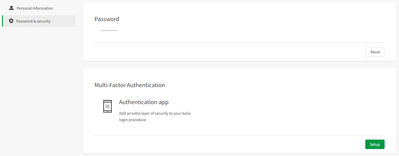
  3. Choose Password & Security
  4. Click on Setup

    Jamie_Gregory_7-1709929244204.png
  5. Install a Multi Factor Authentication (MFA) on phone. There are several on the market, (Google Authenticator - LastPass Authenticator - Microsoft Authenticator and more)

    Note: Using just a QR reader will not work, Only a MFA Authetication app will.
     
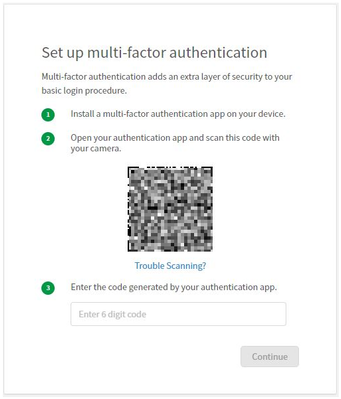
  6. Scan the QR code with your MFA Authenticator

    Jamie_Gregory_1-1709928817919.png
  7. Proceeded to use the code created from MFA authenticator 
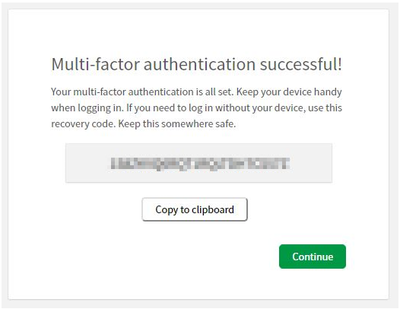
  8. You are given an important recovery link. The link is ONE time use - IMPORTANT - Save this code for recovery purposes *

    Jamie_Gregory_2-1709928817915.png

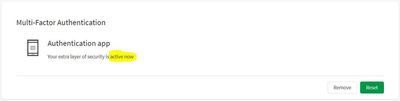
  9. You will see that the MFA is successfully set.

    Jamie_Gregory_3-1709928817925.jpeg
    * If you see yourself the need to use the MFA Recovery code, Note that a new one will be generated. Please save the last one generated.
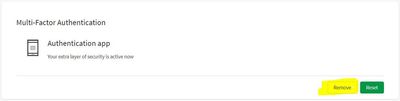
  10. If in the future MFA needs to be disabled, navigate to the same screen and click "Remove"...

    Jamie_Gregory_4-1709928817927.jpeg

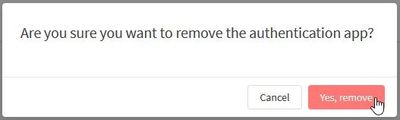
  11. Click "Yes, remove"

    Jamie_Gregory_5-1709928817867.jpeg


Labels (2)
Comments
QFabian
MVP
MVP

Thank @Jamie_Gregory , aligned with the actual security requirements

0 Likes
Contributors
Version history
Last update:
‎2024-03-08 03:21 PM
Updated by: