Unlock a world of possibilities! Login now and discover the exclusive benefits awaiting you.

- Qlik Community
- :
- Forums
- :
- Analytics & AI
- :
- Products & Topics
- :
- Integration, Extension & APIs
- :
- Clear Selections to reflect on Dropdown menu mashu...
- Subscribe to RSS Feed
- Mark Topic as New
- Mark Topic as Read
- Float this Topic for Current User
- Bookmark
- Subscribe
- Mute
- Printer Friendly Page

- Mark as New
- Bookmark
- Subscribe
- Mute
- Subscribe to RSS Feed
- Permalink
- Report Inappropriate Content
Clear Selections to reflect on Dropdown menu mashup
Hi, I am building a mashup using a custom template. I have created a drop down select object following the tutorial
Mashup Editor - Create a Bootstrap Drop Down selection menu
The drop down menu looks and works great. I have created a current selections box using
<div id="CurrentSelections" class="qvobjects">
<div class="current-selections-placeholder">
<span>Connect to app to see Selection Toolbar</span>
</div>
</div>
if (app) {
app.getObject('CurrentSelections','CurrentSelections');
$(".current-selections-placeholder span").css("display", "inline-block");
app.clearAll();
$('#qvfilters .dropdown button').html('Select Department <span class="caret"></span>');
}
My mashup looks like this
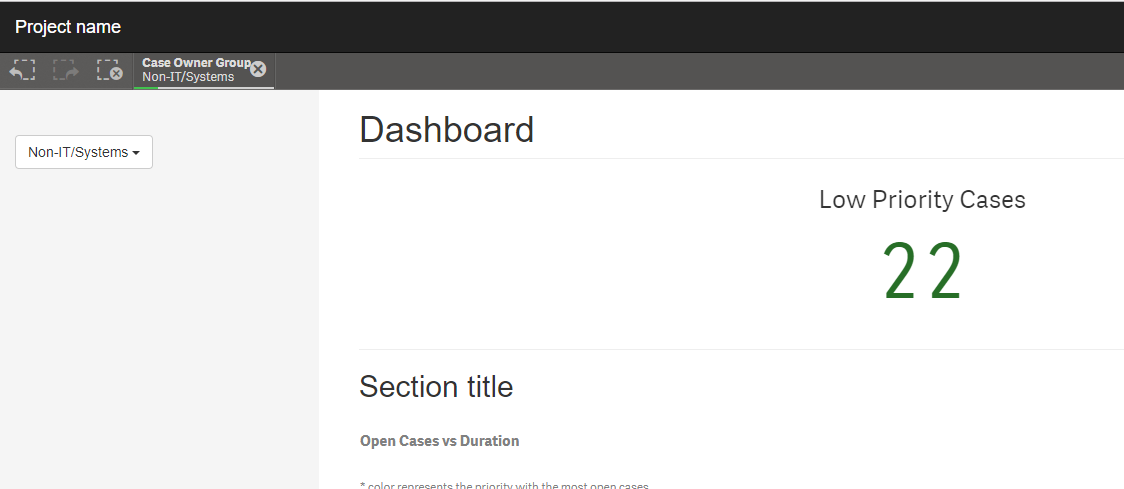
When I clear my selections, the drop down box still holds the value selected. Would anyone be able to advise on how to clear selections on the drop down box.
 ErikWetterberg
- Mark as New
- Bookmark
- Subscribe
- Mute
- Subscribe to RSS Feed
- Permalink
- Report Inappropriate Content
I would set the button text in the showData callback function. Look in the data, is there a selected value, set that as button value, if not set ''select department' as value.
Erik Wetterberg