Unlock a world of possibilities! Login now and discover the exclusive benefits awaiting you.

- Qlik Community
- :
- Forums
- :
- Analytics & AI
- :
- Products & Topics
- :
- Integration, Extension & APIs
- :
- Mashup : Add Qlik Sense Selection bar into a Boots...
- Subscribe to RSS Feed
- Mark Topic as New
- Mark Topic as Read
- Float this Topic for Current User
- Bookmark
- Subscribe
- Mute
- Printer Friendly Page

- Mark as New
- Bookmark
- Subscribe
- Mute
- Subscribe to RSS Feed
- Permalink
- Report Inappropriate Content
Mashup : Add Qlik Sense Selection bar into a Bootstrap modal
Hi,
I'm currently working on a Mashup and I want to add a selection bar into a Boostrap modal.
In my HTML file :
- I included the Bootstrap librairy and jQuery library:
<link rel="stylesheet" href="https://maxcdn.bootstrapcdn.com/bootstrap/3.3.7/css/bootstrap.min.css">
<script src="https://ajax.googleapis.com/ajax/libs/jquery/3.2.1/jquery.min.js"></script>
<script src="https://maxcdn.bootstrapcdn.com/bootstrap/3.3.7/js/bootstrap.min.js"></script>
- I added a button to call the modal:
<button id="showModal" type="button" class="btn btn-info btn-lg" data-toggle="modal" data-target="#myModal">Show Map</button>
- I created the modal:
<!-- Map Modal -->
<div id="myModal" class="modal fade" role="dialog">
<div class="modal-dialog modal-lg">
<!-- Map Modal content-->
<div class="modal-content">
<div class="modal-header">
<button type="button" class="close" data-dismiss="modal">×</button>
<h4 class="modal-title">Selection</h4>
</div>
<div class="modal-body">
<div class="row">
<div class="col-xs-6 col-sm-6 col-md-6">
<div id="QV01" class="qvobject" style="width:100%; height:50px"></div>
</div>
<div class="col-xs-6 col-sm-6 col-md-6">
<div id="QV02" class="qvobject" style="width:100%; height:50px"></div>
</div>
</div>
</div>
<div class="modal-footer">
<button type="button" class="btn btn-default" data-dismiss="modal">Close</button>
</div>
</div>
</div>
</div>
In my javaScript file:
I wrote a code to resize the Qlik Sense Object inside the modal:
// Function to toggle hidden objects in a bootstrap popup modal
$.fn.extend({
toggleResize: function() {
return this.toggle(400, function() {
qlik.resize();
});
}
});
// IDs for showing up on toggleResize function
$(document).ready(function(){
$('#showModal').on('click', function(event) {
$('#QV01').hide().toggleResize();
$('#QV02').hide().toggleResize();
});
});
But somehow the selection on my selection bar appear behind the modal and I can't select anything.

Do you have a solution to solve my problem, please ?
Regards,
Clément Boyer
Accepted Solutions
- Mark as New
- Bookmark
- Subscribe
- Mute
- Subscribe to RSS Feed
- Permalink
- Report Inappropriate Content
Hi Erik,
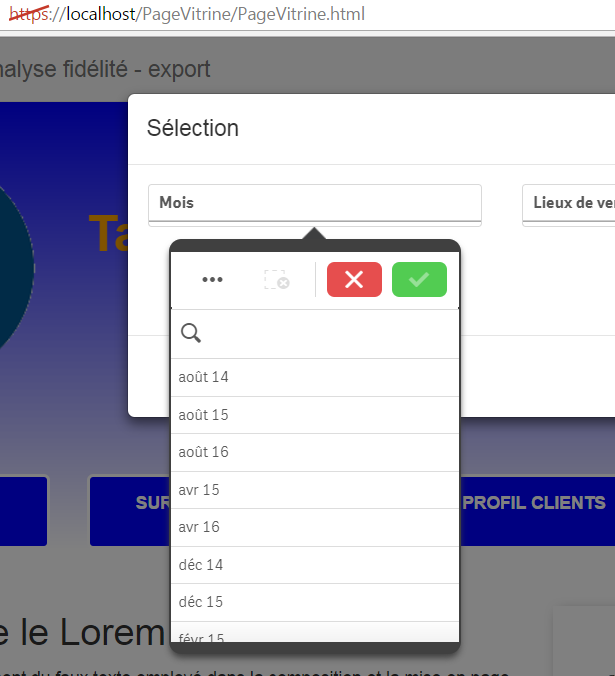
I tried again your CSS code, I slightly modified it:
.qv-listbox-popover{
z-index: 1100;
}
And it works even after I exported my mashup inside a wamp server.
Also I tried the CSS code below, but It doesn't work:
.modal-body.qv-listbox-popover{
z-index: 1100;
}
.qvobject.qv-listbox-popover{
z-index: 1100;
}
I hope this helps.
Regards,
Clément Boyer

 ErikWetterberg
- Mark as New
- Bookmark
- Subscribe
- Mute
- Subscribe to RSS Feed
- Permalink
- Report Inappropriate Content
Hi,
This is probably a problem with z-index. Qlik sets z-index to 1 for the current-selections-panel. You need to override it for the selection bar when its inside a modal.
Add something like this to your CSS:
.modal-body .qv-panel-current-selections {
z-index: 1100;
}
The value 1100 is just my guess, I haven't actually tested this.
Hope this helps
Erik Wetterberg
- Mark as New
- Bookmark
- Subscribe
- Mute
- Subscribe to RSS Feed
- Permalink
- Report Inappropriate Content
Hi,
Thanks for the reply Erik.
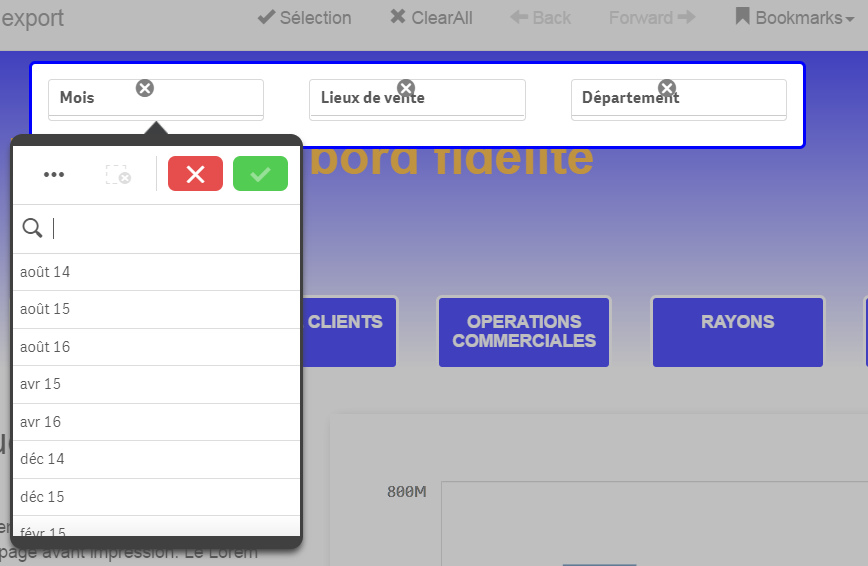
I tried z-index with the Boostrap modal but it doesn't seems to solve the issue.
So I made a custom modal using z-index and it work as intended.
Regards,
Clément Boyer
- Mark as New
- Bookmark
- Subscribe
- Mute
- Subscribe to RSS Feed
- Permalink
- Report Inappropriate Content
Hi Erik,
I tried again your CSS code, I slightly modified it:
.qv-listbox-popover{
z-index: 1100;
}
And it works even after I exported my mashup inside a wamp server.
Also I tried the CSS code below, but It doesn't work:
.modal-body.qv-listbox-popover{
z-index: 1100;
}
.qvobject.qv-listbox-popover{
z-index: 1100;
}
I hope this helps.
Regards,
Clément Boyer
ErikWetterberg
- Mark as New
- Bookmark
- Subscribe
- Mute
- Subscribe to RSS Feed
- Permalink
- Report Inappropriate Content
Good!
And what about this:
.modal-body .qv-listbox-popover{
z-index: 1100;
}
.qvobject .qv-listbox-popover{
z-index: 1100;
}
Not I have added a space between the css class names. That will change the rule from 'Elements with class modal-body and qv-listbox-popover' to 'Elements with class qv-listbox-popover inside elements with class modal-boy'. CSS is tricky...
Hope this helps
Erik Wetterberg
- Mark as New
- Bookmark
- Subscribe
- Mute
- Subscribe to RSS Feed
- Permalink
- Report Inappropriate Content
Hi,
Adding a space between the css class names doesn't work. I'll leave the CSS like this:
.qv-listbox-popover{
z-index: 1100;
}
Thank you,
Clément Boyer