Unlock a world of possibilities! Login now and discover the exclusive benefits awaiting you.

- Qlik Community
- :
- Forums
- :
- Analytics & AI
- :
- Products & Topics
- :
- Integration, Extension & APIs
- :
- Re: Qlik-cli bad request
- Subscribe to RSS Feed
- Mark Topic as New
- Mark Topic as Read
- Float this Topic for Current User
- Bookmark
- Subscribe
- Mute
- Printer Friendly Page

 dferreirogft
- Mark as New
- Bookmark
- Subscribe
- Mute
- Subscribe to RSS Feed
- Permalink
- Report Inappropriate Content
Qlik-cli bad request
Hi,
I'm trying to configure Qlik-cli in our server .
I connect successfully to it but then when executing commands like start-qliktask I'm getting bad request (400) error.
Other api calls like getAbout or so are working correctly.
I followed the steps to install the certificates from GitHub page and qlik help.
Any clues?
Thanks
- « Previous Replies
-
- 1
- 2
- Next Replies »

 Levi_Turner
- Mark as New
- Bookmark
- Subscribe
- Mute
- Subscribe to RSS Feed
- Permalink
- Report Inappropriate Content
This run fine on my end:
$license = Get-Content -Path C:\shared-content\licenses\qlik-license.json | ConvertFrom-Json
Connect-Qlik
Set-QlikLicense -serial $license.sense.serial -control $license.sense.control -lef $license.sense.lef -name $license.sense.name -organization $license.sense.organization
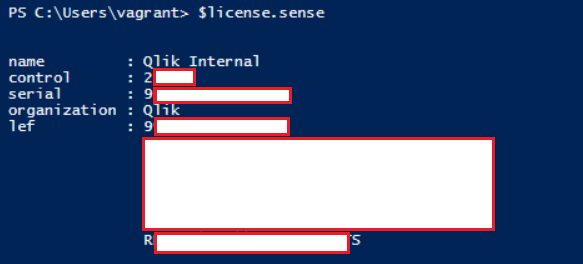
Again, this is an unlicensed system. If a license is applied then a different technique would be required.
 ceciliadoan
- Mark as New
- Bookmark
- Subscribe
- Mute
- Subscribe to RSS Feed
- Permalink
- Report Inappropriate Content
hi Levi_Turner:
thank you so much. we will try that once we get things working.
at the moment we can't even connect (running win_shell Connect-Qlik {{ inventory_hostname }} -TrustAllCerts -UseDefaultCredentials directly from ansible). we are sure that the port 4242 on the remote host is opened. the Connect-Qlik sometime works and sometime doesn't when running on local visual code. but it doesn't work at all when running from Jenkins with errors:
"stderr": "Invoke-RestMethod : Unable to connect to the remote server\r\nAt C:\\Program Files\\WindowsPowerShell\\Modules\\Qlik-Cli\\functions\\core.ps1:30 char:17\r\n+ ...   $result = Invoke-RestMethod -Method $method -Uri $path @params -Ses ...\r\n+                 ~~~~~~~~~~~~~~~~~~~~~~~~~~~~~~~~~~~~~~~~~~~~~~~~~~~~~~~~~\r\n    + CategoryInfo          : InvalidOperation: (System.Net.HttpWebRequest:HttpWebRequest) [Invoke-RestMethod], WebExc \r\n   eption\r\n    + FullyQualifiedErrorId : WebCmdletWebResponseException,Microsoft.PowerShell.Commands.InvokeRestMethodCommand",
    "stderr_lines": [
        "Invoke-RestMethod : Unable to connect to the remote server",
        "At C:\\Program Files\\WindowsPowerShell\\Modules\\Qlik-Cli\\functions\\core.ps1:30 char:17",
        "+ ...   $result = Invoke-RestMethod -Method $method -Uri $path @params -Ses ...",
        "+                 ~~~~~~~~~~~~~~~~~~~~~~~~~~~~~~~~~~~~~~~~~~~~~~~~~~~~~~~~~",
        "    + CategoryInfo          : InvalidOperation: (System.Net.HttpWebRequest:HttpWebRequest) [Invoke-RestMethod], WebExc ",
        "   eption",
        "    + FullyQualifiedErrorId : WebCmdletWebResponseException,Microsoft.PowerShell.Commands.InvokeRestMethodCommand"
    ],
    "stdout": "",
    "stdout_lines": []
}
thank you.

 nategreen
- Mark as New
- Bookmark
- Subscribe
- Mute
- Subscribe to RSS Feed
- Permalink
- Report Inappropriate Content
Hi - Did you find a solution to this? I'm having the same issue. Thanks!
 BoB_Qlik_Suppor
- Mark as New
- Bookmark
- Subscribe
- Mute
- Subscribe to RSS Feed
- Permalink
- Report Inappropriate Content
@Levi_Turner Except Start-QlikTask , all other commands (like Get-QlikTask ) seems to run properly from a third party tool. I get 400 error while running from a third party tool .
However everything runs fine from powershell . Any clue why this is happening .

- « Previous Replies
-
- 1
- 2
- Next Replies »