Unlock a world of possibilities! Login now and discover the exclusive benefits awaiting you.

- Qlik Community
- :
- Support
- :
- Support
- :
- Knowledge
- :
- Support Articles
- :
- QlikView Access Point not loading, shows a blank o...
- Subscribe to RSS Feed
- Mark as New
- Mark as Read
- Bookmark
- Subscribe
- Printer Friendly Page
- Report Inappropriate Content
QlikView Access Point not loading, shows a blank or greyed out screen showing "Loading Content"

 Sonja_Bauernfei
- Mark as New
- Bookmark
- Subscribe
- Mute
- Subscribe to RSS Feed
- Permalink
- Report Inappropriate Content
QlikView Access Point not loading, shows a blank or greyed out screen showing "Loading Content"
Mar 20, 2023 7:02:57 AM
Aug 23, 2013 2:59:04 AM
The QlikView AccessPoint is blank.
The QlikView AccessPoint is empty, no documents are loading.
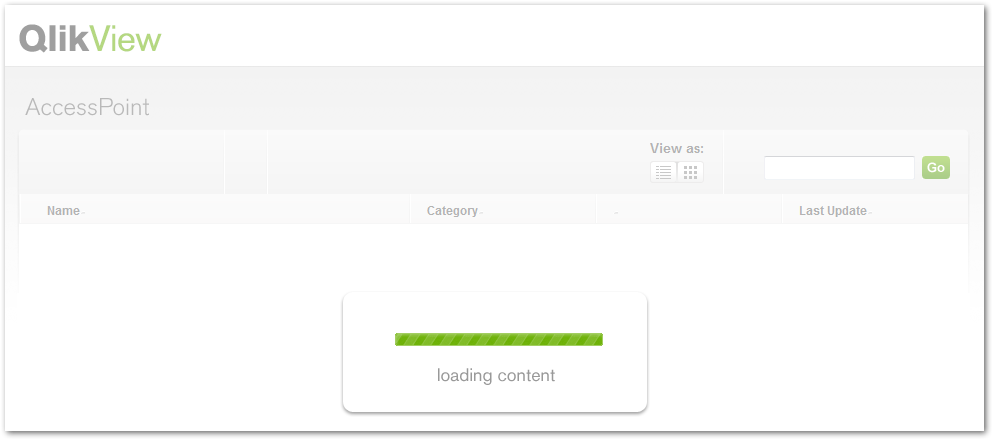
The QlikView AccessPoint is greyed out, doesn't load, or is stuck in a "Loading Content" loop.
Content:
- If only specific users are affected:
- If the issue is global (all users affected):
- General (server-side)
- General (client side)
- IIS specifics
- Related Content:
The Loading Content message indicates a generic error message that can be caused by authentication failures, loading delays, and permission issues, as well as lacking prerequisites. This article outlines the most common causes and possible solutions.
- .NET Framework 4.0 is not installed
- ASP.NET feature in not activated in IIS
- IIS Application Pool is not using .NET Framework 4.0
- The /QvAjaxZfc and /WebTicketSite web sites are not using the "QlikView IIS" Application Pool. (i.e using the DefaultAppPool)
- Domain Controller(s) for domain(s) in play in the environment not local to the Qlik servers to more efficiently process Authentication/Authorization requests
- Affected users are part of a large number (e.g. 120 or more) of AD groups
- .json mime types are missing in IIS.
- Newtonsoft.jsop.dll is outdated (error Could not load file or assembly 'Newtonsoft.Json' or one of it's dependencies. The located assembly's manifest definition does not match the assembly reference. (Exception from HRESULT: 0x80131040) is displayed in the Windows Event Logs) See QlikView AccessPoint does not load: Could not load file or assembly 'Newtonsoft.Json' or one of it's...
If only specific users are affected:
The issue is probably due to the users being part of a large number of Active Directory groups. The solution can be found here. The user cannot authenticate because the Kerberos token that is generated during authentication attempts has a fixed maximum size. Transports such as remote procedure call (RPC) and HTTP rely on the MaxTokenSize value when they allocate buffers for authentication. In Windows Server 2008, the MaxTokenSize value is 12,000 bytes. In Windows 2012 and later version, it's 48,000. Make the recommended registry changes found in the above Microsoft article to resolve this issue and increase the token size.
Possible alternate solution:
The fix was to modify the MaxFieldLength and MaxRequestBytes keys in the System Registry. The following Maximum decimal values must be set in Computer\HKEY_LOCAL_MACHINE\SYSTEM\CurrentControlSet\services\HTTP\Parameters
| Name |
Value Type | Value Data |
| MaxFieldLength | DWORD | 65534 |
| MaxRequestBytes | DWORD | 16777216 |
If the issue is global (all users affected):
General (server-side)
- Are all prerequisites installed on the server (.NET Framework 4.0 for Qlikview 11+) and if IIS is in use, have all pertinent role features been added? See How to configure: QlikView and IIS for details regarding IIS installation.
- Ensure the Service Account running the Directory Service connector has the proper permissions to resolve usernames. This may be an authentication related issue. One way to check this is to view the Windows Logs (Event/Security) to see if the Service Account is failing audit or generating other authentication/permission-related messages.
- If the Service Account does not have access to Active Directory, ensure a proper login account is configured in the Directory Service Connector settings in the Management Console.
- If the Directory Service Connector is installed on a different server, ensure TCP port 4730 is not blocked inbound or outbound.
- Check location of domain controller(s) in relation to servers, if not local to the servers, even with low latent network connections, this may still pose issues when the environment is fairly busy with users coming into the AccessPoint.
- The host name of the server address may not include an underscore (Internet Explorer (IE) in particular), as no cookies can be set, which may cause the authentication process to fail:
http://blogs.msdn.com/b/ieinternals/archive/2009/08/20/wininet-ie-cookie-internals-faq.aspx - Enhanced Security settings for IE should be turned off for Administrators.
- Does the QlikView Server have full control on the ProgramData\QlikTech folder?
c:\programdata\qliktech\qlikview server as well as the mounts configured for the QlikView Server resource in the Management console should allow Full Control rights. - Are there a large number of folder mounts, or do the folder mounts contain a high number of none-QlikView related files? Note: the QVS scans the folder mount content regularly, which may lead to delays or timeouts.
- Ensure the Qlikview Webserver machine connection is using the QlikView Server host name and not
Localhost, in QlikView Management Console check the following:
System > Setup > QlikviewWebserver > Accesspoint > Server > Connections - Ensure that the Newtonsoft.jsop.dll used by VisualStudio (if installed on the server) is updated to the latest version.
General (client side)
- Add the QlikView AccessPoint site to the Local Intranet security zone or trusted sites in IE.
- Have cookies been allowed in the browser for the currently logged on user?
IIS specifics
- The account running the Application Pool is the same account as the one running the QlikView Services,
or is in the QlikView Administrators and Local Administrators Security Groups. Note: Ensure that the /QvAjaxZfc and /WebTicketSite websites are using the "QlikView IIS" Application Pool and not the DefaultAppPool. - Incorrect .NET Trust levels. See QlikView AccessPoint: Index.htm not fully loaded when using IIS .
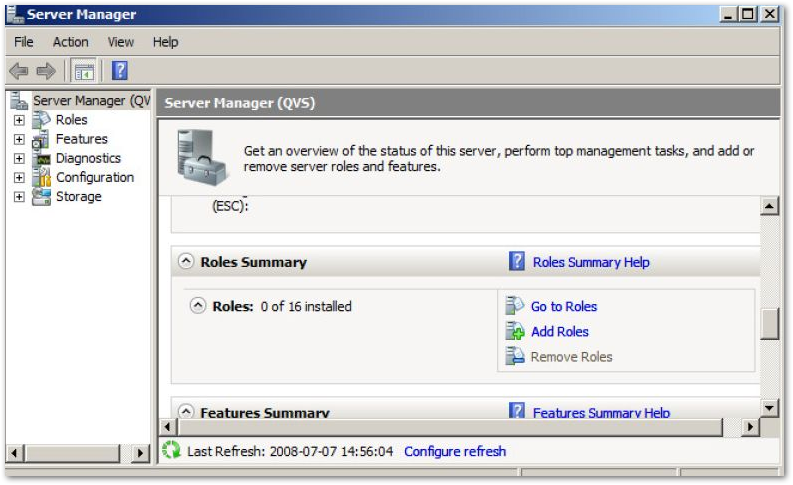
- If Windows Authentication is being used, ensure it is installed/enabled. To do so, review the enabled features in the IIS Roles configuration. See below:
- Click Add Roles and check Web Server (IIS). Click Add Required Features and Click Next.
- On the page Select Role Services ensure the following is checked: > Security > Windows Authentication
- If the issue persists, proceed as follows:
- Test one of the QlikView .aspx pages by browsing to, (for example) http://server/QvAjaxZfc/QvClient.aspx.
If an error similar to the following is returned:
HTTP Error 500.21 - Internal Server Error Handler "WebServiceHandlerFactory-Integrated" has a bad module "ManagedPipelineHandler" in its module list.
or
Exception Details: System BadlmageFormatException: Could not load file or assembly 'AccessPoint' or one of its dependencies. An attempt was made to load a program with an incorrect format. - Run the following command to register ASP.NET v.4 in IIS:
%windir%\Microsoft.NET\Framework64\v4.0xxxx\aspnet_regiis.exe -i (Windows 2008)
dism /online /enable-feature /featurename:IIS-ASPNET45 /all (Windows 2012)
- Test one of the QlikView .aspx pages by browsing to, (for example) http://server/QvAjaxZfc/QvClient.aspx.
- Ensure ASP.NET feature is activated in IIS role:
-
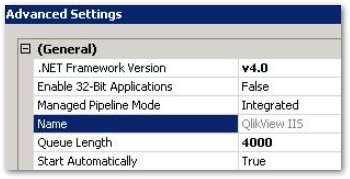
Navigate to the Application Pools overview, right-click and open the Advanced Settings... for the QlikView IIS AppPool. Verify that the settings are as follows:
-
.Net Framework Version: v4.0
-
Enable 32-Bit Applications: False
-
Managed Pipeline Mode: Integrated
-
-

Related Content:
Customised AccessPoint is grayed out
QlikView AccessPoint: long "Loading Content" time before showing the list of documents, or the list ...
QlikView Access point is not loading after upgrading to latest version of QlikView


