Unlock a world of possibilities! Login now and discover the exclusive benefits awaiting you.

- Qlik Community
- :
- Forums
- :
- Analytics & AI
- :
- Products & Topics
- :
- Management & Governance
- :
- Re: AWS Application Load Balancer Health Check Qli...
- Subscribe to RSS Feed
- Mark Topic as New
- Mark Topic as Read
- Float this Topic for Current User
- Bookmark
- Subscribe
- Mute
- Printer Friendly Page

 maheshyv
- Mark as New
- Bookmark
- Subscribe
- Mute
- Subscribe to RSS Feed
- Permalink
- Report Inappropriate Content
AWS Application Load Balancer Health Check Qlik Sense
I'm trying to Use AWS Application Load Balancer, by health Check is always UnHealthy. When i use Network Load Balancer Node become healthy i used TLS 443. But when i use Application ELB i need to specify Path. I tried with all possible combinations like /engine/healthcheck or /mynodename/hub or / but it's always unhealthy on port 443. Any suggestions on how to make it healthy?
Accepted Solutions
 witty
witty
- Mark as New
- Bookmark
- Subscribe
- Mute
- Subscribe to RSS Feed
- Permalink
- Report Inappropriate Content
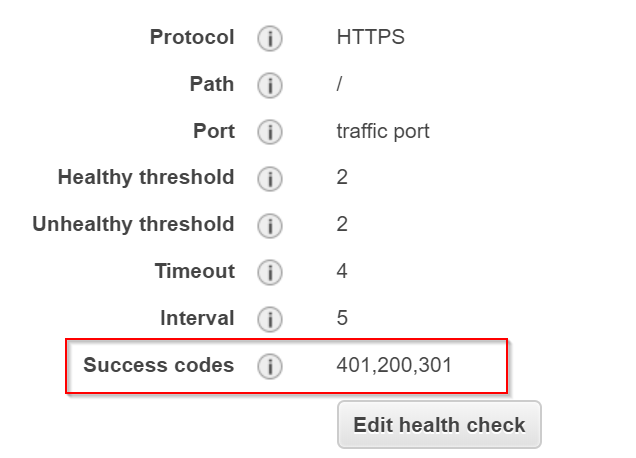
try using a new application load-balancer and a target group; then you can specify the status codes that are "healthy"

 Levi_Turner
- Mark as New
- Bookmark
- Subscribe
- Mute
- Subscribe to RSS Feed
- Permalink
- Report Inappropriate Content
/qps/user with a 201 should also be healthy. Can you give that a try? The accepted answer, albeit correct, will have a consequence of spamming Qlik's logs with attempted authentication attempts.
witty
- Mark as New
- Bookmark
- Subscribe
- Mute
- Subscribe to RSS Feed
- Permalink
- Report Inappropriate Content
try using a new application load-balancer and a target group; then you can specify the status codes that are "healthy"
maheshyv
- Mark as New
- Bookmark
- Subscribe
- Mute
- Subscribe to RSS Feed
- Permalink
- Report Inappropriate Content
it worked
Levi_Turner
- Mark as New
- Bookmark
- Subscribe
- Mute
- Subscribe to RSS Feed
- Permalink
- Report Inappropriate Content
/qps/user with a 201 should also be healthy. Can you give that a try? The accepted answer, albeit correct, will have a consequence of spamming Qlik's logs with attempted authentication attempts.
witty
- Mark as New
- Bookmark
- Subscribe
- Mute
- Subscribe to RSS Feed
- Permalink
- Report Inappropriate Content
This is good to know; - 201 (201 Created) did not result in healthy state but using 200 and that path does.
Levi_Turner
- Mark as New
- Bookmark
- Subscribe
- Mute
- Subscribe to RSS Feed
- Permalink
- Report Inappropriate Content
Doh, yeah, it should be a 200 (OK) response 😃
maheshyv
- Mark as New
- Bookmark
- Subscribe
- Mute
- Subscribe to RSS Feed
- Permalink
- Report Inappropriate Content
