Unlock a world of possibilities! Login now and discover the exclusive benefits awaiting you.

- Qlik Community
- :
- Forums
- :
- Analytics & AI
- :
- Products & Topics
- :
- Management & Governance
- :
- Re: Installing Qlik Sense Server Error
- Subscribe to RSS Feed
- Mark Topic as New
- Mark Topic as Read
- Float this Topic for Current User
- Bookmark
- Subscribe
- Mute
- Printer Friendly Page

 mccook
- Mark as New
- Bookmark
- Subscribe
- Mute
- Subscribe to RSS Feed
- Permalink
- Report Inappropriate Content
Installing Qlik Sense Server Error
Hi All,
I've installed Qlik Sense x64 onto our Windows Server 2008 64-bit and it says installed successfully, however when I try to open the Management Console or Hub I get the following error message in Google Chrome:
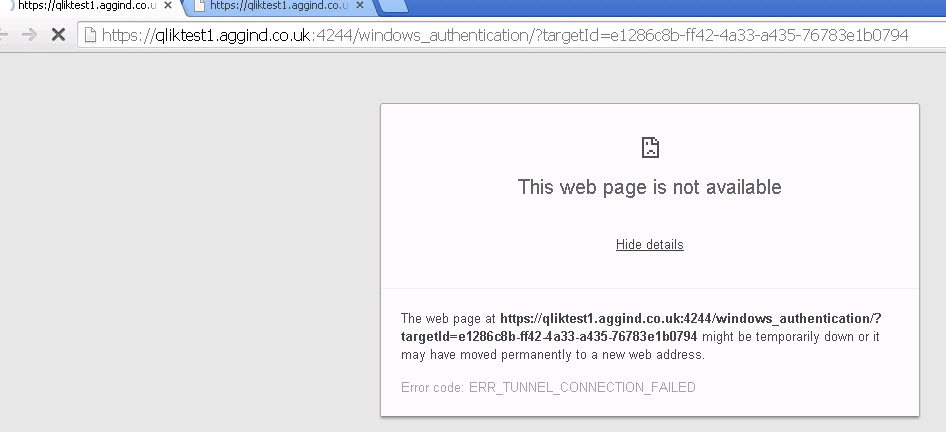
Also tried in internet explorer.
Any help appreciated (I don't usually do the installs).
Cheers,
Dean
mccook
- Mark as New
- Bookmark
- Subscribe
- Mute
- Subscribe to RSS Feed
- Permalink
- Report Inappropriate Content
Hi Giuseppe,
Tried the 4 steps, no joy.


Cheers,
Dean

.png "Former Employee") Giuseppe_Novell
Giuseppe_Novell- Mark as New
- Bookmark
- Subscribe
- Mute
- Subscribe to RSS Feed
- Permalink
- Report Inappropriate Content
Dean,
Does you certificate name match your machine full qualify name?
Gio
Principal Technical Support Engineer @ Qlik
mccook
- Mark as New
- Bookmark
- Subscribe
- Mute
- Subscribe to RSS Feed
- Permalink
- Report Inappropriate Content
Hi
Yeah it appears so in the Personal and Trusted folders e.g.
qliktest1.xxxxxx.co.uk-CA
Cheers,
Dean
Giuseppe_Novell- Mark as New
- Bookmark
- Subscribe
- Mute
- Subscribe to RSS Feed
- Permalink
- Report Inappropriate Content
Dean,
In that case, if you have a Qlik support agreement for Qlik Sense, I would open a support ticket for further help.
Make sure that ports are open, here the default one that Qlik Sense needs:
Gio
Principal Technical Support Engineer @ Qlik

 Ricardo_Gerhard
- Mark as New
- Bookmark
- Subscribe
- Mute
- Subscribe to RSS Feed
- Permalink
- Report Inappropriate Content
Hi Giuseppe,
I made the same tests removing certificates and the problem persist. All services is running ok and firewall is disabled.
Need I open a case in Partner Portal?
If it´s necessary, I´ve a test enviroment to simulate all installation process or only the problem.
Regards,
Ricardo Gerhard
OEM Solution Architect
LATAM
Giuseppe_Novell- Mark as New
- Bookmark
- Subscribe
- Mute
- Subscribe to RSS Feed
- Permalink
- Report Inappropriate Content
Ricardo,
Did you check if the certificate name match exactly as what you machine fully qualify name?
Gio
Principal Technical Support Engineer @ Qlik
Ricardo_Gerhard
- Mark as New
- Bookmark
- Subscribe
- Mute
- Subscribe to RSS Feed
- Permalink
- Report Inappropriate Content
Yes, all certificates was recreate with machine name.
OEM Solution Architect
LATAM
Giuseppe_Novell- Mark as New
- Bookmark
- Subscribe
- Mute
- Subscribe to RSS Feed
- Permalink
- Report Inappropriate Content
Ricardo,
After installing it, did you reboot the machine? Also, when you do a netstat -ano do you see the following ports open:
http://help.qlik.com/sense/en-US/online/#../Subsystems/Server_deployment_and_configuration/Content/Q... Sense/QSSRM_Deployment_Ports.htm?Highlight=port
Gio
Principal Technical Support Engineer @ Qlik
Ricardo_Gerhard
- Mark as New
- Bookmark
- Subscribe
- Mute
- Subscribe to RSS Feed
- Permalink
- Report Inappropriate Content
Yes, I rebooted the system and the same issue.
All ports is openning.
OEM Solution Architect
LATAM
Giuseppe_Novell- Mark as New
- Bookmark
- Subscribe
- Mute
- Subscribe to RSS Feed
- Permalink
- Report Inappropriate Content
so you are confirming that by doing a netstat -ano all the ports listed on the link I provided are been held by a process "4" or a Qlik process related? or just assuming because you just disable the firewall?
Gio
Principal Technical Support Engineer @ Qlik
