Unlock a world of possibilities! Login now and discover the exclusive benefits awaiting you.

- Qlik Community
- :
- Forums
- :
- Analytics & AI
- :
- Products & Topics
- :
- Management & Governance
- :
- Issues after upgrading qlik sense to version 3.0
- Subscribe to RSS Feed
- Mark Topic as New
- Mark Topic as Read
- Float this Topic for Current User
- Bookmark
- Subscribe
- Mute
- Printer Friendly Page

 agigliotti
- Mark as New
- Bookmark
- Subscribe
- Mute
- Subscribe to RSS Feed
- Permalink
- Report Inappropriate Content
Issues after upgrading qlik sense to version 3.0
Hello,
I'm facing problems after upgrading customer's qlik sense multi-node site from version 2.2.4 to version 3.0.
I upgraded successfully both the central node first and the rim node after.
It ended with no errors in both server.
Now either the QMC and Hub doesn't works anymore in both nodes.
Before upgrading the central node I made a backup of repository using repositorySnapshotManager (RSM) utility.
Calling the hub I get the following error message:
"An error occurred. The load balancing module did not return any engine service for the following app: __hub"
Someone can help me ???
However I submitted a new case to the support portal.
Many thanks in advance.
Best Regards
Andrea
- Tags:
- multi-node
- « Previous Replies
-
- 1
- 2
- Next Replies »
agigliotti
- Mark as New
- Bookmark
- Subscribe
- Mute
- Subscribe to RSS Feed
- Permalink
- Report Inappropriate Content
I applied the upgrade successfully to version 3.0.1 on both nodes right now.
However I still get the same error message accessing the RIM node hub.
How can I fix it ?

- Mark as New
- Bookmark
- Subscribe
- Mute
- Subscribe to RSS Feed
- Permalink
- Report Inappropriate Content
Does your RIM Node has engine installed in it. If not, you have to route your RIM node to Central node.
Proxies>>RIM Node>>Load balancing>>Add>> central node.
Thanks,
Nithesh
agigliotti
- Mark as New
- Bookmark
- Subscribe
- Mute
- Subscribe to RSS Feed
- Permalink
- Report Inappropriate Content
yes I did it on the default virtual proxy of rim node.
the support told me there was a bug in version 3.0 fixed in 3.0.1 but it's not true.
i need a customer patch urgently.
agigliotti
- Mark as New
- Bookmark
- Subscribe
- Mute
- Subscribe to RSS Feed
- Permalink
- Report Inappropriate Content
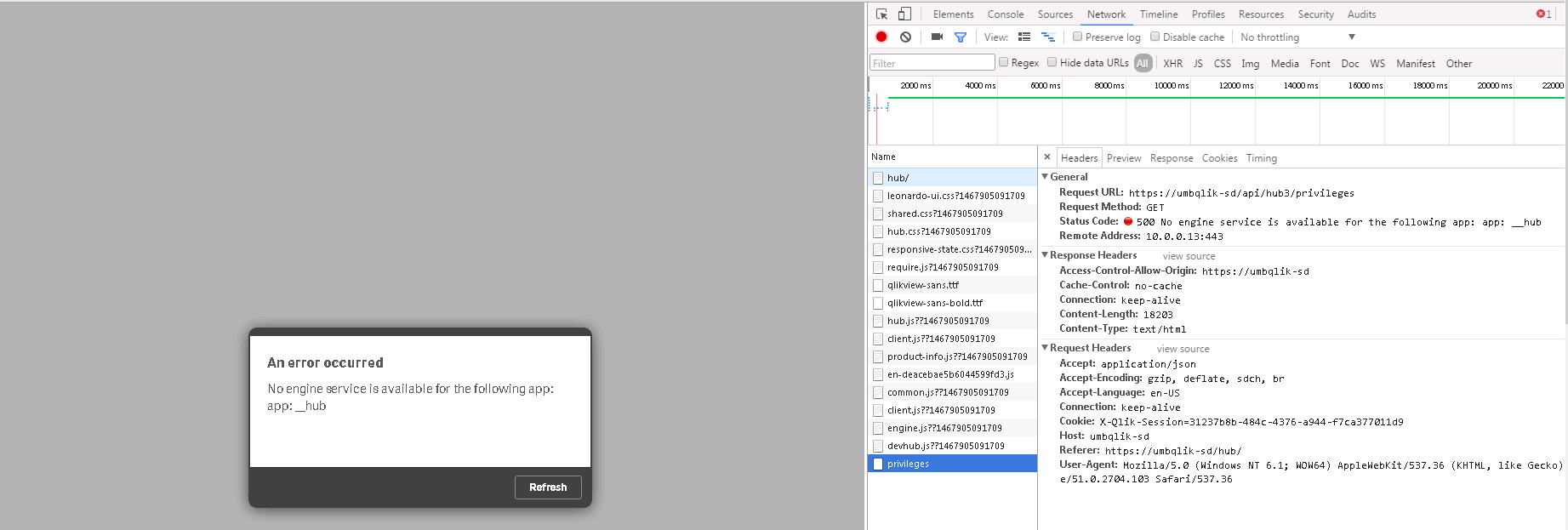
below the issue i'm facing opening hub on rim node:

 pablolabbe
- Mark as New
- Bookmark
- Subscribe
- Mute
- Subscribe to RSS Feed
- Permalink
- Report Inappropriate Content
Did you solved this issue ?
agigliotti
- Mark as New
- Bookmark
- Subscribe
- Mute
- Subscribe to RSS Feed
- Permalink
- Report Inappropriate Content
Yes finally I solved opening the port 4900 (two-ways) on the firewall and disabling IPv6 in TCP settings.
- Mark as New
- Bookmark
- Subscribe
- Mute
- Subscribe to RSS Feed
- Permalink
- Report Inappropriate Content
Thanks!
This solved my problem.

 hugo_andrade
- Mark as New
- Bookmark
- Subscribe
- Mute
- Subscribe to RSS Feed
- Permalink
- Report Inappropriate Content
I wouldn't call this a valid solution since it changes the environment design.
Live and Breathe Qlik & AWS.
Follow me on my LinkedIn | Know IPC Global at ipc-global.com
- « Previous Replies
-
- 1
- 2
- Next Replies »