Unlock a world of possibilities! Login now and discover the exclusive benefits awaiting you.

- Qlik Community
- :
- Forums
- :
- Analytics & AI
- :
- Products & Topics
- :
- Management & Governance
- :
- Make specific table cells Null
- Subscribe to RSS Feed
- Mark Topic as New
- Mark Topic as Read
- Float this Topic for Current User
- Bookmark
- Subscribe
- Mute
- Printer Friendly Page

 khaled_altaher
- Mark as New
- Bookmark
- Subscribe
- Mute
- Subscribe to RSS Feed
- Permalink
- Report Inappropriate Content
Make specific table cells Null
Hello All!
I'm looking for a way to make specific cells be Null in a pivot table,
for males only to be null, even if it has data.
I tried
if(GENDER = 'Male' AND TREATMENT_GROUP_NAME= 'EC', Null(),
Sum({<TREATMENT_ELIGIBILITY = {"Eligible"}, TREATMENT_GROUP_NAME = {"EC"}>} FIELD_VALUE))

Is there any possible way to make it work.
Accepted Solutions

 Andrei_Cusnir
- Mark as New
- Bookmark
- Subscribe
- Mute
- Subscribe to RSS Feed
- Permalink
- Report Inappropriate Content
Hello,
I have an example with demo data that you can take a look. If it suits your needs, you can modify it by changing the expression's details:
1. Demo dataset:
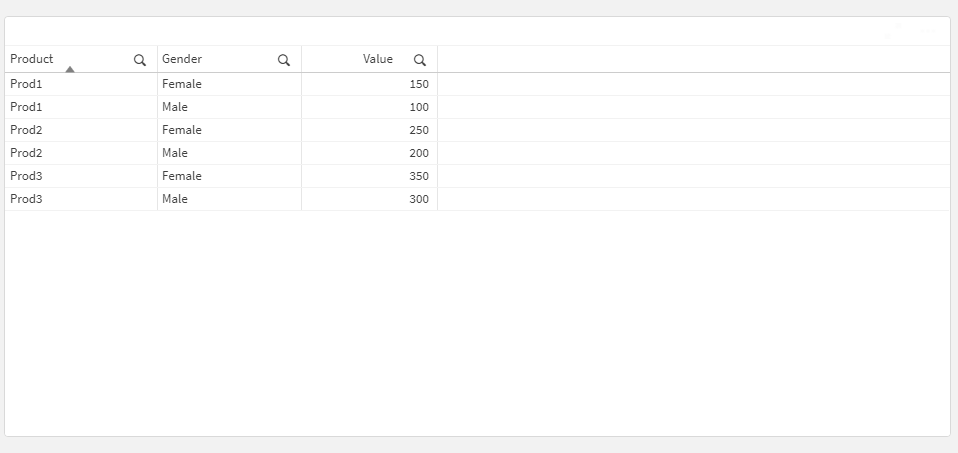
2. I have created a Pivot table with:
- Dimension 1: Product
- Dimension 2: Gender
- Measure: Sum(Value)
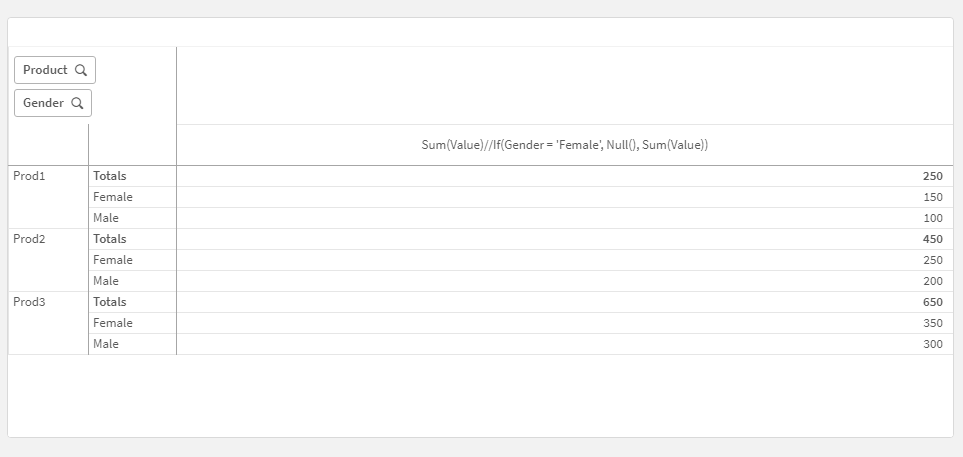
3. Now I have changed the measure expression to:
If(Gender = 'Female', Null(), Sum(Value))
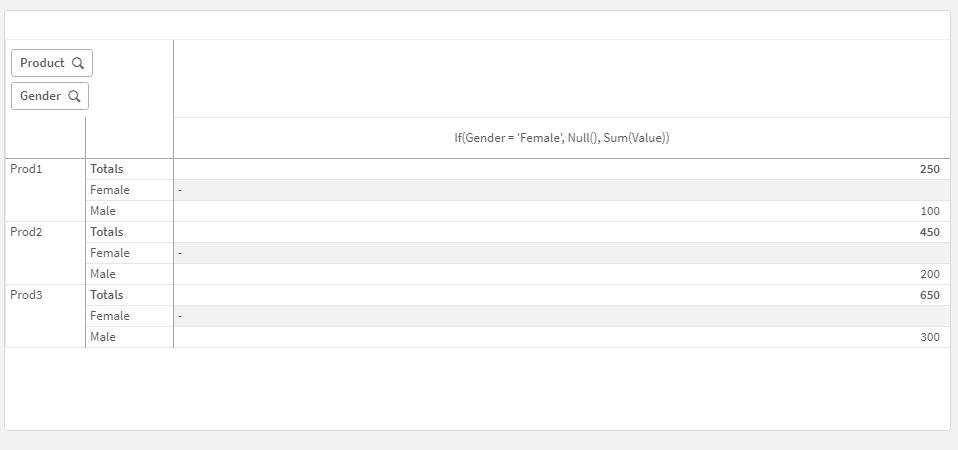
As you can see, all the Value values for "Female" are Null(), while for the rest is the calculated expression.
I hope that this information was helpful. In case I have misunderstood the use case scenario, please elaborate in details by providing additional information. However, if it has helped you resolve the issue, addressed your concerns or at least pointed you in the right direction, please mark it as Accepted Solution to give further visibility to other community members.
Andrei_Cusnir
- Mark as New
- Bookmark
- Subscribe
- Mute
- Subscribe to RSS Feed
- Permalink
- Report Inappropriate Content
Hello,
I have an example with demo data that you can take a look. If it suits your needs, you can modify it by changing the expression's details:
1. Demo dataset:
2. I have created a Pivot table with:
- Dimension 1: Product
- Dimension 2: Gender
- Measure: Sum(Value)
3. Now I have changed the measure expression to:
If(Gender = 'Female', Null(), Sum(Value))
As you can see, all the Value values for "Female" are Null(), while for the rest is the calculated expression.
I hope that this information was helpful. In case I have misunderstood the use case scenario, please elaborate in details by providing additional information. However, if it has helped you resolve the issue, addressed your concerns or at least pointed you in the right direction, please mark it as Accepted Solution to give further visibility to other community members.
