Unlock a world of possibilities! Login now and discover the exclusive benefits awaiting you.

- Qlik Community
- :
- Forums
- :
- Analytics & AI
- :
- Products & Topics
- :
- Management & Governance
- :
- Re: Monitoring Apps Doesn't Load Archived Logs
- Subscribe to RSS Feed
- Mark Topic as New
- Mark Topic as Read
- Float this Topic for Current User
- Bookmark
- Subscribe
- Mute
- Printer Friendly Page

 mfarsln
- Mark as New
- Bookmark
- Subscribe
- Mute
- Subscribe to RSS Feed
- Permalink
- Report Inappropriate Content
Monitoring Apps Doesn't Load Archived Logs
Hi,
We have a qlik sense sense server which has only one central node. When i reload the monitoring apps, it doesn't reload from archived logs. There are log files under archived logs folder from 2018 September but i can't see any data before 2019 August in Qlik App.
Here is the log folders connection strings;
ArchivedLogsFolder : '\\<FQDN>\<Shared>\ArchivedLogs'
ServerLogFolder: 'C:\ProgramData\Qlik\Sense\Log\'
There is one more folder inside the ArchivedLogsFolder which is named as fqdn. You can check the screenshot below.
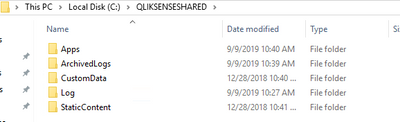
And there is one more folder inside the ArchivedLogs folder;

So my question is, if i change the ArchivedLogsFolder connection to '\\<FQDN>\<Shared>\ArchivedLogs\fqdn' it checks for node configuration(multi, single) and because there are more than 1 folder, it behaves like a multi-node configuration.
Is this causes to not load archived logs? If it's not then what should be the problem i am facing?
Thanks in advance.

 simon_minifie
- Mark as New
- Bookmark
- Subscribe
- Mute
- Subscribe to RSS Feed
- Permalink
- Report Inappropriate Content
Hi,
Have a look at the KB article below:
https://support.qlik.com/articles/000026358
Had a similar issue, and removing the old qvd files resolved.
Thanks,
Simon
