Unlock a world of possibilities! Login now and discover the exclusive benefits awaiting you.

- Qlik Community
- :
- Forums
- :
- Analytics & AI
- :
- Products & Topics
- :
- Management & Governance
- :
- Problem with tables not attached
- Subscribe to RSS Feed
- Mark Topic as New
- Mark Topic as Read
- Float this Topic for Current User
- Bookmark
- Subscribe
- Mute
- Printer Friendly Page

 zied_ahmed1
- Mark as New
- Bookmark
- Subscribe
- Mute
- Subscribe to RSS Feed
- Permalink
- Report Inappropriate Content
Problem with tables not attached
Hello,
I have two tables :
first table name Exist_Not Exist ( we have two fields Exist , Not Exist )
Second table named Objects (Car Name, Statut)
The problem is i cant attached the two tables
and this is the structure for fields :
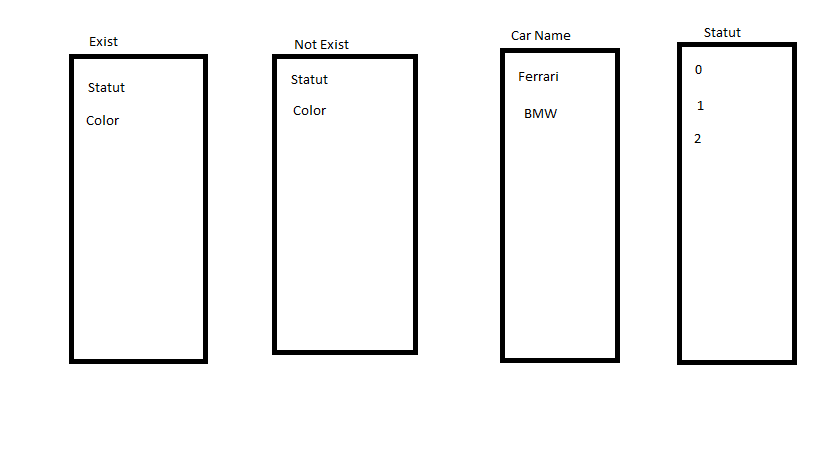
i need to when in Exist we select Statut we have directly to select 1 in the field statut and display only the car Names who have Statut = 1
(I need to do this with variables for exemples not in script )
Thanks for help

 joseph_eftamand
- Mark as New
- Bookmark
- Subscribe
- Mute
- Subscribe to RSS Feed
- Permalink
- Report Inappropriate Content
Not sure I understand you correctly, apologies If I misunderstood your query. When loaded in the script in order to build the associations between tables, they need to share a field of the same name. This will usually be some kind id which can associate a fact table to various dimension tables. If you can provide the tables you are trying to associate then that would make the explanation easier.
zied_ahmed1
- Mark as New
- Bookmark
- Subscribe
- Mute
- Subscribe to RSS Feed
- Permalink
- Report Inappropriate Content
I can't touch the code that's the problem , so i need to use some variables and condition to do it
 breno_morais
- Mark as New
- Bookmark
- Subscribe
- Mute
- Subscribe to RSS Feed
- Permalink
- Report Inappropriate Content
Can you attach sample application? I can't understand what you need.
 OmarBenSalem
- Mark as New
- Bookmark
- Subscribe
- Mute
- Subscribe to RSS Feed
- Permalink
- Report Inappropriate Content
Use set expressions.
Sthnng like, if(Exist='Statut',sum({<Statut={1}>}measure),sum(measure))
 Anders_Eriksson
- Mark as New
- Bookmark
- Subscribe
- Mute
- Subscribe to RSS Feed
- Permalink
- Report Inappropriate Content
Set analysis is a good solution but your example is not.
Both Sum-statements and the if-statement will be executed for every row in the table.
The if should be placed in a $-expansion inside the set analysis.
Like this: Sum({$<$(if(Exist='Statut', 'Statut={1}', '')>} measure)
Set analysis is executed once for the whole table and we have only one expression calculated for each row.
A small table with limited data it makes no difference but in large applications it does.
zied_ahmed1
- Mark as New
- Bookmark
- Subscribe
- Mute
- Subscribe to RSS Feed
- Permalink
- Report Inappropriate Content
Hello everybody,
Thanks for your answers. I attached an example of the application.Just one thing when I selected Color in Exist I can't select it in not exist
so now for example when I select color in Exist and Entreprise in not exist I will have a table with just one row with the hostname X
Hope you understand how I need to do
Thanks
breno_morais
- Mark as New
- Bookmark
- Subscribe
- Mute
- Subscribe to RSS Feed
- Permalink
- Report Inappropriate Content
Hi Zied,
I'm studying your case and I finded until moment this expression in Statut dimension on chart:
=if(match(Exist,'Statut'), if(match(Statut,'1'), Statut, Null()), Statut)

Later I will back to the case, if this information will help you, pls mark HELPFUL
Good luck
