Unlock a world of possibilities! Login now and discover the exclusive benefits awaiting you.

- Qlik Community
- :
- Forums
- :
- Analytics & AI
- :
- Products & Topics
- :
- Management & Governance
- :
- Re: Qlik Sense Desktop - Screen Resolution Issue
- Subscribe to RSS Feed
- Mark Topic as New
- Mark Topic as Read
- Float this Topic for Current User
- Bookmark
- Subscribe
- Mute
- Printer Friendly Page

 csellei
- Mark as New
- Bookmark
- Subscribe
- Mute
- Subscribe to RSS Feed
- Permalink
- Report Inappropriate Content
Qlik Sense Desktop - Screen Resolution Issue
Hi all,
I have an issue with screen resolution at newest versions of Qlik Sense Desktop. I used to work with version 3.1.1, where resolution was ok according to machine resolution.
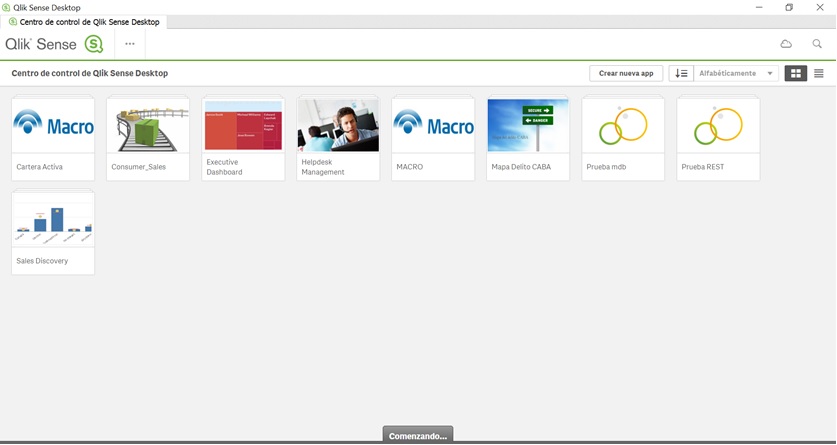
I upgraded to version 3.1.2, just download and install whitout any other change, and resolution changes to following:

Version 3.1.3 has same issue than 3.1.2.
After uninstalling and installing version 3.1.1 again, issue is fixed.
Anyone face the same issue? Since I didn't change anything else than Qlik Sense Desktop, I strongly believe that this is a product issue.
Is there any configuration file into Sense Desktop for resolution settings?
Best regards.
Christian.
- « Previous Replies
- Next Replies »
Accepted Solutions

- Mark as New
- Bookmark
- Subscribe
- Mute
- Subscribe to RSS Feed
- Permalink
- Report Inappropriate Content
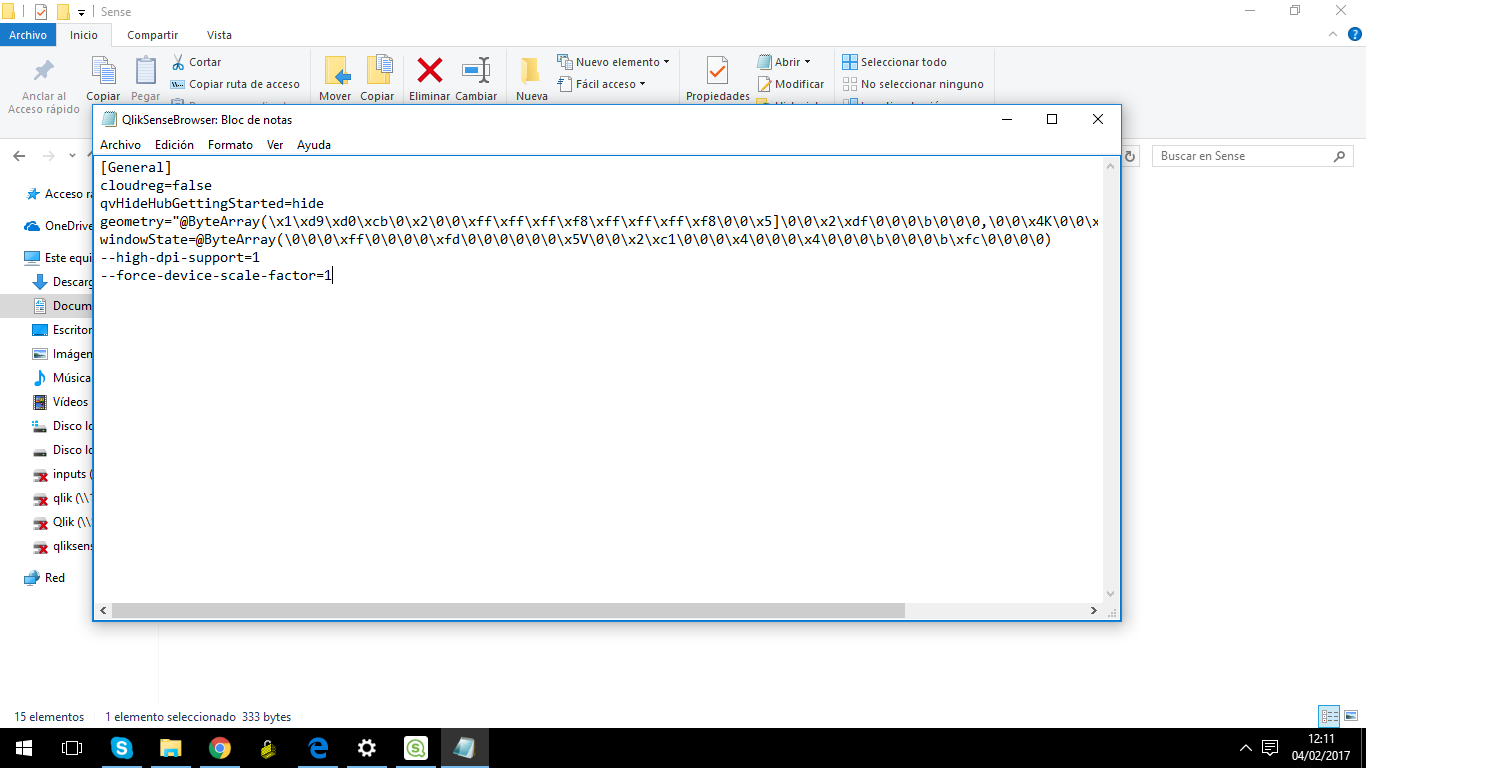
Try navigating to the services.conf file, which can be found here: C:\Users(yourfolder)\AppData\Local\Programs\Qlik\Sense. Open the file with WordPad or the likes, and under the [browser.parameters] section, add the following parameters:
--high-dpi-support=1
--force-device-scale-factor=1

 johan_soderlund
- Mark as New
- Bookmark
- Subscribe
- Mute
- Subscribe to RSS Feed
- Permalink
- Report Inappropriate Content
I have the same issue and there are some posts about this but have not found any solution. Run the app in the browser at http://localhost:4848/hub instead and the resolution is fine.
- Mark as New
- Bookmark
- Subscribe
- Mute
- Subscribe to RSS Feed
- Permalink
- Report Inappropriate Content
Working on browser is alternate option, But not really sure how to do that with in desktop.
 nlr-biin_soluti
- Mark as New
- Bookmark
- Subscribe
- Mute
- Subscribe to RSS Feed
- Permalink
- Report Inappropriate Content
Hi,
I'm facing the same issue with 3.1 SR4.
Anyone with a solution other than browser option?
Best regards,
Nicolas
- Mark as New
- Bookmark
- Subscribe
- Mute
- Subscribe to RSS Feed
- Permalink
- Report Inappropriate Content
Try navigating to the services.conf file, which can be found here: C:\Users(yourfolder)\AppData\Local\Programs\Qlik\Sense. Open the file with WordPad or the likes, and under the [browser.parameters] section, add the following parameters:
--high-dpi-support=1
--force-device-scale-factor=1
csellei
- Mark as New
- Bookmark
- Subscribe
- Mute
- Subscribe to RSS Feed
- Permalink
- Report Inappropriate Content
Great !!!!
It's work for me.
Just adding, I had to restart my machine.
Best Regards.
nlr-biin_soluti
- Mark as New
- Bookmark
- Subscribe
- Mute
- Subscribe to RSS Feed
- Permalink
- Report Inappropriate Content
Thanks!
It works for me too
Best regards,
Nicolas
- Mark as New
- Bookmark
- Subscribe
- Mute
- Subscribe to RSS Feed
- Permalink
- Report Inappropriate Content
It worked. Awesome Ricci !!!
johan_soderlund
- Mark as New
- Bookmark
- Subscribe
- Mute
- Subscribe to RSS Feed
- Permalink
- Report Inappropriate Content
Worked for me as well!
- Mark as New
- Bookmark
- Subscribe
- Mute
- Subscribe to RSS Feed
- Permalink
- Report Inappropriate Content
Hello Ricci, can you help me to configure? is it okay like this? Thanks!
- « Previous Replies
- Next Replies »