Unlock a world of possibilities! Login now and discover the exclusive benefits awaiting you.

- Qlik Community
- :
- Forums
- :
- Analytics & AI
- :
- Products & Topics
- :
- Management & Governance
- :
- Qlik Sense Management Console - Cannot Connect
- Subscribe to RSS Feed
- Mark Topic as New
- Mark Topic as Read
- Float this Topic for Current User
- Bookmark
- Subscribe
- Mute
- Printer Friendly Page

 PhilippeMotillo
- Mark as New
- Bookmark
- Subscribe
- Mute
- Subscribe to RSS Feed
- Permalink
- Report Inappropriate Content
Qlik Sense Management Console - Cannot Connect
Hello,
I have Installed Qlik Sense Server on my Laptop. All the services are running but I cannot access my Management Console.
I did the test using IE and Chrome , but I have the same message Error code: ERR_CONNECTION_REFUSED.
I did check the Proxy settings and change the parameter in Skype to avoid port 80 usage.
Any suggestion ?
Thanks a lot
Philippe
- « Previous Replies
-
- 1
- 2
- Next Replies »
.png "pbr")
 pbr
pbr
- Mark as New
- Bookmark
- Subscribe
- Mute
- Subscribe to RSS Feed
- Permalink
- Report Inappropriate Content
Philippe,
If you could attach the log files (C:\ProgramData\Qlik\Sense\Log) to this post we can review them and see if we can find out what's causing the issue.
Pierce

.png "Former Employee") JonnyPoole
JonnyPoole
- Mark as New
- Bookmark
- Subscribe
- Mute
- Subscribe to RSS Feed
- Permalink
- Report Inappropriate Content
Allo Phillippe, Sense is by default configured with Https:// and so port 443 is an issue too and is also used by skype.
If you stop skype and exit and restart the sense proxy service are u good.
the above error will appear in the logs as well as Pierce mentions.
PhilippeMotillo- Mark as New
- Bookmark
- Subscribe
- Mute
- Subscribe to RSS Feed
- Permalink
- Report Inappropriate Content
I will check it.
Thanks a lot
Philippe
Philippe Motillon | Directeur Pratique Data Discovery | Manager, Data Discovery Practice
tél +1(514) 989-2000 x 1575 | Fax +1(514) 989-1122
Cel. +1(514) 290-4828
759 Square Victoria , # 420 , Montréal , Canada
H2Y 2J7
www.keyrus.com<http://www.keyrus.com>
Le 2014-10-03 à 12:21, Jonathan Poole <qcwebmaster@qlikview.com<mailto:qcwebmaster@qlikview.com>> a écrit :
Qlik Community<http://community.qlik.com/>
Qlik Sense Management Console - Cannot Connect
reply from Jonathan Poole<http://community.qlik.com/people/jpe?et=watches.email.thread> in Qlik Sense - Installation, Deployment & Management - View the full discussion<http://community.qlik.com/message/625106?et=watches.email.thread#625106>
PhilippeMotillo- Mark as New
- Bookmark
- Subscribe
- Mute
- Subscribe to RSS Feed
- Permalink
- Report Inappropriate Content
Hi Pierce ,
Here are the log files.
Thanks again for your help.
Philippe
pbr
- Mark as New
- Bookmark
- Subscribe
- Mute
- Subscribe to RSS Feed
- Permalink
- Report Inappropriate Content
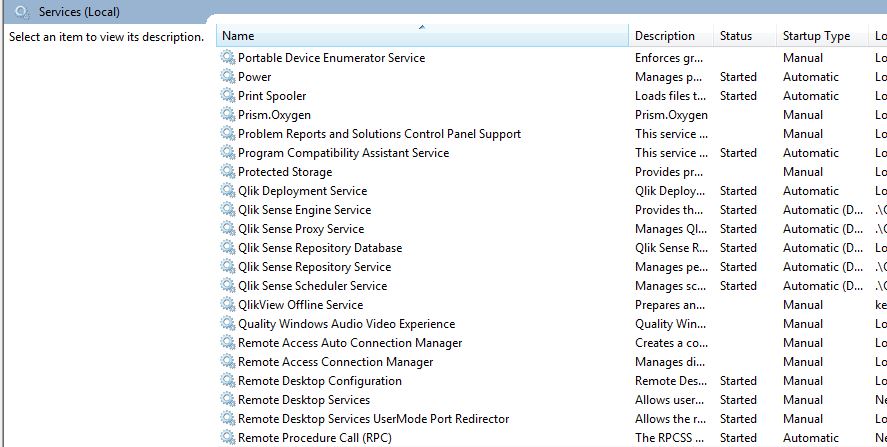
From what I see, the Repository Service isn't started.
Also, there is no Repository logs. Is the service actually running? Can you post a screenshot of the Services? One thing to review is the Event Viewer logs for the OS to see if there is anything there.
| Could not contact local repository to retrieve proxy settings | The remote server returned an error: (403) Forbidden. |
| 1674 | 20141003T100004.807-0400 | INFO | CAYMXL0146 | System.Scheduler.Scheduler.Core.Utility.SystemInformationProvider | 9284 | 4f6cd49f-6410-48a5-880b-809727748b14 | CAYMXL0146\Qvs | Tried to contact the Repository 1520 times. Slowing down... | 4f6cd49f-6410-48a5-880b-809727748b14 | ||||||||
| 1675 | 20141003T100009.816-0400 | ERROR | CAYMXL0146 | System.Scheduler.Scheduler.Communication.Wrapper.Repository.RepositoryWrapper | 9284 | 2b1d181f-32d9-4739-8c01-45521f3f7dac | CAYMXL0146\Qvs | Exception message from RestResponse: The remote server returned an error: (403) Forbidden. | 2b1d181f-32d9-4739-8c01-45521f3f7dac |
| 2 | 20141003T051221.719-0400 | WARN | CAYMXL0146 | Security.Proxy.Qlik.Sense.Common.Security.SecuritySetup | 8872 | 1c29ffe3-2617-4c38-8d95-3987931f7740 | CAYMXL0146\Qvs | Trusted root certificates on this node is uncomfortably high: 314 | 1c29ffe3-2617-4c38-8d95-3987931f7740 | |||
| 3 | 20141003T051221.722-0400 | WARN | CAYMXL0146 | Security.Proxy.Qlik.Sense.Common.Security.SecuritySetup | 8872 | f648ef55-0df7-49b4-8c47-988ebd2dc77d | CAYMXL0146\Qvs | This might impede SSL communication, since Windows truncates too large (300+) lists of Trusted root certificates that are sent to client during SSL handshake. | f648ef55-0df7-49b4-8c47-988ebd2dc77d | |||
| 4 | 20141003T051221.722-0400 | WARN | CAYMXL0146 | Security.Proxy.Qlik.Sense.Common.Security.SecuritySetup | 8872 | 8fcd131d-9e57-4707-88ba-1dcc587c0fb5 | CAYMXL0146\Qvs | Please consider removing too old or otherwise invalid trusted root certificates (under LocalMachine/Root) | 8fcd131d-9e57-4707-88ba-1dcc587c0fb5 |
You can review this thread for the above error as well -
Re: Re: Re: Qlik Server is installed and running, but I can't connect
Pierce
PhilippeMotillo- Mark as New
- Bookmark
- Subscribe
- Mute
- Subscribe to RSS Feed
- Permalink
- Report Inappropriate Content
PhilippeMotillo- Mark as New
- Bookmark
- Subscribe
- Mute
- Subscribe to RSS Feed
- Permalink
- Report Inappropriate Content
Here are the files for the repository service
pbr
- Mark as New
- Bookmark
- Subscribe
- Mute
- Subscribe to RSS Feed
- Permalink
- Report Inappropriate Content
Philippe,
I would open a case with Support to review the issue with you.
Pierce
PhilippeMotillo- Mark as New
- Bookmark
- Subscribe
- Mute
- Subscribe to RSS Feed
- Permalink
- Report Inappropriate Content
Thanks a lot.

- « Previous Replies
-
- 1
- 2
- Next Replies »