Unlock a world of possibilities! Login now and discover the exclusive benefits awaiting you.

- Qlik Community
- :
- Forums
- :
- Analytics & AI
- :
- Products & Topics
- :
- Management & Governance
- :
- Qlik Sense Monitoring Applications
- Subscribe to RSS Feed
- Mark Topic as New
- Mark Topic as Read
- Float this Topic for Current User
- Bookmark
- Subscribe
- Mute
- Printer Friendly Page

 _Adam_
- Mark as New
- Bookmark
- Subscribe
- Mute
- Subscribe to RSS Feed
- Permalink
- Report Inappropriate Content
Qlik Sense Monitoring Applications
Hi all,
We are currently running Qlik Sense Enterprise - August 2022 Patch 4
We have the default monitoring applications from the very first Qlik verison we deployed in our company. (in 2019)
Now, we decided to check if there are new versions released that might have new added information that can be usefull.
As I saw in most places they all direct to check the folder in the central server named "Default Apps" that is where the monitoring applications are stored and supposed to be up to date according to the version that we recently installed.
I would like to know:
1) How often those monitoring apps are being updated ?
2) Are there any new monitoring apps except those default ones that come with the installation ? (Qlik certified)
3) Where can I check / download the latest Qlik monitoring apps from ?
4) I need advice regarding the application called - Sense System Performance Analyzer
In order for it to work it require enabling "Centralized Logging service" as explained on this post below:
https://help.qlik.com/en-US/sense-admin/May2021/Subsystems/DeployAdministerQSE/Content/Sense_DeployA...
I'm facing same problem as the post creator:
https://community.qlik.com/t5/Deployment-Management/Why-is-Qlik-Sense-s-System-Performance-Analyzer-...
But when I continued to search for solution as we are not confident yet on what the result might be from resources aspect.. I encountered this post that says that Centralized Logging service has been decommissioned by the end of 2021:
https://community.qlik.com/t5/Support-Updates/Deprecation-of-Centralized-Logging-in-Qlik-Sense-Enter...
Is there is an replacment for that application currently ?
What is the impact of enabling Centralized Logging service ?
* How much extra resources it might take ? (CPU, RAM, Hard Disk space,etc..)
* Will it effect daily running operations ?
* How much depth those logs dive to ? (Qlik allow the option to choose how detailed the log should be, that's effect log size)
Any feedback will be much appreciated !
Thank you!

Accepted Solutions

 Chip_Matejowsky
- Mark as New
- Bookmark
- Subscribe
- Mute
- Subscribe to RSS Feed
- Permalink
- Report Inappropriate Content
Hi @_Adam_,
I am not aware of a replacement for the System Performance app. You can make a feature request for one by following steps in Qlik Knowledgebase article How To Submit an Idea or Propose and Improvement For Qlik Products.
Regarding your other queries, review the Qlik Sense Help entry Monitoring a Qlik Sense Enterprise on Windows site and it's sub-topics. Importing new Monitoring apps provides details on how to configure these additional monitoring apps to use in your Qlik Sense environment.
The Qlik Sense Admin Playbook and the Qlik Sense Admin Playbook Tools Index are other great resources.
Best Regards
Help users find answers! Don't forget to mark a solution that worked for you!
Chip_Matejowsky
- Mark as New
- Bookmark
- Subscribe
- Mute
- Subscribe to RSS Feed
- Permalink
- Report Inappropriate Content
Hi @_Adam_,
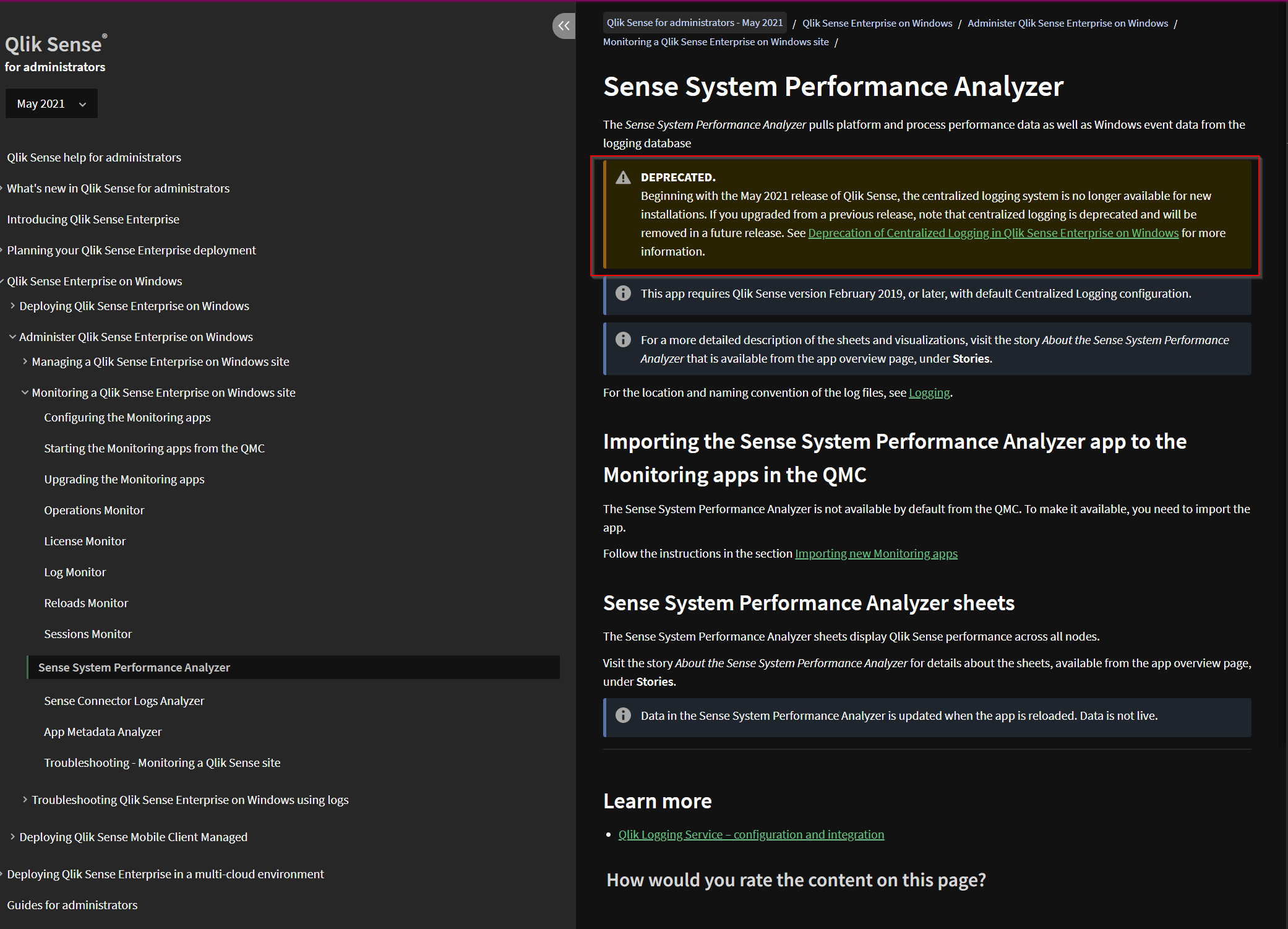
The Qlik Sense System Performance Analyzer app has been deprecated since the release of Qlik Sense Enterprise version May 2021. See the online Qlik Sense Help entry Sense System Performance Analyzer for more details.
Best Regards
Help users find answers! Don't forget to mark a solution that worked for you!
_Adam_
- Mark as New
- Bookmark
- Subscribe
- Mute
- Subscribe to RSS Feed
- Permalink
- Report Inappropriate Content
Thank you @Chip_Matejowsky for the confirmation regarding the "Sense System Performance Analyzer".
Would you might know if there is any replacment for it ?
Could you please reply on the 1 ~ 3 sections ?
1) How often those monitoring apps are being updated ?
2) Are there any new monitoring apps except those default ones that come with the installation ? (Qlik certified)
3) Where can I check / download the latest Qlik monitoring apps from ?
Is this accurate ?
"As I saw in most places they all direct to check the folder in the central server named "Default Apps" that is where the monitoring applications are stored and supposed to be up to date according to the version that we recently installed."
Chip_Matejowsky
- Mark as New
- Bookmark
- Subscribe
- Mute
- Subscribe to RSS Feed
- Permalink
- Report Inappropriate Content
Hi @_Adam_,
I am not aware of a replacement for the System Performance app. You can make a feature request for one by following steps in Qlik Knowledgebase article How To Submit an Idea or Propose and Improvement For Qlik Products.
Regarding your other queries, review the Qlik Sense Help entry Monitoring a Qlik Sense Enterprise on Windows site and it's sub-topics. Importing new Monitoring apps provides details on how to configure these additional monitoring apps to use in your Qlik Sense environment.
The Qlik Sense Admin Playbook and the Qlik Sense Admin Playbook Tools Index are other great resources.
Best Regards
Help users find answers! Don't forget to mark a solution that worked for you!
_Adam_
- Mark as New
- Bookmark
- Subscribe
- Mute
- Subscribe to RSS Feed
- Permalink
- Report Inappropriate Content
Thank you @Chip_Matejowsky
your feedback has been great help for me.
You coverd all the info I was searching for.
Thanks again!!

 AshutoshBhumkar
- Mark as New
- Bookmark
- Subscribe
- Mute
- Subscribe to RSS Feed
- Permalink
- Report Inappropriate Content
