Unlock a world of possibilities! Login now and discover the exclusive benefits awaiting you.

- Qlik Community
- :
- Forums
- :
- Analytics & AI
- :
- Products & Topics
- :
- Management & Governance
- :
- Re: Qliksense backup util with automation
- Subscribe to RSS Feed
- Mark Topic as New
- Mark Topic as Read
- Float this Topic for Current User
- Bookmark
- Subscribe
- Mute
- Printer Friendly Page

 Deepak_dhikale
- Mark as New
- Bookmark
- Subscribe
- Mute
- Subscribe to RSS Feed
- Permalink
- Report Inappropriate Content
Qliksense backup util with automation
Hi All
I am taking Qlik sense backup with the help of util.exe
but I want to integrate it with windows scheduler .but we have to put some credentials like yes or no.
but i want auto yes over there.
i am attaching screenshots for ref.
please help me if anyone knows the solution
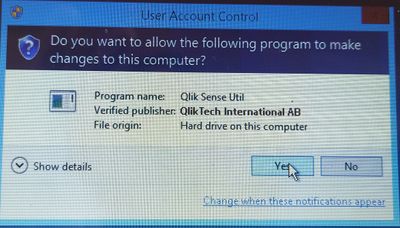

thanks
[ will -f help in this case for silent backup? if yes then how and where to put ?]
Also after that i want to delete old backup with email notification.
Echo Forfiles to delete files older than 5 days
forfiles -p "E:\Backup\ALC_full_backup" -s -m *.*  /D -4 /C "cmd /c del /q @path"
echo Done!
timeout 30
powershell.exe -ExecutionPolicy remotesigned -File C:\Desktop\Deepak\fullbackupmail.ps1
exit
Regards'
Deepak
Accepted Solutions

 Adam_R
- Mark as New
- Bookmark
- Subscribe
- Mute
- Subscribe to RSS Feed
- Permalink
- Report Inappropriate Content
Hi Deepak,
Seem like the feature you want to disable, is the Windows User Account control:
Disable User Account Control (UAC) - Windows Server | Microsoft Docs
Adam_R
- Mark as New
- Bookmark
- Subscribe
- Mute
- Subscribe to RSS Feed
- Permalink
- Report Inappropriate Content
Hi Deepak,
Seem like the feature you want to disable, is the Windows User Account control:
Disable User Account Control (UAC) - Windows Server | Microsoft Docs
 Bhagwat09
- Mark as New
- Bookmark
- Subscribe
- Mute
- Subscribe to RSS Feed
- Permalink
- Report Inappropriate Content
Hey Thanks @Adam_R
But I Already got the solution and it is working fine since then.
 Eugene_Sleator
- Mark as New
- Bookmark
- Subscribe
- Mute
- Subscribe to RSS Feed
- Permalink
- Report Inappropriate Content
Hi @Deepak_dhikale it is not necessary to disable UAC nor advisable due to the obvious security implications.
You can run the scheduler with admin privilege's and bypass UAC. Here is a guide on how to set up a scheduled task bypassing UAC.
How to bypass uac using task scheduler
Hope this helps
