Unlock a world of possibilities! Login now and discover the exclusive benefits awaiting you.

- Qlik Community
- :
- Forums
- :
- Analytics & AI
- :
- Products & Topics
- :
- Management & Governance
- :
- Re: Qlikview Report Issue After Upgrade
- Subscribe to RSS Feed
- Mark Topic as New
- Mark Topic as Read
- Float this Topic for Current User
- Bookmark
- Subscribe
- Mute
- Printer Friendly Page

 fabio_vallone
- Mark as New
- Bookmark
- Subscribe
- Mute
- Subscribe to RSS Feed
- Permalink
- Report Inappropriate Content
Qlikview Report Issue After Upgrade
Hi guys
Recently I upgrade Qlikview from November 2018 to May 2021 IR; however, now Reports created in panels get font problems when I use Ajax client (fonts get bigger and unformatted, no matter how much I reduce then); with IEPlugin they are normal. What can I do in Ajax client to solve it? Thanks for any help.

.png "Former Employee") Lucas_Gatling
Lucas_Gatling
- Mark as New
- Bookmark
- Subscribe
- Mute
- Subscribe to RSS Feed
- Permalink
- Report Inappropriate Content
Fabio,
Please see the following KB article: https://community.qlik.com/t5/Knowledge/Clarification-regarding-new-Skia-rendering-engine-and-IE-Plu...
Also, see this thread with a potential workaround as well if the KB article does not help: https://community.qlik.com/t5/QlikView-Integrations/QlikView-Font-Size-issue-after-upgrade-to-12-5/m...
fabio_vallone
- Mark as New
- Bookmark
- Subscribe
- Mute
- Subscribe to RSS Feed
- Permalink
- Report Inappropriate Content
Thanks, Lucas, but I think I don't expressed my issue properly.
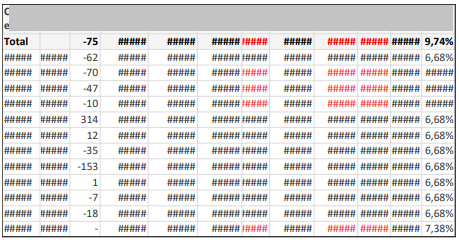
My issue occurs in Qlikview Report Creator. The same table that appears normally in Ajax Client, in the Report it looks like below image. (If I use IEPlugin, the report appears normally, my problem is only in Ajax client).
I have already try to change dimensions, font reduction, but nothing work...