Unlock a world of possibilities! Login now and discover the exclusive benefits awaiting you.

- Qlik Community
- :
- Forums
- :
- Analytics & AI
- :
- Products & Topics
- :
- Management & Governance
- :
- Sense Archived Logs location
- Subscribe to RSS Feed
- Mark Topic as New
- Mark Topic as Read
- Float this Topic for Current User
- Bookmark
- Subscribe
- Mute
- Printer Friendly Page

- Mark as New
- Bookmark
- Subscribe
- Mute
- Subscribe to RSS Feed
- Permalink
- Report Inappropriate Content
Sense Archived Logs location
is it possible to change the location of the archived logs, currently they store in
c:\ProgramData\Qlik\Sense\Repository\Archived Logs
just a bit concerned about them filling up my servers C drive and don't want to delete them too regularly.

 jananireddy
- Mark as New
- Bookmark
- Subscribe
- Mute
- Subscribe to RSS Feed
- Permalink
- Report Inappropriate Content
Hi John, Although its a very late response.. hope it helps.
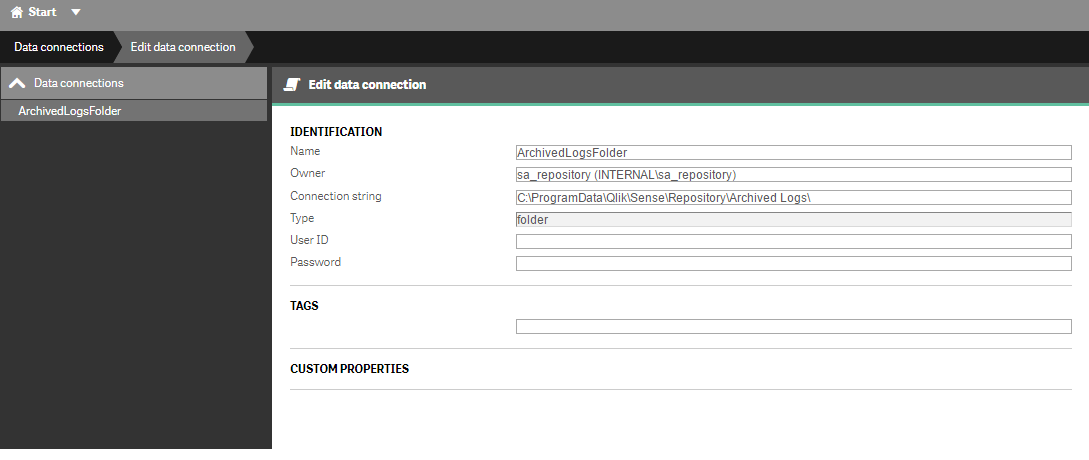
Archive Logs location can be identified from QMC >> Data Connections >> (check the Path for connection ArchivedLogsFolder)
Normally it path is set as c:\ProgramData\Qlik\Sense\Repository\Archived Logs\ which can modified
Regards,
Janani
 vlad_komarov
- Mark as New
- Bookmark
- Subscribe
- Mute
- Subscribe to RSS Feed
- Permalink
- Report Inappropriate Content
John,
Yes, as jananireddy has mentioned, you can change the default Logs folder(s) location... But it might create a problem with upgrades (I did not check it lately, but Qlik used to overwrite the custom settings and configure your system to the default parameters....)
I am using a "link" method instead: I am "linking" default folders on C: drive to their actual locations on other (larger) partitions:
How to “link” folders:
- Have services offline
- Start > cmd (run as admin)
- cd /d E:\
- mkdir "Archived Logs"
- cd /d C:\ProgramData\Qlik\Sense\Repository
- rename "Archived Logs-old" "Archived Logs-2"
- mklink /J "C:\ProgramData\Qlik\Sense\Repository\Archived Logs" "E:\Archived Logs"
- (copy the files in Archived Logs-2 to the E (or D or whatever) drive, either by command line or cut/paste so that E:\Archived Logs\ has single folder in it (e.g. qlikserver.domain.local in my environment) then a bunch of subfolders for each service
- Bring services back online
Samples:
mklink /J "C:\ProgramData\Qlik\Sense\Repository\Archived Logs" "d:\QlikLinks\Archived Logs"
mklink /J "C:\ProgramData\Qlik\Sense\Log" "d:\QlikLinks\Log"
mklink /J "C:\ProgramData\Qlik\Sense\Apps" "d:\QlikLinks\Apps"
And I am doing it for Logs, Archived Logs, and Apps folders.....
Hope it helps!
Regards,
Vlad
P.S. When applicable, please mark this answer Correct or Helpful.