Unlock a world of possibilities! Login now and discover the exclusive benefits awaiting you.

- Qlik Community
- :
- Forums
- :
- Analytics & AI
- :
- Products & Topics
- :
- Management & Governance
- :
- Sense installed in a Windows temp folder
- Subscribe to RSS Feed
- Mark Topic as New
- Mark Topic as Read
- Float this Topic for Current User
- Bookmark
- Subscribe
- Mute
- Printer Friendly Page

 fosuzuki
- Mark as New
- Bookmark
- Subscribe
- Mute
- Subscribe to RSS Feed
- Permalink
- Report Inappropriate Content
Sense installed in a Windows temp folder
Qlik Sense was installed by default in "C:\Users\[myusername]\AppData\Local\Temp\QlikSenseBrowser1.0.50500.0409.10". I suppose that "C:\Users\[myusername]\AppData\Local\Temp" is a Windows temporary folder, so this seems odd to me. Can someone explain why?
Accepted Solutions

 Michael_Tarallo
- Mark as New
- Bookmark
- Subscribe
- Mute
- Subscribe to RSS Feed
- Permalink
- Report Inappropriate Content
Hi Fernando - this folder structure is used by Qlik Sense Desktop. It is were the executable processes and cache are stored and are used / recreated each time you start Qlik Sense Desktop. If you deleted them, starting - C:\Users\<userprof>\AppData\Local\Programs\Qlik\Sense\QlikSense.exe (Sense Desktop) will just re-create them when Desktop is started again. It is part of the normal operation of the product.
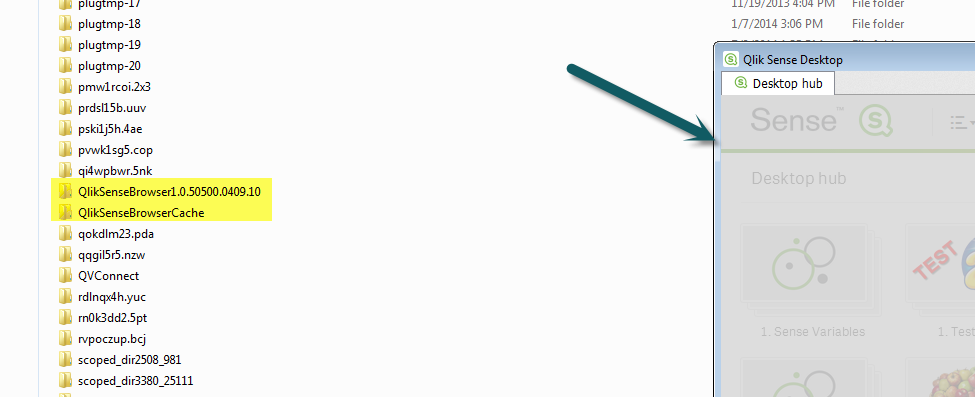
I just deleted mine for example, then started Sense Desktop again - and watched the folders be created.
If you would like more specifics, please let us know and we can dig further with our R&D team.
Please mark the appropriate replies as helpful / correct so our team and other members know that your question(s) has been answered to your satisfaction.
Regards,
Mike
Mike Tarallo
Qlik
.png "pbr") pbr
pbr
- Mark as New
- Bookmark
- Subscribe
- Mute
- Subscribe to RSS Feed
- Permalink
- Report Inappropriate Content
Fernando,
Is there anything located here? C:\Users\<username>\Documents\Qlik\Sense and is the .exe located -C:\Users\<username>\AppData\Local\Programs\Qlik\Sense?
Please mark the appropriate replies as helpful / correct so our team and other members know that your question(s) has been answered to your satisfaction.
Pierce
Michael_Tarallo
- Mark as New
- Bookmark
- Subscribe
- Mute
- Subscribe to RSS Feed
- Permalink
- Report Inappropriate Content
Hi Fernando - this folder structure is used by Qlik Sense Desktop. It is were the executable processes and cache are stored and are used / recreated each time you start Qlik Sense Desktop. If you deleted them, starting - C:\Users\<userprof>\AppData\Local\Programs\Qlik\Sense\QlikSense.exe (Sense Desktop) will just re-create them when Desktop is started again. It is part of the normal operation of the product.
I just deleted mine for example, then started Sense Desktop again - and watched the folders be created.
If you would like more specifics, please let us know and we can dig further with our R&D team.
Please mark the appropriate replies as helpful / correct so our team and other members know that your question(s) has been answered to your satisfaction.
Regards,
Mike
Mike Tarallo
Qlik
fosuzuki
- Mark as New
- Bookmark
- Subscribe
- Mute
- Subscribe to RSS Feed
- Permalink
- Report Inappropriate Content
Hi Mike,
That explains it. I didn't realise the "C:\Users\<userprof>\AppData\Local\Programs\Qlik\Sense\QlikSense.exe" folder.
Thanks
