Fetching a very large dataset (> 10 GB) using GoogleBig Query from Qlik OdbcConnectorPackage 6.149 returns:
[Qlik][BigQuery] (100) Error interacting with REST API: Response too large to return. Consider specifying a destination table in your job configuration. For more details, see https://cloud.google.com/bigquery/troubleshooting-errors
Environment
QlikOdbcConnector 6.149 (Released Sept 9, 2021)
QlikView 12.20 and above
Resolution:
The following configuration is required in the connection for large data sets:
"Allow Large Result Sets" enabled
"Dataset Name For Large Results Sets", indicate the name of the temporary table.
"Language Dialect" set to "Legacy SQL"
If the driver doesn't show the options, those can be configured in the "Advance Parameters" section
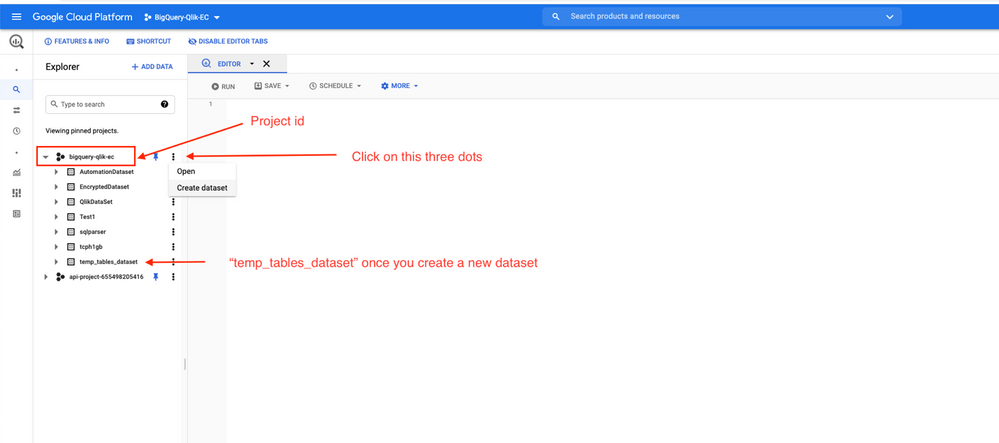
In 6.149 version, when working with a very large dataset, a temporary destination table is needed within GBQ to stage the data before it is made available to an external application. The 6.149, GoogleBig Query connector exposes the parameters to use for a temporary table. The user will have to manually create a dataset in advance in GBQ when using these parameters (i.e. when it is expected to load large amounts of data).
Steps: (the following are suggested steps. Recommend to consult with internal GBQ admin)
Log in to Google Cloud Platform
Select the Project ID holding the data to be queried by the connector (logged in use must have write permission)
Open the 3-dot menu, select "Create dataset"
Insert desired name in the Dataset ID field and create Google Cloud Platform
Provide the exact same dataset name in the field "Dataset Name for Large Result sets in the GoogleBig Query Connector Dialog within QlikView (the dataset name is case sensitive)
Notes:
Temporary tables for large results will get created during data reloads, within the dataset used in the connection definition, with a unique name based on the date and time it is created
One dataset can hold many tables. The same dataset can be used in multiple connection definitions, therefore the creation of a dataset can be limited to one per Project.
The information in this article is provided as-is and to be used at own discretion. Depending on tool(s) used, customization(s), and/or other factors ongoing support on the solution below may not be provided by Qlik Support.


.png "Former Employee")