If you already have a connection you can use that and skip the steps to create a new one
Click Add a connection to a server
Use the following details in New Server Registration
Name: NPrinting
Server: localhost
Port: 4992
Maintenance DB: postgres (select from pull down)
Username: postgres
Password: The password that you entered during installation or see first step
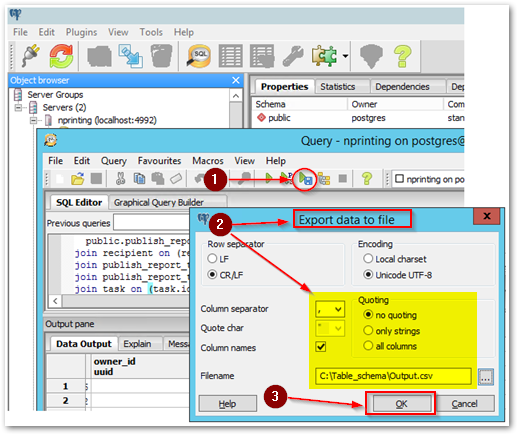
Open the Query tool (Ctrl+E) or click the icon
Paste the following SQL statement in the SQL Editor
SELECT
  *
FROM
public.publish_report_task_recipient
join recipient on (recipient_id=recipient.id)
join publish_report_task on (publish_report_task_id=publish_report_task.app_task_id)
join publish_report_task_report on (app_task_id=publish_report_task_report.publish_report_task_id)
join task on (task.id=app_task_id)
Execute to file (F8 or click the button)
Change settings in Export data to file as required
Click OK
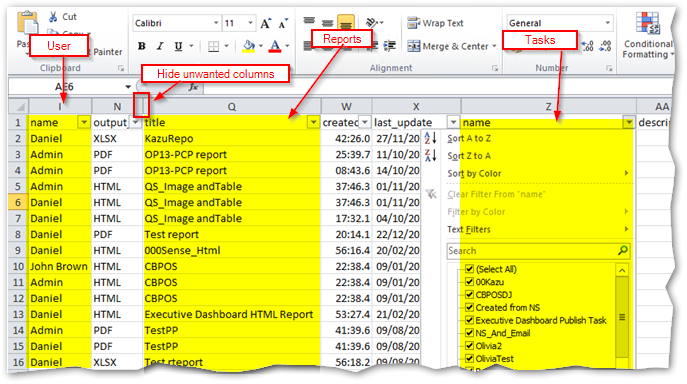
Open the Output CSV file in Excel
Hide unwanted columns as required
Enable Filter [on the Editing section of the ribbon: Sort & Filter > Filter]