Unlock a world of possibilities! Login now and discover the exclusive benefits awaiting you.

- Qlik Community
- :
- Support
- :
- Support
- :
- Knowledge
- :
- Support Articles
- :
- Qlik Replicate: One or more Endpoint Servers canno...
- Subscribe to RSS Feed
- Mark as New
- Mark as Read
- Bookmark
- Subscribe
- Printer Friendly Page
- Report Inappropriate Content
Qlik Replicate: One or more Endpoint Servers cannot be reached after licensing new endpoint

 Steve_Nguyen
- Mark as New
- Bookmark
- Subscribe
- Mute
- Subscribe to RSS Feed
- Permalink
- Report Inappropriate Content
Qlik Replicate: One or more Endpoint Servers cannot be reached after licensing new endpoint
Mar 7, 2023 7:57:24 AM
Mar 7, 2023 5:14:22 AM
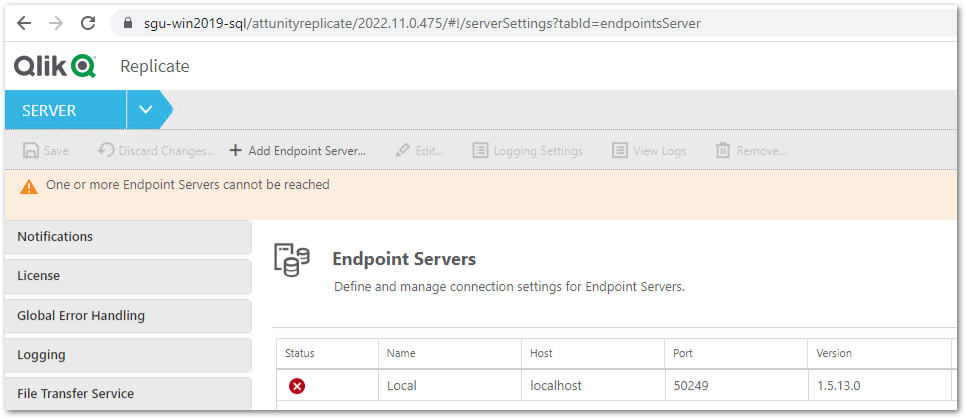
After licensing a new Qlik Replicate Endpoint that requires an Endpoint Server (such as Salesforce, MongoDB, BigQuery) one or more Endpoint Servers cannot be reached.
The message One or more Endpoint Servers cannot be reached is displayed and the individual servers are listed as disconnected in the status column.
Resolution
- Stop:
- All running tasks
- The Qlik Replicate Server or Attunity Replicate Server service
- The Qlik Replicate UI Server services
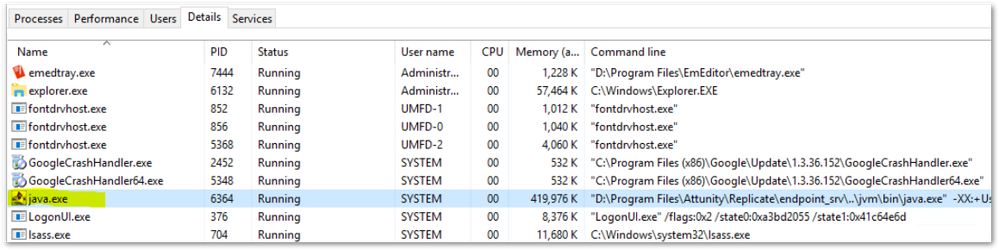
- Verify that the endpoint server java.exe is not running:
- Open your Windows Task Manager
- Switch to Details
- Search for java.exe
- If you can locate the java.exe running, right-click and terminate it
- Open a cmd.exe window as Administrator
- Change to the Qlik Replicate bin directory. Default: C:\Program Files\Attunity\Replicate\bin
- In the cmd.exe window, run:
Note: "D:\attunity\replicate\data" is an example of the data folder location.~\bin>repctl -d "D:\attuntity\replicate\data" exportrepository - This will create the following file:
$QLIK_REPLICATE_INSTALL_ROOT\data\imports\Replication_Definition.json - Open the Replication_Definition.json in a text editor and look for the section for the Local Endpoint Server.
Example of the section:"endpoint_servers": [{ "name": "Local", "host": "localhost", "port": 3560, "password": "{ZASomeRandomLettersAndNumbersHereXXXXXXXXXXXXXXXXXXX}", ... }] -
Edit the password for that section, by changing it to say:
"endpoint_servers": [{ "name": "Local", "host": "localhost", "port": 3560, "password": "password", ... }] - In the cmd.exe window, run:
repctl -d "D:\attunity\replicate\data" importrepository json_file=Replication_Definition.json - In Windows file explorer, rename the folder:
$QLIK_REPLICATE_INSTALL_ROOT\data\endpoint_srv\data to data_old - Start the Qlik Replicate Server or Attunity Replicate Server and Qlik Replicate UI Server services.
-
Log back into the Qlik Replicate console and verify that your local endpoint server reports as running in the status column.
Environment
Qlik Replicate 7.0 and later


 kartik_patel
- Mark as Read
- Mark as New
- Bookmark
- Permalink
- Report Inappropriate Content
Hi @Steve_Nguyen , @Sonja_Bauernfeind ,
This solution is working on only one Node, when Qlik Replicate is hosted on the HA cluster then only one node is working and when we apply this solution then it will working on another node but stop working on previous node. For e.g. Node 1 where mongo db endpoint is working and node 2 is not working, and we have applied this solution on node 2 then it will start working but node 1 is stopped working. Also, when we have tried again same step on node 1 then it will start working on node 1 but stopped working on node 2. Are there any solutions where we can configure to run on both nodes.
We are running Qlik Replicate 2023.11.0.282 version.
 Dana_Baldwin
- Mark as Read
- Mark as New
- Bookmark
- Permalink
- Report Inappropriate Content
In the high availability cluster configuration, only one node can be active and running Qlik Replicate at a time. The data folder is shared between the nodes.
Thanks,
Dana
kartik_patel
- Mark as Read
- Mark as New
- Bookmark
- Permalink
- Report Inappropriate Content
Hi @Dana_Baldwin ,
Thanks for your response. I agree in HA only one node will be active at a time but when we do switch over from active node to passive node (as active) that time we need to do all this steps mentioned above because It will not pickup the MongoDB Endpoint automatically when we are doing the switch over.
Are there any ways to automatically enable the MongoDB Endpoint when we do switch over without performed above steps.
Thanks,
Kartik Patel
Dana_Baldwin
- Mark as Read
- Mark as New
- Bookmark
- Permalink
- Report Inappropriate Content
You should not need to perform this on each node as the repository is stored in the data directory which should be shared by the two cluster nodes. It sounds like the cluster is not set up properly, like each node has its own data directory - this will not work.
Please verify per our documentation here, and if you are still having trouble please open a support case:
Thanks,
Dana

