Unlock a world of possibilities! Login now and discover the exclusive benefits awaiting you.


 Yianni_Ververis
- Subscribe to RSS Feed
- Mark as New
- Mark as Read
- Bookmark
- Subscribe
- Printer Friendly Page
- Report Inappropriate Content
For all of my large projects I use angular to handle the pages, content, variables, navigation etc. I have setup a template that everyone can access and download from git and branch.qlik.com. In this tutorial, I will show you how to install and use it.
- Go to Git or Branch and download the project on your server or if you do not have one, in your desktop Qlik\Sense\Extensions.
- Assuming that you are running git and you are familiar with the console, type bower install to get all of the necessary libraries.
- Config files below to point to your paths
Index.html
<link rel="stylesheet" href="http://localhost:4848/resources/autogenerated/qlikui.css">
<link rel="stylesheet" href="http://localhost:4848/resources/assets/client/client.css" media="all">
<script src="http://localhost:4848/resources/assets/external/requirejs/require.js" data-main="js/lib/main.js"></script>
js/lib/main.js
path to local script and libraries, L1
var scriptsUrl = 'http://localhost:4848/extensions/angularTemplate/';
path to Sense scripts like "js/qlik", L4
baseUrl: "http://localhost:4848/resources",
Now lets go over the anatomy of the template.Index.html is our container. It has the navigation and 2 controllers, header and main.The header is for the any persistent toolbar you may want to use, plus it holds the global bindings like navigation and clearAll() for our sense object selections. The next one is the current page and holds all the objects specific to this page.
For this tutorial I used the helpdesk that is bundled with any Sense installation. In this template, I have two ways of displaying Sense objects. One is by getting the object as is from the app and the other one is by calling a HyperQube and displaying the desired results. For the first, we need to put the object ids into an array that can be accessed from our html template.
In js/controllers/dashboard.js we define our variable with the objects as (L23)
$scope.objects = ['a5e0f12c-38f5-4da9-8f3f-0e4566b28398'];
and in view/dashboard.html we display it with a height of 300px as :
<get-object object="objects[0]" height="300"></get-object>The other way is a little more complicated since it requires a service, api.getHyperCube. In this, we can pass an array of dimensions, measures, or both and a limit, if we want to limit our results.
js/controllers/dashboard.html
me.measures = [
["Count( {$<Priority={'High'}, Status -={'Closed'} >} Distinct %CaseId )", false],
["Count( {$<Priority={'Medium'}, Status -={'Closed'} >} Distinct %CaseId )", false],
["Count( {$<Priority={'Low'}, Status -={'Closed'} >} Distinct %CaseId )", false],
];
$scope.kapi = [];
   angular.forEach(me.measures, function(value, key) {
   api.getHyperCube([], [value[0]], function(data){
      $scope.kapi[key] = (value[1])?utility.string2thousands(data[0][0].qText):data[0][0].qText;
   });
});
and in the view/dashboard.html
<h2>{{ kapi[2] }}</h2>I am also using a utility to display numbers as per Sense KPI format.
Now, say that you want to add another page named "performance" as the Sense sheet, you will need to define it in js/lib/main.js.
- Copy and rename js/controllers/dashboard.js to performance.js
- Copy and rename views/dashboard.html to performance.html
- Add in L5 paths your new controller path, "controller.performance': scriptsUrl + 'js/controllers/performance'".
- In L35 add your new route (state)
 .state('dashboard', {
    url: "/dashboard",
      views: {
        'header': {
           templateUrl: "views/header.html",
           controller: 'controller.header'
        },
        'main': {
           templateUrl: "views/performance.html",
           controller: 'controller.performance'
        },
    }
})
- In L49 'Require' add the controller again
'controller.dashboard',- And make sure your controller is defined properly, L10 of js/controllers/performance.js
app.obj.angularApp
  .controller('controller.performance', function ($scope, $rootScope, $location, $injector, api, utility) {
  var me = {};
  me.init = function () {
  $rootScope.page = 2;
  $rootScope.title = 'Performance';
- Also, we do not need the measures for this one so delete L17 and $scope.kapi
- For this tutorial we will only add the Resurce Details table. So change the object id to 'uETyGUP' and remove from views/performance.html all the kpis
- Last, add the in the index.html the navigation in L39
<li ng-class="(page==2) ? 'active' : ''"><a ng-click="goTo('performance')">Performance</a></li>Your final webpage should look like this:
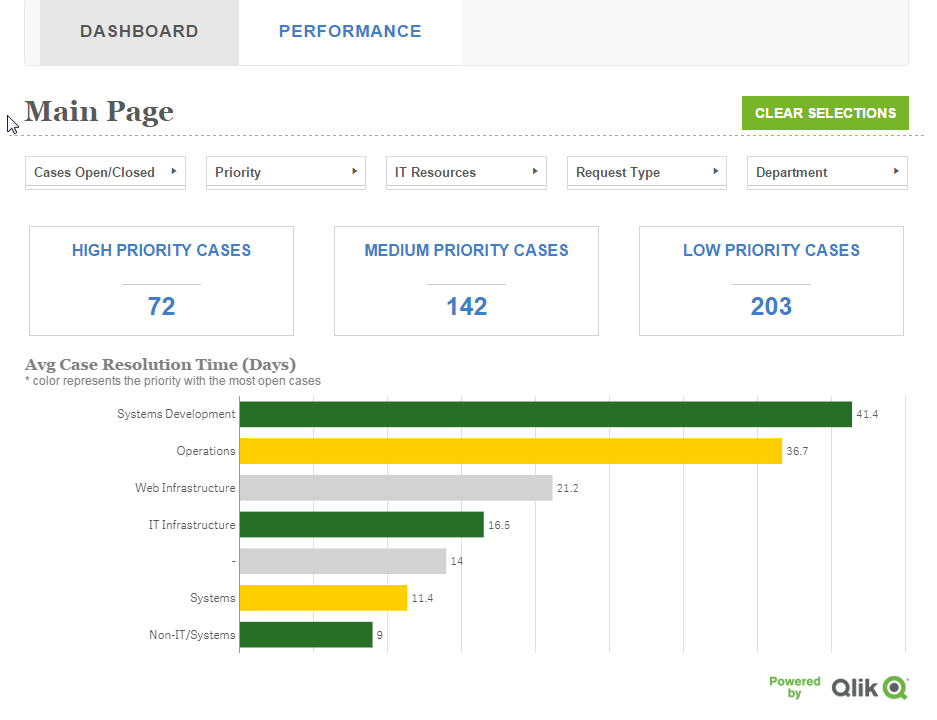
For any further explanation and feature requests please let me know.
Coming up: setting a similar template for the Engine API and qSocks.
Git: https://github.com/yianni-ververis/capabilities-api-angular-template
Qlik Branch: http://branch.qlik.com/#/project/56b4a40140a985c431a64b08
Yianni
You must be a registered user to add a comment. If you've already registered, sign in. Otherwise, register and sign in.