Unlock a world of possibilities! Login now and discover the exclusive benefits awaiting you.

- Qlik Community
- :
- Discover
- :
- Programs
- :
- Learning
- :
- Qlik Learning Discussions
- :
- Re: Range Average Qlikview
- Subscribe to RSS Feed
- Mark Topic as New
- Mark Topic as Read
- Float this Topic for Current User
- Bookmark
- Subscribe
- Mute
- Printer Friendly Page

- Mark as New
- Bookmark
- Subscribe
- Mute
- Subscribe to RSS Feed
- Permalink
- Report Inappropriate Content
Range Average Qlikview
I am trying to calculate a moving average for customers. I want my table to show me the average of each customer based on his previous months data available. When I make a selection of a particular customer the table works fine. But problem arises when there is no selection on Contract. The table does not aggregate the moving average w.r.t to Customers. The query that i am currently using, which works fine for each Contract when selected, is:
Rangeavg(Above(TOTAL Sum(UnitBilled), 1, Rowno(TOTAL)))
However when there is no selection made the table shows the following details:
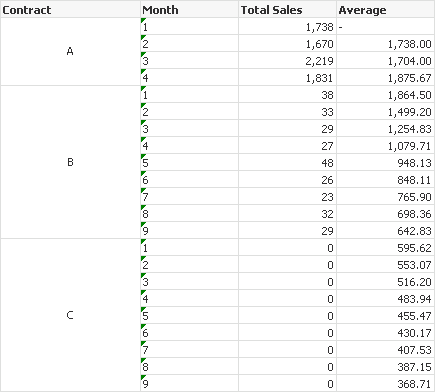
For each contract i want the table to show his own moving average. Like it is doing so for A in the above table.
Thanks!
Accepted Solutions

 Gysbert_Wassena
- Mark as New
- Bookmark
- Subscribe
- Mute
- Subscribe to RSS Feed
- Permalink
- Report Inappropriate Content
Try removing the totals from the expression so the rangeavg does not cross the borders of the contact dimension:
Rangeavg(Above(Sum(UnitBilled), 1, Rowno()))
talk is cheap, supply exceeds demand
Gysbert_Wassena- Mark as New
- Bookmark
- Subscribe
- Mute
- Subscribe to RSS Feed
- Permalink
- Report Inappropriate Content
Try removing the totals from the expression so the rangeavg does not cross the borders of the contact dimension:
Rangeavg(Above(Sum(UnitBilled), 1, Rowno()))
talk is cheap, supply exceeds demand
- Mark as New
- Bookmark
- Subscribe
- Mute
- Subscribe to RSS Feed
- Permalink
- Report Inappropriate Content
thank you Gysbert, it worked!