Unlock a world of possibilities! Login now and discover the exclusive benefits awaiting you.

- Qlik Community
- :
- Discover
- :
- Programs
- :
- Learning
- :
- Qlik Learning Discussions
- :
- Re: compare month prodution with average prodution
- Subscribe to RSS Feed
- Mark Topic as New
- Mark Topic as Read
- Float this Topic for Current User
- Bookmark
- Subscribe
- Mute
- Printer Friendly Page

- Mark as New
- Bookmark
- Subscribe
- Mute
- Subscribe to RSS Feed
- Permalink
- Report Inappropriate Content
compare month prodution with average prodution
hi, this is my firt post and this is my first project
i have this table
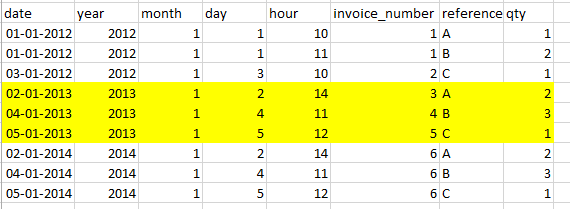
this one i can create

but i can't create this one

the total is calculated by adding the total of each january (4+6+6)
and the avarege is the avarege of (4,6,6) i.e in this case (4+6+6)/3
can anyone help me.
thaks

 marcus_sommer
- Mark as New
- Bookmark
- Subscribe
- Mute
- Subscribe to RSS Feed
- Permalink
- Report Inappropriate Content
Try this: avg(aggr(sum(qty), year))
- Marcus

 ecolomer
- Mark as New
- Bookmark
- Subscribe
- Mute
- Subscribe to RSS Feed
- Permalink
- Report Inappropriate Content
Your formula for calculate average are wrong
you can use:
Sum(total) / count(distinct year)
or
Sum(qty) / count(distinct year)
or
avg(aggr(sum(qty), year)
 MK_QSL
- Mark as New
- Bookmark
- Subscribe
- Mute
- Subscribe to RSS Feed
- Permalink
- Report Inappropriate Content
Check enclosed file....
- Mark as New
- Bookmark
- Subscribe
- Mute
- Subscribe to RSS Feed
- Permalink
- Report Inappropriate Content
i only have to add the month
avg(aggr(sum(qty), year, month))
the average its ok, but it returns the average of my selection, i want the average of all the data.
thanks
- Mark as New
- Bookmark
- Subscribe
- Mute
- Subscribe to RSS Feed
- Permalink
- Report Inappropriate Content
i think its this
avg({1}aggr({1}sum({1}qty)), year, month))
thaks to all
MK_QSL
- Mark as New
- Bookmark
- Subscribe
- Mute
- Subscribe to RSS Feed
- Permalink
- Report Inappropriate Content
it should be
SUM({1}qty)
and
Avg({1}Aggr(SUM({1}qty),Year))