Unlock a world of possibilities! Login now and discover the exclusive benefits awaiting you.

- Qlik Community
- :
- Discover
- :
- Programs
- :
- Learning
- :
- Qlik Learning Discussions
- :
- list box
- Subscribe to RSS Feed
- Mark Topic as New
- Mark Topic as Read
- Float this Topic for Current User
- Bookmark
- Subscribe
- Mute
- Printer Friendly Page

 mario-sarkis
- Mark as New
- Bookmark
- Subscribe
- Mute
- Subscribe to RSS Feed
- Permalink
- Report Inappropriate Content
list box
Dear All,
i have this List box below each field has a flag
Example card and car under the a flag called retail , house factory and cinema under the flag called Commercial.
i need to put this lix in a dashboard but i dont want allow the user to select the field that follow the commercial flag
CATEGORY
| car |
| card |
| house |
| factory |
| cinema |
Example:(user cannot select house factory and cinema since they are under the commercial flag.
CATEGORY
| car |
| card |
| house |
| factory |
| cinema |

 Gysbert_Wassena
- Mark as New
- Bookmark
- Subscribe
- Mute
- Subscribe to RSS Feed
- Permalink
- Report Inappropriate Content
Perhaps you can use section access. See this blog post for more information: A Primer on Section Access. And this document: Introduction to Section Access
talk is cheap, supply exceeds demand
 francoiscave
- Mark as New
- Bookmark
- Subscribe
- Mute
- Subscribe to RSS Feed
- Permalink
- Report Inappropriate Content
Hi Mario,
I think about a solution:
If you need to see the excluded value : In your List Box Category, use the "Read Only" option like below.
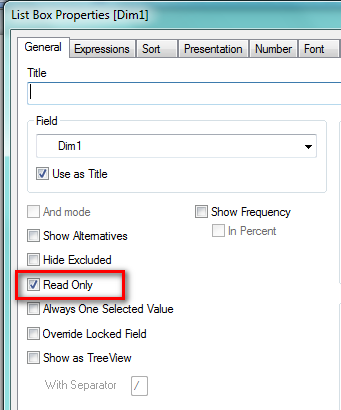
And use the Tab Triggers to set the right flag.
Section access would be useful if you want a data reduction.
It's what do you expect ?
François

- Mark as New
- Bookmark
- Subscribe
- Mute
- Subscribe to RSS Feed
- Permalink
- Report Inappropriate Content
Hi,
see the attachement and let me know if it's ok for you.
KR
Elena