Unlock a world of possibilities! Login now and discover the exclusive benefits awaiting you.

- Qlik Community
- :
- All Forums
- :
- Qlik NPrinting
- :
- Re: A PDF Report
- Subscribe to RSS Feed
- Mark Topic as New
- Mark Topic as Read
- Float this Topic for Current User
- Bookmark
- Subscribe
- Mute
- Printer Friendly Page

- Mark as New
- Bookmark
- Subscribe
- Mute
- Subscribe to RSS Feed
- Permalink
- Report Inappropriate Content
A PDF Report
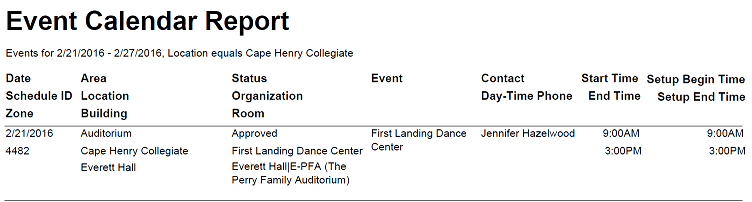
I have created one PDF report in NPrinting but I was wondering if a report can be created like the attached report. Can someone give me some thoughts.
David

 avinashelite
- Mark as New
- Bookmark
- Subscribe
- Mute
- Subscribe to RSS Feed
- Permalink
- Report Inappropriate Content
yes, you can . Create the chart in Qlikview and provide the Multi line header option for the caption and remove the border of the straight (go to chart properties >layout > boarders) in Nprinting import this chart and check the keep source formatting...
Hope this helps you 
- Mark as New
- Bookmark
- Subscribe
- Mute
- Subscribe to RSS Feed
- Permalink
- Report Inappropriate Content
Are you saying create a straight chart or a pivot chart. I am not sure I follow what you are saying.

 luciancotea
- Mark as New
- Bookmark
- Subscribe
- Mute
- Subscribe to RSS Feed
- Permalink
- Report Inappropriate Content
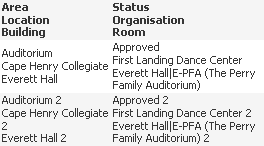
OK, this is what I come up with:
Your script:
Source:
LOAD * INLINE [
Area, Location, Building, Status, Organisation, Room
Auditorium, Cape Henry Collegiate, Everett Hall, Approved, First Landing Dance Center, Everett Hall|E-PFA (The Perry Family Auditorium)
Auditorium 2, Cape Henry Collegiate 2, Everett Hall 2, Approved 2, First Landing Dance Center 2, Everett Hall|E-PFA (The Perry Family Auditorium) 2
];
Table2:
LOAD Area & chr(13) & Location & chr(13) & Building as F1,
Status & chr(13) & Organisation & chr(13) & Room as F2
RESIDENT Source;
Then add a table and change the Properties -> Presentation -> Multiline Settings
- Mark as New
- Bookmark
- Subscribe
- Mute
- Subscribe to RSS Feed
- Permalink
- Report Inappropriate Content
Can you provide me with a qvw file because everything I am trying is not working.
- Mark as New
- Bookmark
- Subscribe
- Mute
- Subscribe to RSS Feed
- Permalink
- Report Inappropriate Content
I could not get this to work no matter how I tried.
 Daniel_Jenkins
- Mark as New
- Bookmark
- Subscribe
- Mute
- Subscribe to RSS Feed
- Permalink
- Report Inappropriate Content
Hi David,
Why don't you post a sample QVW? Someone can take a look and try to build a QlikView NPrinting project around it.
Best,
Daniel.
luciancotea
- Mark as New
- Bookmark
- Subscribe
- Mute
- Subscribe to RSS Feed
- Permalink
- Report Inappropriate Content
See attachment
- Mark as New
- Bookmark
- Subscribe
- Mute
- Subscribe to RSS Feed
- Permalink
- Report Inappropriate Content
Hi Lucian,
Thank you so much for your help I was able to get the columns setup correct. Now I have another issue that happens from time to time. I am attaching a copy of the output I am trying to produce. If you scroll down the page a little you will see some of my schedules have setup requirements. Like schedule 4816. I would attach the qvw file but we are creating these reports from a various list of qv files that we had to do things to just to get it to work. Any suggestions.
Thanks,
David
Daniel_Jenkins
- Mark as New
- Bookmark
- Subscribe
- Mute
- Subscribe to RSS Feed
- Permalink
- Report Inappropriate Content
Hi David,
You should be able to do this fairly easily in QlikView NPrinting using PixelPerfect. No need to prep the table in QlikView either. I have attached a project that creates a report like: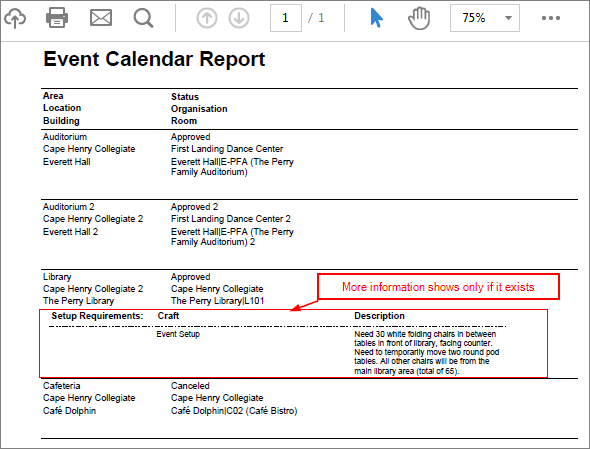
Extract the attached file to folder C:\Temp\Community\050 or change paths in the NSQ appropriately.
HTH - Daniel.