Unlock a world of possibilities! Login now and discover the exclusive benefits awaiting you.

- Qlik Community
- :
- All Forums
- :
- Qlik NPrinting
- :
- Re: Dynamic Subject
- Subscribe to RSS Feed
- Mark Topic as New
- Mark Topic as Read
- Float this Topic for Current User
- Bookmark
- Subscribe
- Mute
- Printer Friendly Page

 ali_hijazi
- Mark as New
- Bookmark
- Subscribe
- Mute
- Subscribe to RSS Feed
- Permalink
- Report Inappropriate Content
Dynamic Subject
Hello
I have a qlik sense file whose name has spaces
and I have an Nprinting report to distribute to users
I want to make a dynamic subject for the email message (I want to put the month and year of today)
kindly advise on how to accomplish this
Accepted Solutions

 Ruggero_Piccoli
- Mark as New
- Bookmark
- Subscribe
- Mute
- Subscribe to RSS Feed
- Permalink
- Report Inappropriate Content
Hi,
Adding dynamic content in email (subject included) is documented in https://help.qlik.com/en-US/nprinting/May2021/Content/NPrinting/DistributionSchedulesAutomation/Dist...
You can create a Qlik variable with the content you need, refresh the connection cache, insert the new variable in the email body then cut and past it into the subject line.
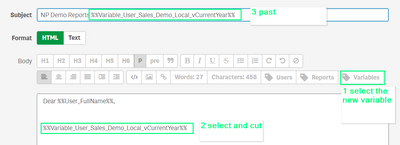
The button to add Variables is available only for email body but they are replaced also in the subject.
Best Regards,
Ruggero
Best Regards,
Ruggero
---------------------------------------------
When applicable please mark the appropriate replies as CORRECT. This will help community members and Qlik Employees know which discussions have already been addressed and have a possible known solution. Please mark threads with a LIKE if the provided solution is helpful to the problem, but does not necessarily solve the indicated problem. You can mark multiple threads with LIKEs if you feel additional info is useful to others.
Ruggero_Piccoli
- Mark as New
- Bookmark
- Subscribe
- Mute
- Subscribe to RSS Feed
- Permalink
- Report Inappropriate Content
Hi,
Adding dynamic content in email (subject included) is documented in https://help.qlik.com/en-US/nprinting/May2021/Content/NPrinting/DistributionSchedulesAutomation/Dist...
You can create a Qlik variable with the content you need, refresh the connection cache, insert the new variable in the email body then cut and past it into the subject line.
The button to add Variables is available only for email body but they are replaced also in the subject.
Best Regards,
Ruggero
Best Regards,
Ruggero
---------------------------------------------
When applicable please mark the appropriate replies as CORRECT. This will help community members and Qlik Employees know which discussions have already been addressed and have a possible known solution. Please mark threads with a LIKE if the provided solution is helpful to the problem, but does not necessarily solve the indicated problem. You can mark multiple threads with LIKEs if you feel additional info is useful to others.
