Unlock a world of possibilities! Login now and discover the exclusive benefits awaiting you.

Announcements
Share your agentic AI experience, learn from others, and earn a new badge: Put Agentic AI to Work
- Qlik Community
- :
- All Forums
- :
- Qlik NPrinting
- :
- Image Space.
Options
- Subscribe to RSS Feed
- Mark Topic as New
- Mark Topic as Read
- Float this Topic for Current User
- Bookmark
- Subscribe
- Mute
- Printer Friendly Page
Turn on suggestions
Auto-suggest helps you quickly narrow down your search results by suggesting possible matches as you type.
Showing results for

 infosense_devel
Creator II
2016-06-10
08:05 AM
- Mark as New
- Bookmark
- Subscribe
- Mute
- Subscribe to RSS Feed
- Permalink
- Report Inappropriate Content
Image Space.
Hello,
I have an Image Object in my Excel Template have property set with stretch on Object.
It will uses some more space apart from actual image size like,
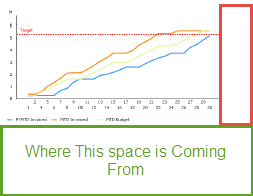
No Extra Row In Template.
1,233 Views
2 Replies

Anonymous
Not applicable
2016-06-10
04:48 PM
- Mark as New
- Bookmark
- Subscribe
- Mute
- Subscribe to RSS Feed
- Permalink
- Report Inappropriate Content
Is the property for the object in QV, set to Size to Data?
When I am exporting an image, I always format my image in my QV app the way it will display in Nprinting template and then disable Size to Data on the Layout tab. No guesses then as to how it will display
1,150 Views
infosense_devel
Creator II
2016-06-13
04:16 AM
Author
- Mark as New
- Bookmark
- Subscribe
- Mute
- Subscribe to RSS Feed
- Permalink
- Report Inappropriate Content
Hi,
I have tried as you suggested disabling the flag but still there is extra space is coming in PDF report.
For your information I have also fix the height and width for Image in Template.
1,150 Views