Unlock a world of possibilities! Login now and discover the exclusive benefits awaiting you.

- Qlik Community
- :
- All Forums
- :
- Qlik NPrinting
- :
- Re: NPrinting Installation/configuration problem
- Subscribe to RSS Feed
- Mark Topic as New
- Mark Topic as Read
- Float this Topic for Current User
- Bookmark
- Subscribe
- Mute
- Printer Friendly Page

 Åke
Åke
- Mark as New
- Bookmark
- Subscribe
- Mute
- Subscribe to RSS Feed
- Permalink
- Report Inappropriate Content
NPrinting Installation/configuration problem
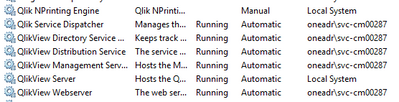
The current situation is that we are having problem running QV12 services on the server and we don’t have the knowledge on how to fix that.
QlikView server was re-installed once, but it didn’t help on the issue
So, please, can you guys help us further.


Accepted Solutions

 Frank_S
- Mark as New
- Bookmark
- Subscribe
- Mute
- Subscribe to RSS Feed
- Permalink
- Report Inappropriate Content
Please note that your current configuration is not supported. You must have a dedicated NP service account and a dedicate NP server computer separate from QlikView to operate normally.
The very issue you have may be due to having NP and QV on the same computer. Otherwise I would recommend starting a support request to help you with getting the QVS running again.
Frank_S
- Mark as New
- Bookmark
- Subscribe
- Mute
- Subscribe to RSS Feed
- Permalink
- Report Inappropriate Content
Please note that your current configuration is not supported. You must have a dedicated NP service account and a dedicate NP server computer separate from QlikView to operate normally.
The very issue you have may be due to having NP and QV on the same computer. Otherwise I would recommend starting a support request to help you with getting the QVS running again.
