Unlock a world of possibilities! Login now and discover the exclusive benefits awaiting you.

- Qlik Community
- :
- All Forums
- :
- Qlik NPrinting
- :
- Re: NPrinting Report 'levels' function - how do I ...
- Subscribe to RSS Feed
- Mark Topic as New
- Mark Topic as Read
- Float this Topic for Current User
- Bookmark
- Subscribe
- Mute
- Printer Friendly Page

 craggus
- Mark as New
- Bookmark
- Subscribe
- Mute
- Subscribe to RSS Feed
- Permalink
- Report Inappropriate Content
NPrinting Report 'levels' function - how do I filter out null values?
Morning,
I am trying to set up a basic Nprint report which shows all invoices generated per customer... in order to do this I have added a Level into the report.
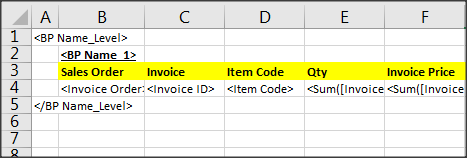
When the report runs, it includes ALL customers even those that have no sales / invoices.
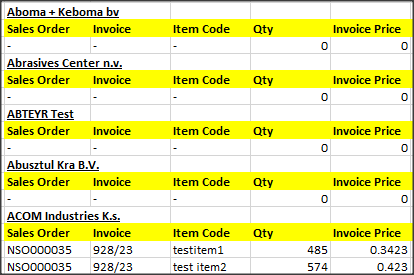
The source table in Qlik Sense is set to ignore null values, so only those customers with sales / invoices are displayed. How do I replicate this in the NPrinting report, so that customers with no sales / invoices are ignored? I cannot find any Nprinting options to enable me to do this.
Thanks
Craig
Accepted Solutions

 lironbaram
- Mark as New
- Bookmark
- Subscribe
- Mute
- Subscribe to RSS Feed
- Permalink
- Report Inappropriate Content
hi
instead of using the field in the level ,
you can use a table in the level
the table should have the customer as dimension and and expression that makes sure you only display the relevant customers
or you can create a filter on the field customer which filter only relevant customers you
advanced search capabilities
lironbaram
- Mark as New
- Bookmark
- Subscribe
- Mute
- Subscribe to RSS Feed
- Permalink
- Report Inappropriate Content
hi
instead of using the field in the level ,
you can use a table in the level
the table should have the customer as dimension and and expression that makes sure you only display the relevant customers
or you can create a filter on the field customer which filter only relevant customers you
advanced search capabilities
craggus
- Mark as New
- Bookmark
- Subscribe
- Mute
- Subscribe to RSS Feed
- Permalink
- Report Inappropriate Content
What do you mean by "advanced search capabilities" ?
lironbaram
- Mark as New
- Bookmark
- Subscribe
- Mute
- Subscribe to RSS Feed
- Permalink
- Report Inappropriate Content
hi
it means you can create advanced filters like
in customer field you can use "=sum(sales)>10000" and only get customers who's sales amount is larger then 10,000

 Lech_Miszkiewic
- Mark as New
- Bookmark
- Subscribe
- Mute
- Subscribe to RSS Feed
- Permalink
- Report Inappropriate Content
https://nprintingadventures.com/2019/06/26/nprinting-filters-part-3-advanced-search/
craggus
- Mark as New
- Bookmark
- Subscribe
- Mute
- Subscribe to RSS Feed
- Permalink
- Report Inappropriate Content
Lironbaram - your suggestion to use a table in the level (rather than the customer field) worked perfectly, thanks very much!
Craig
