Unlock a world of possibilities! Login now and discover the exclusive benefits awaiting you.

Announcements
Want to see what's currently in public preview? We've pulled it all together in one place. Check it out here
- Qlik Community
- :
- All Forums
- :
- Qlik NPrinting
- :
- Nprinting error message
Options
- Subscribe to RSS Feed
- Mark Topic as New
- Mark Topic as Read
- Float this Topic for Current User
- Bookmark
- Subscribe
- Mute
- Printer Friendly Page
Turn on suggestions
Auto-suggest helps you quickly narrow down your search results by suggesting possible matches as you type.
Showing results for

 gargi_bardhan
Creator II
2019-04-10
05:27 AM
- Mark as New
- Bookmark
- Subscribe
- Mute
- Subscribe to RSS Feed
- Permalink
- Report Inappropriate Content
Nprinting error message
Hi All,
Getting this below error message:
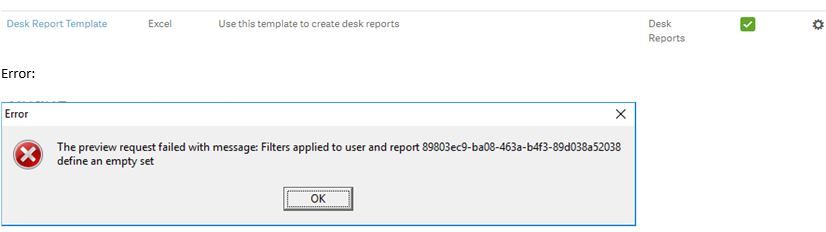
Thanks,
Gargi
1,790 Views
4 Replies

 PrashantSangle
MVP
2019-04-10
05:32 AM
- Mark as New
- Bookmark
- Subscribe
- Mute
- Subscribe to RSS Feed
- Permalink
- Report Inappropriate Content
are you using any report level filter ??
Great dreamer's dreams never fulfilled, they are always transcended.
Please appreciate our Qlik community members by giving Kudos for sharing their time for your query. If your query is answered, please mark the topic as resolved 🙂
Please appreciate our Qlik community members by giving Kudos for sharing their time for your query. If your query is answered, please mark the topic as resolved 🙂
1,786 Views
gargi_bardhan
Creator II
2019-04-10
05:34 AM
Author
- Mark as New
- Bookmark
- Subscribe
- Mute
- Subscribe to RSS Feed
- Permalink
- Report Inappropriate Content
forgot to mention above error comes while I am trying to preview my report.
1,785 Views
PrashantSangle
MVP
2019-04-10
05:55 AM
- Mark as New
- Bookmark
- Subscribe
- Mute
- Subscribe to RSS Feed
- Permalink
- Report Inappropriate Content
are you using any filter on report? or Filter on table in nprinting?
Great dreamer's dreams never fulfilled, they are always transcended.
Please appreciate our Qlik community members by giving Kudos for sharing their time for your query. If your query is answered, please mark the topic as resolved 🙂
Please appreciate our Qlik community members by giving Kudos for sharing their time for your query. If your query is answered, please mark the topic as resolved 🙂
1,781 Views

 Frank_S
Support
2019-04-15
01:41 PM
- Mark as New
- Bookmark
- Subscribe
- Mute
- Subscribe to RSS Feed
- Permalink
- Report Inappropriate Content
There is a specific solution in the community about 'NPrinting Empty Set' which describes rules regarding use of filters with NPrinting.
I have copied the link here for your convenience.
In the report template, I suspect you have a 'report' filter and possibly an 'object' filter on a report 'image' or 'table' object or some other combination with filter dimension values from the same dimension causing the empty set message.
Ex: Dimension used is 'City'
Table object filter : 'Portugal'
Report filter: 'Madrid'
This type combination will yield the 'empty set' error.
Hope this helps.
Please remember hit the 'Like' button and for helpful answers and resolutions, click on the 'Accept As Solution' button. Cheers!
1,747 Views
