Unlock a world of possibilities! Login now and discover the exclusive benefits awaiting you.

- Qlik Community
- :
- Forums
- :
- Data Integration
- :
- Products & Topics
- :
- Qlik Replicate
- :
- Re: Facing issue while connecting to oracle as a s...
- Subscribe to RSS Feed
- Mark Topic as New
- Mark Topic as Read
- Float this Topic for Current User
- Bookmark
- Subscribe
- Mute
- Printer Friendly Page

 suvbin
- Mark as New
- Bookmark
- Subscribe
- Mute
- Subscribe to RSS Feed
- Permalink
- Report Inappropriate Content
Facing issue while connecting to oracle as a source.
Hi,
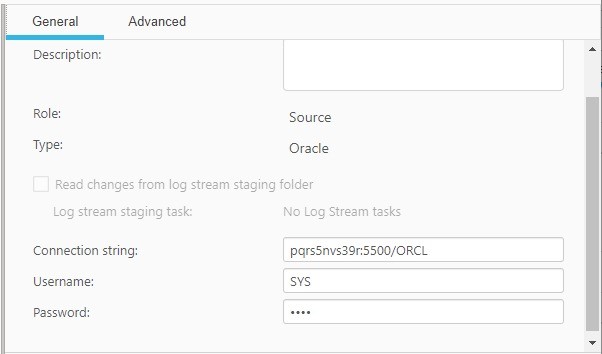
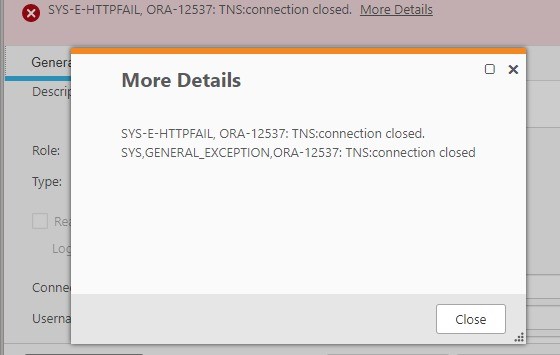
Am facing issue while connecting to the source. Below attached is the tns ora file content. And also find the screenshot of the error.
pqrs5nvs39r -- this is my computername. Replicate is running on this name
Thanks in advance.
Accepted Solutions

 john_wang
- Mark as New
- Bookmark
- Subscribe
- Mute
- Subscribe to RSS Feed
- Permalink
- Report Inappropriate Content
Hello @suvbin ,
You may check your PDBs name , and replace the instance name by PDB name in connection string, for example:
|
C:\Users\Administrator>sqlplus /nolog SQL*Plus: Release 21.0.0.0.0 - Production on Thu Mar 23 14:59:14 2023 Copyright (c) 1982, 2021, Oracle. All rights reserved. SQL> conn / as sysdba NAME SQL> |
In the above sample, there are 2 PDBs , ORCLPDB1 and ORCLPDB2, they can be used as Replicate source if they are CDC ready for Replicate, an example of connection string: OracleServer:1521/ORCLPDB1. Or check with your DBA for help.
Regards,
John.
john_wang
- Mark as New
- Bookmark
- Subscribe
- Mute
- Subscribe to RSS Feed
- Permalink
- Report Inappropriate Content
Hello @suvbin ,
Thanks for reaching out.
Looks like a regular Oracle client/server connectivity issue. The most easy way to setup the Oracle client/server is installing Instant Client, no need to config TNS, utilize SQLplus to troubleshoot the connectivity issue. There are a few similar article, see the last comment in this article. Just replace the Linux platform by Windows platform.
Hope it helps.
Regards,
John.
suvbin
- Mark as New
- Bookmark
- Subscribe
- Mute
- Subscribe to RSS Feed
- Permalink
- Report Inappropriate Content
Am getting below error when establishing source connection from oracle in Qlik replicate, am getting this error "Oracle CDB environment is not yet supported".
Am using oracle 19c (19.3.0.0.0)

Request your help here.
Thanks.
john_wang
- Mark as New
- Bookmark
- Subscribe
- Mute
- Subscribe to RSS Feed
- Permalink
- Report Inappropriate Content
Hello @suvbin ,
If the Oracle is CDB environment then please configurate Replicate to connect to a given PDB rather than CDB, and also make sure you are using Replicate Log Reader option, because connecting to a PDB using Oracle LogMiner is not supported.
Hope this helps.
Regards,
John.
suvbin
- Mark as New
- Bookmark
- Subscribe
- Mute
- Subscribe to RSS Feed
- Permalink
- Report Inappropriate Content
kindly assist how to connect to pdb rather than cdb. here are the connections.

john_wang
- Mark as New
- Bookmark
- Subscribe
- Mute
- Subscribe to RSS Feed
- Permalink
- Report Inappropriate Content
Hello @suvbin ,
You may check your PDBs name , and replace the instance name by PDB name in connection string, for example:
|
C:\Users\Administrator>sqlplus /nolog SQL*Plus: Release 21.0.0.0.0 - Production on Thu Mar 23 14:59:14 2023 Copyright (c) 1982, 2021, Oracle. All rights reserved. SQL> conn / as sysdba NAME SQL> |
In the above sample, there are 2 PDBs , ORCLPDB1 and ORCLPDB2, they can be used as Replicate source if they are CDC ready for Replicate, an example of connection string: OracleServer:1521/ORCLPDB1. Or check with your DBA for help.
Regards,
John.
suvbin
- Mark as New
- Bookmark
- Subscribe
- Mute
- Subscribe to RSS Feed
- Permalink
- Report Inappropriate Content
Am able to connect to the pluggable database. But how to create tables under that database. ? Actually i connected with the pluggable database in SQL Developer tool. Below are the cred that i have given. And also i tried creating a table there. but its not showing up in the replicate. Kindly assist.



john_wang
- Mark as New
- Bookmark
- Subscribe
- Mute
- Subscribe to RSS Feed
- Permalink
- Report Inappropriate Content
Hello @suvbin ,
Thanks for the feedback.
In general if you cannot find a table after creation, maybe it's created in another schema, or it's in CDB, or another PDB ... you may enable SERVER to Verbose to check the SQL how Replicate prepares the available tables list. Hope this helps.
Regards,
John.
