Unlock a world of possibilities! Login now and discover the exclusive benefits awaiting you.

- Qlik Community
- :
- Forums
- :
- Forums by Product
- :
- Products (A-Z)
- :
- Qlik Sense
- :
- Documents
- :
- Qlik Sense App: QVD Meta Data Viewer
- Move Document
- Delete Document
- Subscribe to RSS Feed
- Mark as New
- Mark as Read
- Bookmark
- Subscribe
- Printer Friendly Page
- Report Inappropriate Content
Qlik Sense App: QVD Meta Data Viewer

 stevedark
- Move Document
- Delete Document and Replies
- Mark as New
- Bookmark
- Subscribe
- Mute
- Subscribe to RSS Feed
- Permalink
- Report Inappropriate Content
Qlik Sense App: QVD Meta Data Viewer
There is a large amount of useful information that is stored in the header of QVD files. This gives information about the data in the file, when it was created and which app created it. This data is in an XML format and can be viewed in a text editor.
Being XML it can also be loaded in to Sense and viewed there.
This blog post describes how this can be done and gives some background to the application uploaded here:
https://www.quickintelligence.co.uk/qlik-qvd-xml-header-viewer
The application enumerates around a number of libraries and reads the header information from each QVD in those libraries. It persists the information it finds to a QVD and also creates a timestamped archive - so you can see how your QVDs are changing over time.
You will need to configure the app to find your libraries by editing the load script, just list the libraries in this INLINE load:
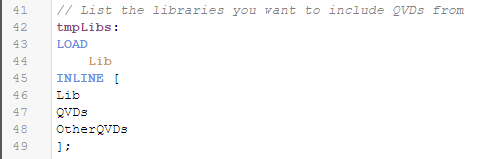
If you have any questions regarding getting this app set up please post in the comments below.
There is a QlikView version of this application also, which you can find here:
QlikView App: QVD Meta Data Viewer
Both versions of the app also include our popular Data Profiler, which you can find more information about here:
Qlik Sense App: Generic Data Profiler
I hope that you find the application useful. You will find other applications that I have uploaded under my profile on QlikCommunity or on our Downloads page..
Steve
stevedark
- Move Comment
- Delete Comment
- Mark as Read
- Mark as New
- Bookmark
- Permalink
- Report Inappropriate Content
Hi @jpjust
Rather than specifying a QVD file the inline table just needs to point to a library. The script will then load from all QVDs in that library. It should therefore be:
tmpLibs:
LOAD
Lib
INLINE [
Lib
QVD_REPO
];
The script will attempt to load the document that created the QVD into the File Created By field:

If the QVD has been created by Sense Enterprise (either SaaS or Client Managed) this will just give you a GUID rather than a sensible app name. If you have permissions to the app with that GUID though you should be able to find the app by altering the URL to include that GUID. Hope that makes sense?
If you are just looking to find out information on one QVD at a time then I highly recommend QViewer, which you can download from here:
https://easyqlik.com/qviewer/
You can use this for free, with a limit on the number of rows that can be viewed, but it is well worth the cost of a licence to unlock all of the features.
Within QViewer you can get to all of the metadata within a QVD, as well as exploring the data in it without having to build a Qlik application to view it.
Steve
 rwunderlich
- Move Comment
- Delete Comment
- Mark as Read
- Mark as New
- Bookmark
- Permalink
- Report Inappropriate Content
Thanks for the mention @stevedark . Note that Qviewer will produce a list of QVDs if you open a folder with QViewer. You can open an individual QVD by clicking the name or perform other operations by right-click.

-Rob
http://www.easyqlik.com
http://masterssummit.com
http://qlikviewcookbook.com

 jpjust
- Move Comment
- Delete Comment
- Mark as Read
- Mark as New
- Bookmark
- Permalink
- Report Inappropriate Content
Awesome Steve.
I am using On-prem qliksense enterprise.
So I added File Created By field to QVD details table. I see the ID of the App that created each qvd.
Is it possible to have App name?
I will also review other details of this app. This is going to be very useful for sure.

Is there a way to
stevedark
- Move Comment
- Delete Comment
- Mark as Read
- Mark as New
- Bookmark
- Permalink
- Report Inappropriate Content
Hi @rwunderlich
I've only recently spotted the ability to open a folder and have all QVDs in that folder listed with headline information. A really neat feature!
Hi @jpjust
That is the only information in the QVD regarding the app that created it. You can however use a different API to get a list of applications on the server and then do an ApplyMap to map the application name in place of the GUID. This article talks about accessing that API:
https://www.quickintelligence.co.uk/back-up-qlik-sense-applications/
You could simplify the call to the monitor_apps_REST_app API, as you only need the GUID and the name, but hopefully it points you in the right direction.
However, it means that if you delete the application that created the QVD that lookup will no longer work. As a result you may want to persist application details to a QVD and do an incremental load refreshing the data for applications that still exist, whilst loading deleted ones from the QVD.
Again the complete script for getting a list of applications is in the Instant Sense Application download.
Hope that all makes sense.
Cheers,
Steve
jpjust
- Move Comment
- Delete Comment
- Mark as Read
- Mark as New
- Bookmark
- Permalink
- Report Inappropriate Content
Definitely make sense. Thank you so much for putting this app.
Do you know for any app that can provide information on a user access level in Qliksense enterprise?
Such as user access to stream/ app etc.,
Thanks
stevedark
- Move Comment
- Delete Comment
- Mark as Read
- Mark as New
- Bookmark
- Permalink
- Report Inappropriate Content
Hi @jpjust
Take time to explore the other APIs that are available in QSE CM. You can certainly download a complete list of users (including those in the AD without a licence) and their licence types. I've not pulled Stream access from the APIs before, as far as I can remember, but that's not to say the information is not in there.
Another tool you may find useful is this one from @StefanStoichev which allows you to download tables of information from QMC:
https://sstoichev.eu/2021/01/08/export-qmc-tables/
It means a manual step, but it could be useful to you.
Cheers,
Steve
jpjust
- Move Comment
- Delete Comment
- Mark as Read
- Mark as New
- Bookmark
- Permalink
- Report Inappropriate Content
Thanks Steve for your advice. I will spend some time to explore the other API's.
In qliksense SaaS there is an access evaluator app under monitoring, pretty helpful to see who has access to what. Kind of similar thing I wanted to build in On-prem. Will go over the api's or qlik cli.
Thanks
jpjust
- Move Comment
- Delete Comment
- Mark as Read
- Mark as New
- Bookmark
- Permalink
- Report Inappropriate Content
Hi Steve,
I am trying to bring the app name by using monitor_apps_REST_app API but after adding the below code on the "Getstats" script tab, the script runs forever. Can you please check and let me know if there is anything wrong. id_u4 is the app ID.
Temp_QVDHeader:
LOAD
$(iID) as JoinID,
QvBuildNo as QvBuildNo,
CreatorDoc as [File Created By],
TableName as [Table Name],
NoOfRecords as [Number Of Records]
FROM [$(vFile)] (XmlSimple, Table is [QvdTableHeader]);
RestConnectorMasterTable:
SQL SELECT
"id" AS "id_u4",
"createdDate" AS "createdDate_u0",
"modifiedDate" AS "modifiedDate_u0",
"modifiedByUserName" AS "modifiedByUserName_u0",
"name" AS "name_u3",
"publishTime",
"published",
"description",
"fileSize",
"lastReloadTime",
"availabilityStatus",
"__KEY_root",
(SELECT
"userId",
"userDirectory",
"__FK_owner"
FROM "owner" FK "__FK_owner"),
(SELECT
"name" AS "name_u2",
"__FK_stream"
FROM "stream" FK "__FK_stream"),
(SELECT
"id" AS "id_u7",
"@Value" AS "@Value_u0",
"name" AS "name_tag",
"__FK_tags"
FROM "tags" FK "__FK_tags" ArrayValueAlias "@Value_u0")
FROM JSON (wrap on) "root" PK "__KEY_root";
App:
LOAD
[id_u4] AS [File Created By],
[name_u3] AS [App Name QRS]
RESIDENT RestConnectorMasterTable
WHERE NOT IsNull([__KEY_root]);
drop table RestConnectorMasterTable;
stevedark
- Move Comment
- Delete Comment
- Mark as Read
- Mark as New
- Bookmark
- Permalink
- Report Inappropriate Content
Not sure what is going on there @jpjust . First thought though is that you are doing a second REST call before dropping the temporary table from the first. The way the connector names the fields there could be a number that are identical between the temporary tables, and that would cause a massive synthetic key.
I would create a list of applications in a separate loader and then persist that to QVD. You can then just load the GUID and application name into a mapping table in your QVD Header app.
Having QVDs as a staging layer is pretty much always a good idea.
Hope that helps.
Steve
jpjust
- Move Comment
- Delete Comment
- Mark as Read
- Mark as New
- Bookmark
- Permalink
- Report Inappropriate Content
Thanks Steve, I will modify the script.
Also, I thought of checking with you on this.
Is it possible to give top level folder instead of giving sub folders?
Like EU_QVD_FOLDER/TECH/UK/Apple, so the script can go and scan qvd's in sub folders as well.
Otherwise my entries is going to be huge.
tmpLibs:
LOAD
Lib
INLINE [
Lib
EU_QVD_FOLDER/TECH/UK/Apple/BITables
EU_QVD_FOLDER/TECH/NL/Apple/CR
];