Unlock a world of possibilities! Login now and discover the exclusive benefits awaiting you.

- Qlik Community
- :
- Forums
- :
- Forums by Product
- :
- Products (A-Z)
- :
- Qlik Sense
- :
- Documents
- :
- Qlik Sense App: QVD Meta Data Viewer
- Move Document
- Delete Document
- Subscribe to RSS Feed
- Mark as New
- Mark as Read
- Bookmark
- Subscribe
- Printer Friendly Page
- Report Inappropriate Content
Qlik Sense App: QVD Meta Data Viewer

 stevedark
- Move Document
- Delete Document and Replies
- Mark as New
- Bookmark
- Subscribe
- Mute
- Subscribe to RSS Feed
- Permalink
- Report Inappropriate Content
Qlik Sense App: QVD Meta Data Viewer
There is a large amount of useful information that is stored in the header of QVD files. This gives information about the data in the file, when it was created and which app created it. This data is in an XML format and can be viewed in a text editor.
Being XML it can also be loaded in to Sense and viewed there.
This blog post describes how this can be done and gives some background to the application uploaded here:
https://www.quickintelligence.co.uk/qlik-qvd-xml-header-viewer
The application enumerates around a number of libraries and reads the header information from each QVD in those libraries. It persists the information it finds to a QVD and also creates a timestamped archive - so you can see how your QVDs are changing over time.
You will need to configure the app to find your libraries by editing the load script, just list the libraries in this INLINE load:
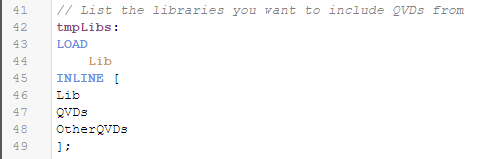
If you have any questions regarding getting this app set up please post in the comments below.
There is a QlikView version of this application also, which you can find here:
QlikView App: QVD Meta Data Viewer
Both versions of the app also include our popular Data Profiler, which you can find more information about here:
Qlik Sense App: Generic Data Profiler
I hope that you find the application useful. You will find other applications that I have uploaded under my profile on QlikCommunity or on our Downloads page..
Steve
stevedark
- Move Comment
- Delete Comment
- Mark as Read
- Mark as New
- Bookmark
- Permalink
- Report Inappropriate Content
Hi @jpjust
Certainly possible. Here is some (very old) code from a QlikView app that I have used that enumerates around files in sub folders.
https://www.quickintelligence.co.uk/FolderBrowserQlikView.qvs
I've not published it on community as an app, partly as I got different results based on the platform it was run on and partly as the code was largely based on a Community post by Rob Wunderlich so I didn't want to push it as my own.
You will need to modify the code to make it work in Sense and with the QVD bits, but hopefully it will give you a point in the right direction.
Good luck!
Steve

 jpjust
- Move Comment
- Delete Comment
- Mark as Read
- Mark as New
- Bookmark
- Permalink
- Report Inappropriate Content
Thanks much Steve, I will take a look.

 Huxleys
- Move Comment
- Delete Comment
- Mark as Read
- Mark as New
- Bookmark
- Permalink
- Report Inappropriate Content
Hi Steve - this app is just what I've been looking for. Similarly to the above post, is there a simple way to enter the top level folder, in my case the data connection is named QlikviewQVD, and have the app scan through sub folders also:
tmpLibs:
LOAD
Lib
INLINE [
Lib
QlikviewQVD
];
I may be in the same position as Jpjust whereby I have many subfolders and folder within folders etc.
stevedark
- Move Comment
- Delete Comment
- Mark as Read
- Mark as New
- Bookmark
- Permalink
- Report Inappropriate Content
- « Previous
- Next »