Unlock a world of possibilities! Login now and discover the exclusive benefits awaiting you.

- Qlik Community
- :
- All Forums
- :
- QlikView App Dev
- :
- Re: EXpression variable
- Subscribe to RSS Feed
- Mark Topic as New
- Mark Topic as Read
- Float this Topic for Current User
- Bookmark
- Subscribe
- Mute
- Printer Friendly Page

 souadouert
- Mark as New
- Bookmark
- Subscribe
- Mute
- Subscribe to RSS Feed
- Permalink
- Report Inappropriate Content
EXpression variable
Hello,
how to have all the list of the variables of an application with its expression, without going through the menu of the variables
- Tags:
- qlikview_scripting
- « Previous Replies
-
- 1
- 2
- Next Replies »
souadouert
- Mark as New
- Bookmark
- Subscribe
- Mute
- Subscribe to RSS Feed
- Permalink
- Report Inappropriate Content
Yes arvind , but always i have two problem
the first with each variable i had this msg
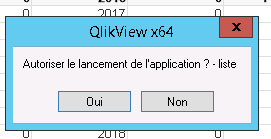
and i need to return to line , because always wrote in the first ligne
souadouert
- Mark as New
- Bookmark
- Subscribe
- Mute
- Subscribe to RSS Feed
- Permalink
- Report Inappropriate Content
I get the solution 
sub ShowVars
rem ** Show name of all variables in document **
set vars = ActiveDocument.GetVariableDescriptions
DIM fso, MyFile, strFile, strText
strFile="C:\Prod\liste.txt"
Set fso = CreateObject("Scripting.FileSystemObject")
If fso.FileExists(strFile) Then
Set MyFile = fso.OpenTextFile (strFile, 2, True)
Else
Set MyFile = fso.CreateTextFile(strFile)
End If
for i = 0 to vars.Count - 1
set v = vars.Item(i)
'msgbox(v.Name & "=" & v.RawValue)
'Add to InputBox object (IB01)
link= v.Name &"|"&v.RawValue& chr(13)
'msgbox( v.Name &","&v.RawValue)
MyFile.WriteLine(link)
next
MyFile.Close
end sub
.png "arvind1494") arvind1494
arvind1494
- Mark as New
- Bookmark
- Subscribe
- Mute
- Subscribe to RSS Feed
- Permalink
- Report Inappropriate Content
Good

- « Previous Replies
-
- 1
- 2
- Next Replies »