Unlock a world of possibilities! Login now and discover the exclusive benefits awaiting you.

- Qlik Community
- :
- All Forums
- :
- QlikView App Dev
- :
- Re: Expression to find Records where OrderDate, Cu...
- Subscribe to RSS Feed
- Mark Topic as New
- Mark Topic as Read
- Float this Topic for Current User
- Bookmark
- Subscribe
- Mute
- Printer Friendly Page

- Mark as New
- Bookmark
- Subscribe
- Mute
- Subscribe to RSS Feed
- Permalink
- Report Inappropriate Content
Expression to find Records where OrderDate, Customer & Sales Rep are same
Hi Guys,
I have requirement where I would like to tag the Orders as dual Order if the following condition is matched
Condition :
If a Customer is placing more then 1 order on a same day from same sales rep, then that order should be called a dual order.
As an example:
- Customer Jon Snow is buying Milk from Sales Rep Tom on 22-June-2016.
- On the same Order Date.. same Customer Jon Snow is now Buying Bread from same sales Rep Tom
- then this is a dual order because order date, customer name and sales rep is same. (Product should not matter)
So.. in the below Table, Order ID 1, 3, 8 & 9 Should have 'YES' in the Dual Product Column, but instead they all showing as 'NO'.
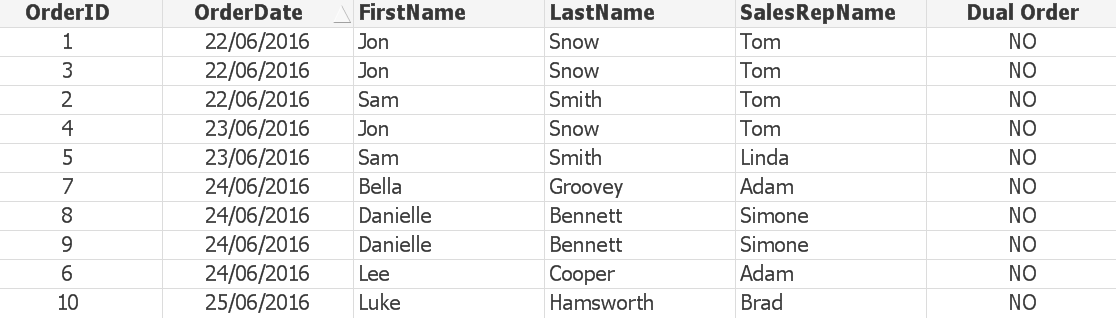
I am using following expression in above straight table.
If(Count(TOTAL <FirstName,LastName,OrderDate,SalesRepID> OrderId) > 1,'YES','NO')
I have attached ZIP file contain sample QVD and QVW with logic definition and sample table.
Thank you for your time.

 antoniotiman
- Mark as New
- Bookmark
- Subscribe
- Mute
- Subscribe to RSS Feed
- Permalink
- Report Inappropriate Content
In Your Expression
OrderID (not OrderId)
Regards,
Antonio

 maniram23
- Mark as New
- Bookmark
- Subscribe
- Mute
- Subscribe to RSS Feed
- Permalink
- Report Inappropriate Content
Hi,
If(Count(TOTAL <FirstName,LastName,OrderDate,SalesRepID> OrderID) > 1,'YES','NO')
"OrderID" you are entered wrongly. so you are not getting your output.
Regards
- Mark as New
- Bookmark
- Subscribe
- Mute
- Subscribe to RSS Feed
- Permalink
- Report Inappropriate Content
Thank you guys, and sorry it my silly mistake while creating this example QVW.
But originally in my actual application I have half a million records and obviously due to privacy I can not post that application here... but I am 100% sure I have written the expression with correct field names but still some records comes up yes and some does not.
Just out of curiosity, would there be any other expression to achieve this?