Unlock a world of possibilities! Login now and discover the exclusive benefits awaiting you.

- Qlik Community
- :
- All Forums
- :
- QlikView App Dev
- :
- Field Issue
- Subscribe to RSS Feed
- Mark Topic as New
- Mark Topic as Read
- Float this Topic for Current User
- Bookmark
- Subscribe
- Mute
- Printer Friendly Page

 vanderson009
- Mark as New
- Bookmark
- Subscribe
- Mute
- Subscribe to RSS Feed
- Permalink
- Report Inappropriate Content
Field Issue
Hi Guys,
I have below data in my table,
| Region | Type | Sales |
|---|---|---|
| North | Actual | 456 |
| East | Actual | 348 |
| South | Actual | 123 |
| West | Actual | 487 |
I want to display it in pivot table as
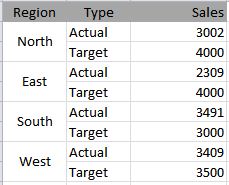
But my problem is, I have not Target Type in my Type column, I have only Actual Type, Can you please help me how can i achieve this scenario.
Thanks and Regards,
Villyee.
- « Previous Replies
-
- 1
- 2
- Next Replies »

 swuehl
- Mark as New
- Bookmark
- Subscribe
- Mute
- Subscribe to RSS Feed
- Permalink
- Report Inappropriate Content
Where do the target values come from?
Do you have a different table with these values?
Or are these random numbers  ?
?

 Chanty4u
- Mark as New
- Bookmark
- Subscribe
- Mute
- Subscribe to RSS Feed
- Permalink
- Report Inappropriate Content
where that data coming from?
vanderson009
- Mark as New
- Bookmark
- Subscribe
- Mute
- Subscribe to RSS Feed
- Permalink
- Report Inappropriate Content
They are not coming from any table, I have to hard code that values,
that value are range value and i have to display it in Text formate.
On the basis of that range value i have to change background colour of actual value.
vanderson009
- Mark as New
- Bookmark
- Subscribe
- Mute
- Subscribe to RSS Feed
- Permalink
- Report Inappropriate Content
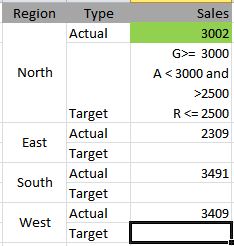
this is actual scenario, On the basis of Region, Range value will be different.
swuehl
- Mark as New
- Bookmark
- Subscribe
- Mute
- Subscribe to RSS Feed
- Permalink
- Report Inappropriate Content
Try a second expression labelled 'Target'
=Pick(
Match(Region,'North','East','South','West'),
4000, 4000,3000,3500)
vanderson009
- Mark as New
- Bookmark
- Subscribe
- Mute
- Subscribe to RSS Feed
- Permalink
- Report Inappropriate Content
Thanks swuehl...
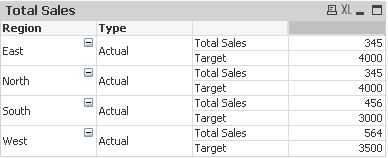
I tried but because of second expression one more column is appeared in pivot table but i want row below actual type for every region.
swuehl
- Mark as New
- Bookmark
- Subscribe
- Mute
- Subscribe to RSS Feed
- Permalink
- Report Inappropriate Content
Have you tried pivoting your expressions columns to the left, so they appear as expression rows?
Pivot your columns by dragging the headers with the mouse.
vanderson009
- Mark as New
- Bookmark
- Subscribe
- Mute
- Subscribe to RSS Feed
- Permalink
- Report Inappropriate Content
Yes i tried it but by dragging headers into row both expression are coming beside of actual type but i want target should appear below actual.
Attached is result
swuehl
- Mark as New
- Bookmark
- Subscribe
- Mute
- Subscribe to RSS Feed
- Permalink
- Report Inappropriate Content
Just rename the first expression from Total Sales to Actual, and remove dimension Type (it's a single value anyway).

- « Previous Replies
-
- 1
- 2
- Next Replies »